
Bank reconciliation across 20 to 50 QuickBooks files


Quick answer: Reconciling forty client files in one close window is a sequencing problem, not a reconciliation problem. The binding constraint is knowing on day one which files will break.
This is a working reference for firms carrying 20 to 50 QuickBooks Online files through a single close. Every technique is sourced to Intuit's own documentation or a real thread on QuickBooks Community.
Infographics in this guide
Three infographics accompany this guide. Each placement point is marked inline below with a [ INFOGRAPHIC N OF 3 · PLACE IMAGE HERE ] block containing the file name, alt text and caption.
What is multi-client bank reconciliation?
The mechanics of reconciling a single account are covered in the bank reconciliation guide and in Intuit's reconcile an account article. Bank feed problems are covered in the bank feed troubleshooting guide. None of that is repeated here.
The concept itself, comparing a book balance against an independent source and explaining every difference, is covered in the reconciliation in accounting explainer.
This covers doing it forty times in eight days with three people, and naming the at-risk files on day four.
How long does bank reconciliation take per client?
Firms typically estimate reconciliation time per client and multiply. The estimate is usually wrong because it models the median file, and the close is governed by the tail.
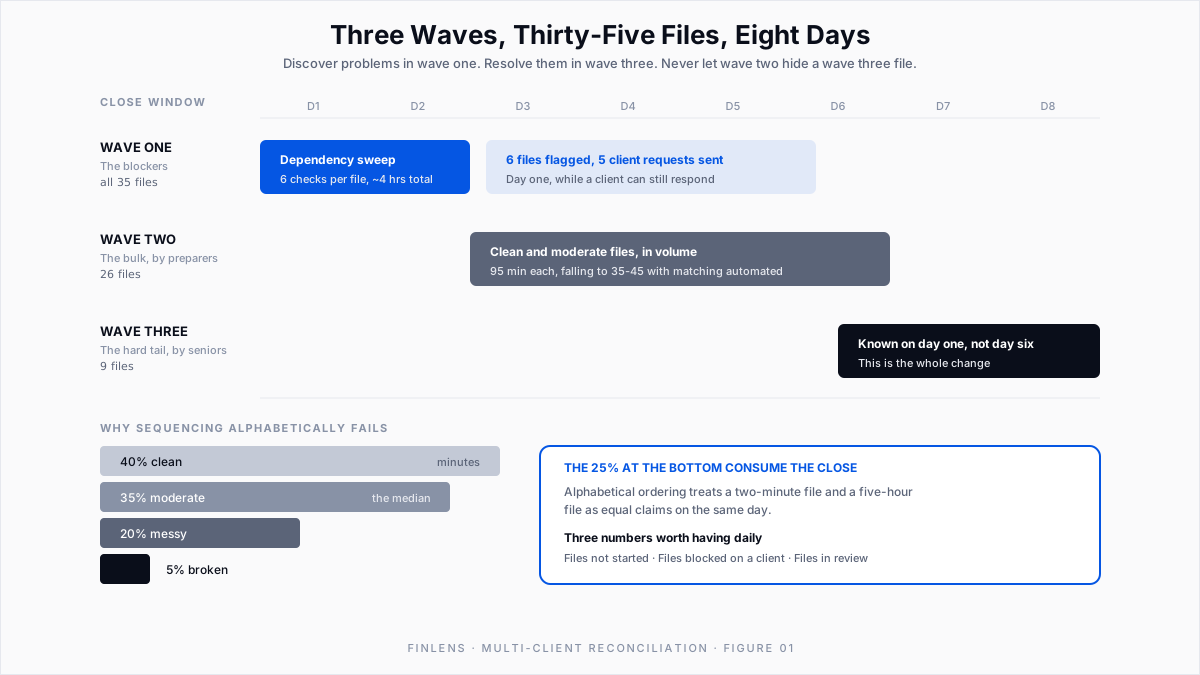
Across a typical book of business the distribution looks roughly like this.
The last two rows consume the close. The 40% that are clean do not reward attention, and the 5% that are broken absorb whatever is available.
Three specific time sinks dominate inside the hard files.
Opening balance disagreement. The prior period's ending balance does not equal this period's beginning balance. An Intuit Community Manager gives the cause in this thread: a transaction that was part of the last reconciliation was later edited, deleted, moved, or unreconciled.
Fix. Run the Reconcile Discrepancy Report, documented in Intuit's fix beginning balance article. Check it before starting, not after.
Waiting on the client. Not reconciliation work at all, but it sits on the critical path. A missing statement or an unexplained transfer stops a file cold, and the firm usually finds out late.
That third one is why firm-level reconciliation is a communication problem as much as an accounting one.
Finlens sends document requests and category review questions directly from the platform, and clients respond by email, Slack or in-app message. The request stays attached to the file, so blocked files show up on day one.
How do you sequence bank reconciliation across 40 client files?
The instinct is to work alphabetically or by assignment. Both treat every file as an equal claim on senior review time.
A better sequence has three waves.
Wave one, day one and two: the blockers. Before any reconciliation, run the dependency check on every file. Has the feed delivered through period end? Is the opening balance intact? Are there outstanding client requests? Anything that will stop a file should be discovered now, while there is still time for a client to respond.
Wave two, days three to six: the bulk. The clean and moderate files, worked by preparers, in volume. These should be substantially mechanical. If they are not, the problem is upstream in categorization.
Wave three, days six to eight: the hard tail. The messy files and anything wave one flagged, worked by the people who can resolve them.
The rule underneath the sequence: discover problems in wave one, resolve them in wave three, and never let wave two hide a wave three file.
How do you track reconciliation status across multiple clients?
Ask a firm partner on day four which files are reconciled and the honest answer is usually a spreadsheet somebody updates manually, or a guess.
This is the actual scaling failure. Not that the work is slow, but that its state is unobservable. A firm cannot reallocate staff toward a file at risk if it does not know the file is at risk until the deadline.
What a firm needs is per-file status that updates as a consequence of the work, not as a separate reporting chore.
Finlens handles the close as a tracked workflow with task management, progress tracking, team assignment and timers. Status becomes a property of the system, not a spreadsheet someone updates. Who is on which file, what is open and what is behind stay visible while there is time to act.
Three numbers are worth having daily during close:
- Files not started. Should trend to zero by day five.
- Files blocked on a client. Should be near zero after wave one, and any new entry is an escalation.
- Files in review. Rising late is normal. Flat late means preparers are stuck.
How much should an accounting firm standardize across client files?
Firms try to standardize and then discover that clients are different. Some variance is worth eliminating and some is not, and conflating the two wastes a lot of effort.
Worth standardizing. Chart of accounts structure, the categorization treatment of common vendors, close calendar and deadlines, the reconciliation checklist itself, and where documentation lives. These differ between clients for historical reasons, not good ones.
Chart of accounts drift is the most common and the most damaging, because it makes cross-client review impossible. A reviewer who has to re-learn the account structure at every file cannot work at volume.
Finlens ships a default chart of accounts, so new clients onboard without a manual build and the drift never starts.
What reduces bank reconciliation time?
Reconciliation is downstream. By the time you are in the reconcile screen, most of the cost was already determined by how well three things upstream went.
Categorization quality. An unreviewed or wrongly categorized transaction surfaces as a reconciliation discrepancy. Fixing categorization is cheaper than fixing reconciliation, because reconciliation forces you to re-derive what the transaction was. The upstream work is covered in the recurring categorization guide.
Feed completeness and continuity. A feed that drops a day, duplicates a batch or silently disconnects creates work that looks like reconciliation but is really data repair.
Finlens connects to more than 12,000 financial institutions through Plaid, covering banks, credit cards and Ramp accounts, so the feed layer is uniform across the client base.
Matching. The genuine mechanical core, and the category transaction matching software exists to serve. Automated matching of bank statements against accounting records removes the line-by-line comparison, and automated invoice and bill matching removes the equivalent work on the AP and AR side. Finlens does both. That is where the per-file hours sit.
What remains after those three is the part that requires an accountant: the exceptions, the judgment calls and the sign-off. That residue is small, and a firm that has not compressed the first three is paying senior rates for mechanical work.
Multi-client bank reconciliation example: 35 clients, 3 staff, 8 days
Thirty-five clients, three staff, an eight-day close window.
After restructuring. Wave one runs on day one across all thirty-five files: feed continuity, opening balance integrity, open client requests. It takes about four hours total and surfaces six files with blockers, five of which are client requests that now go out on day one instead of day six.
Wave two runs days three to six on the twenty-six clean and moderate files. With categorization handled upstream and matching automated, these drop toward 35 to 45 minutes each.
Wave three takes the nine hard files with the senior staff, knowing on day one which nine they are.
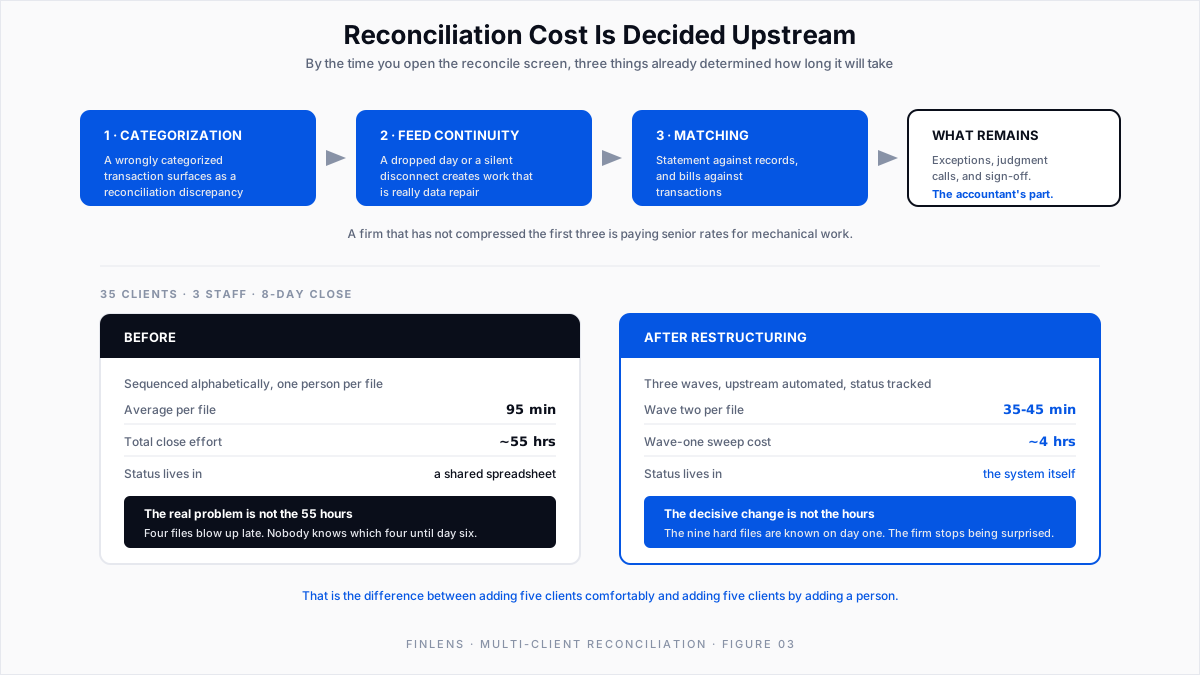
What changed. Total hours fall. The decisive change is that the tail is identified on day one. The firm stops being surprised. That is also the difference between adding five clients comfortably and adding five clients by adding a person, which is the economics the whole exercise is about.
Multi-client bank reconciliation checklist: the wave-one sweep
Wave one only works if it is a fixed list run identically across every file. Judgment belongs in wave three, not here.
Six checks, per file, in order:
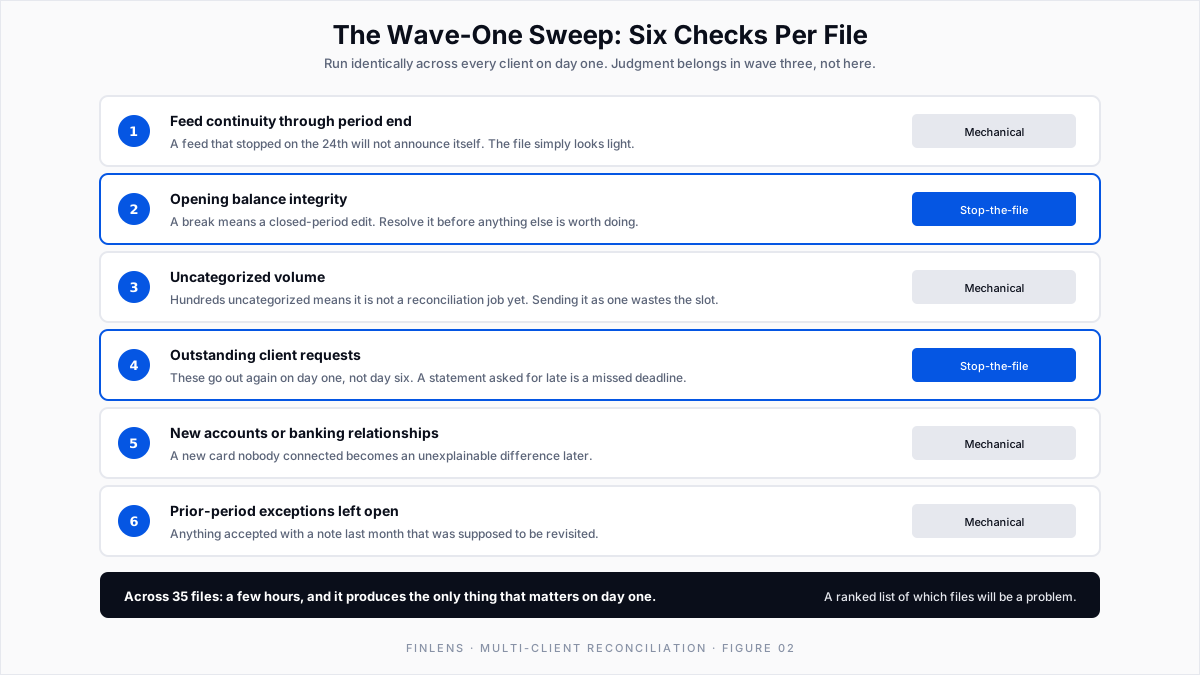
1. Feed continuity through period end. Confirm every connected account has delivered transactions up to the last day of the period. A feed that stopped on the 24th will not announce itself; the file looks light.
2. Opening balance integrity. This period's beginning balance must equal last period's ending balance on every account. A break means a closed-period edit and has to be resolved before anything else is worth doing.
This check earns its place in wave one because the repair is expensive. Undoing a reconciliation is not surgical: an Intuit team member states in this discrepancy thread that undoing one reconciliation undoes that one and every reconciliation after it. Intuit's undo a client's reconciliation article puts it plainly: you cannot undo a single month in the middle.
Discovered in wave one, that is one file to re-reconcile. Discovered on day seven, it is a year.
3. Uncategorized volume. Count what is sitting uncategorized. A file with hundreds of uncategorized items is not a reconciliation job yet, and sending it to a preparer as one wastes the slot.
4. Outstanding client requests. Anything already asked for and not received. These go out again on day one, not day six.
Run across thirty-five files this takes a few hours and produces the only thing that matters on day one: a ranked list of which files are going to be a problem. Everything after that is execution, not discovery.
How do you review bank reconciliations at volume?
Volume without a review trail is how firms get into trouble quietly.
At forty files, no partner is re-performing reconciliations. The review has to be risk-based: sign-off on the exceptions, the unusual items, and anything above a threshold, with the mechanical work trusted because the process is trustworthy.
That only holds if the record exists. A complete audit log of financial and operational actions is what lets a reviewer answer "who changed this and when" months later without reconstructing it from memory.
Finlens maintains that log across client files. It matters most in the situations where it is least convenient: a client dispute, a staff departure, or a file picked up by a new preparer mid-year.
Two practices are worth making non-negotiable:
Close the period in QBO after sign-off. An open prior period is an invitation for the opening balance problem to recur next month.
Know who can actually undo. Only primary admins, in-house accountants, and accountant users working through QuickBooks Online Accountant can undo a full reconciliation, per an Intuit Community Manager in this thread. Everyone else unreconciles row by row, which on a 400-transaction month is not a repair, it is a day. Intuit's undo or remove transactions article covers the row-level route.
Record why an exception was accepted, not just that it was. "Cleared" tells a future reviewer nothing. One line of reasoning costs seconds and saves an hour later.
Common multi-client reconciliation mistakes to avoid
Sequencing alphabetically. Treats a two-minute file and a five-hour file as equivalent claims on the same day.
Discovering blockers during reconciliation. Anything requiring a client response must be found in wave one. Found later, it is a deadline event.
Tracking status in a side spreadsheet. It is always stale, and the staleness is worst exactly when the information matters most.
Standardizing the wrong things. Fighting a client's transaction volume is wasted effort. Fighting their chart of accounts is not.
Treating reconciliation as the place to fix categorization. It is the most expensive place to do it, because you have lost the context by then.
Conclusion
Multi-client reconciliation does not break because reconciliation is hard. It breaks because forty simultaneous instances of a straightforward procedure produce a visibility problem that no individual file reveals.
Fix the sequence first, since it costs nothing: sweep every file for blockers on day one, then work the bulk, then the tail.
Fix the upstream second, because categorization and matching quality determine most of the per-file cost before anyone opens the reconcile screen. Fix the status layer third, so the firm can act on a file at risk while acting is still possible.
Finlens is built for the firm case. Automated bank reconciliation and bill matching compress the mechanical work. A tracked close with assignments makes status observable. A full audit log holds the review up afterward.
Everything syncs back into QuickBooks Online through a real-time two-way connection, so QBO stays the ledger of record.
FAQ: bank reconciliation for multiple clients
How many client files can one preparer reasonably carry?
It depends almost entirely on how much is automated upstream. With manual categorization, eight to twelve is realistic. With categorization and matching handled, the same person carries far more. What is left is exceptions.
How do we handle a client who never sends documents on time?
Make it visible and make it early. Wave one exists to convert this from a day-seven surprise into a day-one request. Route those requests through the system that holds the file, not personal email.
What about clients with multiple entities?
Entity structure adds consolidation work on top of reconciliation. The multi-entity guide covers intercompany mechanics, and Finlens aggregates financial data across multiple entities in a single view, which removes the per-entity switching that makes these engagements slow.
What is the first thing to fix if we only change one thing?
The wave-one sweep. It needs no new software, no redesign and no client conversation. It turns the worst failure mode, finding a broken file with two days left, into a day-one list. Everything else in this guide is a larger project with a longer payback.

