
The QuickBooks guide to multi-state payroll and remote-employee nexus (2026)


This is a working reference for founders and controllers running payroll across state lines in QuickBooks. Every technique is sourced to Intuit's own documentation, IRS guidance, or a real thread on the QuickBooks Community. Numbers cited from user reports are flagged as anecdotal rather than benchmarks.
The problem this guide addresses
A remote hire in a new state is a payroll event and a registration event at the same time, and the two run on different clocks. Payroll can be processed the Friday after the offer is signed. State registration takes weeks, and until it completes there is no account number to file against.
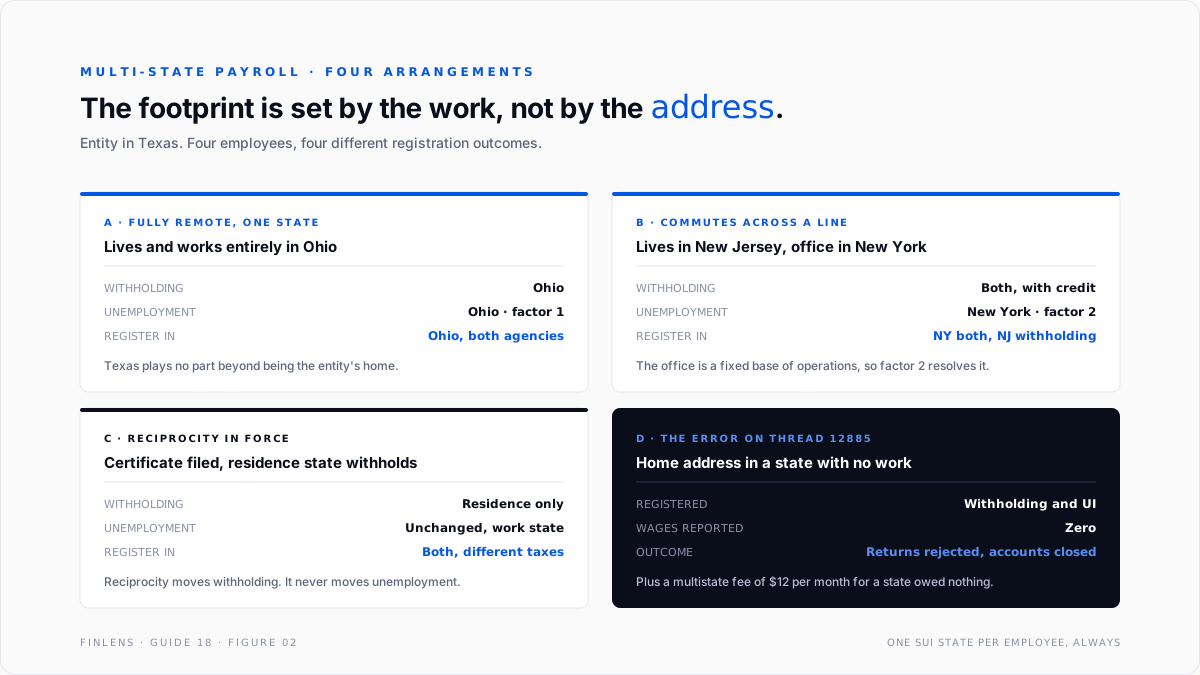
Failure mode one: registration driven by the wrong address. A company incorporated in Illinois with one employee whose home address was in Alabama reported on thread 12885 that QuickBooks required Alabama withholding and unemployment accounts and charged a multistate fee of $12 per month.
The employee did not work remotely and earned no Alabama income. When the quarterly reports came due, Alabama rejected the zero-dollar filings and closed the accounts. Five replies, marked solved. The lesson is that home address is an input to the decision, not the decision itself.
Failure mode two: one paycheck, two states. Intuit's documentation on setting up employees and payroll taxes in a new state states the constraint plainly: QuickBooks payroll products do not support multiple state unemployment or multiple local withholding on a single paycheck or on tax filings, and Intuit advises against workarounds because they corrupt state tax forms.
Threads on an employee who works in multiple states and on setting up multistate payroll across Oregon and Washington both run into the same wall. A genuinely split worker requires either splitting the pay period or moving payroll off the native product.
The nexus identity
Two separate determinations sit behind every multi-state payroll setup, and conflating them is the root of most errors.
STATE INCOME TAX WITHHOLDING
follows where the work is PERFORMED,
modified by reciprocity agreements
and by convenience-of-the-employer rules
STATE UNEMPLOYMENT INSURANCE (SUI)
follows ONE state per employee, chosen by the
localization-of-work test, never split across states
The withholding question can produce two states for one employee. The unemployment question must produce exactly one. QuickBooks models this with two distinct fields: State Worked, which drives SUI, and State Subject to Withholding, which drives income tax. Setting both to the employee's home address by reflex is what produced the Alabama registrations above.
The localization-of-work test used by state unemployment agencies applies four factors in strict order. Wages are reported to the first state that answers yes.
- Localization. Is all or nearly all of the work performed in one state? If yes, that state.
- Base of operations. If work is split, is there a fixed base the employee returns to and works from? If yes, that state.
- Place of direction and control. If there is no base of operations, where is the employee directed from? If the employee performs some work there, that state.
- Residence. Only if the first three fail, and only if the employee performs some work in the state of residence.
Residence is the last factor, not the first. That ordering is the whole answer to the Alabama thread.
.svg)
The account and field setup
Six settings carry the outcome. Getting them right at hire is far cheaper than a prior-quarter correction.
Intuit's guidance on setting up and managing work locations is explicit that for a remote employee the work location may differ from where the employee physically sits. That field is a tax-jurisdiction assignment, not a description of a desk.
Two account-side notes matter for the general ledger. Employer SUI is an expense that varies by state and by the employer's own experience rate, so a single blended Payroll Tax Expense account hides which state is driving the cost.
Splitting employer tax expense by class or location makes the multi-state cost visible, and the mechanics of that split sit in the third-party payroll journal entry guide for anyone running payroll outside QuickBooks.
Reciprocity, and what it actually removes
Reciprocity agreements between states let an employee who lives in one state and works in another have income tax withheld only for the residence state. The employee files a non-residence certificate with the employer, and the work state stops withholding.
Three constraints are worth holding onto.
Reciprocity covers income tax withholding only. It does not move the unemployment insurance obligation. SUI still follows the localization test, so an employer can owe SUI in the work state while withholding income tax for the residence state.
Reciprocity requires an employee-filed certificate. Without the form on file, the employer withholds for the work state by default. The certificate is an employer record-keeping obligation, not an automatic setting.
Convenience-of-the-employer rules cut the other way. A small number of states tax a non-resident's remote wages where the remote arrangement is for the employee's convenience rather than the employer's necessity. In those states a fully remote out-of-state employee can still generate work-state withholding.
The practical consequence is that reciprocity simplifies the employee's filing position without simplifying the employer's registration footprint. An employer can end up registered for unemployment in a state where it withholds no income tax at all, and that is a correct outcome rather than an error to clean up.
The registration sequence
Registration is the step that cannot be compressed, and it runs in a fixed order. Skipping ahead produces filings transmitted under identifiers that do not yet exist.
Step one, determine the obligation. Run the localization test for unemployment and the work-performed test for withholding. These can land in different states, and both answers are needed before any application is filed.
Step two, register with the revenue department. This produces the withholding account number. Processing time varies by state and by whether the application is filed online.
Step three, register with the unemployment agency. This is a separate agency in most states with a separate application and a separate number. The agency assigns a new-employer contribution rate at this point, which is a default rate and not the rate the employer will eventually carry.
Step four, enter both numbers plus the rate in QuickBooks. Intuit's guidance directs employers to contact the withholding, unemployment, and local agencies where employees live and work, because those agencies determine which taxes apply and issue the numbers the filings are transmitted under.
Step five, confirm the filing frequency. States assign deposit and return frequencies independently of the federal schedule. A monthly federal depositor can be a semi-weekly state depositor, or the reverse.
The compression point in this sequence is step one. Doing the determination properly at offer stage, rather than at first payroll, converts a blocked filing into an ordinary lead time.
The failure-mode catalog
Seven diagnoses cover most multi-state payroll work.
1. Registered in a state with no filing obligation. Symptom: zero-dollar quarterly returns rejected, or an agency closing the account unprompted. Cause: registration driven by home address without applying the localization test. Fix: apply the four factors, deregister where no obligation exists, and correct the employee's State Worked field. This is the Alabama case on thread 12885.
2. Running payroll before the account number arrives. Symptom: paychecks processed, filings blocked. Cause: registration lead time was not built into the start date. Fix: withhold at the correct rate from the first check and remit once the number is issued, rather than withholding nothing and correcting later. Underwithholding compounds across pay periods.
3. A genuinely split employee. Symptom: QuickBooks will not accept two unemployment states on one paycheck. Cause: the product does not support it, by design. Fix: determine the single SUI state under localization, and handle income tax withholding for the second state through that state's own rules. Do not attempt a split-paycheck workaround, which Intuit specifically warns corrupts state forms.
4. An employee moved mid-year. Symptom: year-to-date wages sit under the old state, new-state wages start from zero, and the wage bases do not aggregate. Cause: a state change is a new tax profile, not an edit. The thread on an employee moving states covers the mechanics.
Fix: change the work location and withholding state effective on the move date, and expect two state wage lines on the W-2. That downstream effect is covered in the W-2 year-end payroll close guide reconciliation work.
5. Withholding required but unemployment exempt. Symptom: setup blocked because a UI account number is demanded for a state where the employer has no UI liability. A user in Pennsylvania hit exactly this. Fix: the setup flow treats the two as a pair.
Resolve through the exemption path rather than entering a placeholder number, which produces a filing under an identifier that does not exist.
6. Wrong SUI rate. Symptom: employer tax expense materially off for one state. Cause: the experience rate was left at the new-employer default after the state issued a revised rate.
Fix: Intuit's article on updating your SUI rate documents both paths. In QuickBooks Online the rate is entered with an effective date under Payroll settings for the state. In Desktop it is entered per quarter on the state Unemployment Company payroll item.
States issue the notice at the start of the year, so the update belongs in January, not at year end.
7. Unemployment not withholding at all. Symptom: a paycheck shows no state unemployment where it should. Cause: usually a missing state assignment, an exemption flag, or an employee already past the state wage base for the year. Intuit's troubleshooting article for missing SUI and SIT walks the elimination order.
Fix: confirm the wage base position before assuming a setup fault, because reaching the base is the expected outcome rather than an error.
Worked example
A company headquartered in Texas hires an engineer who lives in and works from Ohio, plus a salesperson who lives in New Jersey and commutes to the company's New York office three days a week.
The engineer. All work is performed in Ohio, so factor one resolves immediately. SUI reports to Ohio. Ohio income tax is withheld. Texas has no state income tax and no role here beyond being the entity's home. The employer must register for Ohio withholding and Ohio unemployment before the first filing. Texas SUI does not apply to this employee.
The salesperson. Work is split between New York and a New Jersey home. Factor one fails because the work is not localized. Factor two asks whether there is a fixed base of operations, and the New York office is one, so SUI reports to New York.
Income tax withholding is a separate question governed by New York's rules for non-resident days plus New Jersey's resident taxation with a credit for taxes paid elsewhere.
The practical result is one employee generating one SUI state and two withholding considerations. QuickBooks handles the SUI cleanly because there is a single answer. The withholding side requires the second state to be configured explicitly.
What this costs to get wrong. Registering for Ohio SUI but reporting the engineer's wages to Texas produces a Texas filing that overstates the Texas wage base and an Ohio account with zero reported wages. Both states can assess.
The unemployment wage base is per state and does not transfer, so a mid-year misassignment does not net out at year end.
Where in-QBO multi-state payroll stops scaling
Threshold one: a single employee working in two states in one pay period. This is a hard product boundary, not a volume threshold. QuickBooks does not support two unemployment states or two local jurisdictions on one paycheck, and Intuit advises against workarounds.
Threshold two: roughly five states. Below five, tracking rate notices, filing frequencies, and registration statuses by hand is manageable. Above it, each state carries its own quarterly cadence and its own annual rate letter, and the tracking becomes a register rather than a memory.
Threshold three: any state with local income taxes. Ohio, Pennsylvania, and a handful of others push the jurisdiction question below the state level. The number of distinct filing obligations stops tracking the number of states and starts tracking the number of municipalities.
The Finlens approach
Finlens reads the payroll and employee data already in QuickBooks and treats state obligations as a monitored register rather than a setup step.
1. Nexus exception detection on new hires. When an employee record appears with a work location in a state the employer has no registered account for, the gap is raised with the localization factors laid out, so the registration decision is made against the test rather than against the home address.
2. Registration and rate register. Every state the employer touches is tracked with its account numbers, filing frequency, current SUI rate, and rate effective date. A rate that has not changed across an annual boundary is flagged, because that is the signature of a rate notice that was never entered.
3. Split-worker detection. Employees whose expense coding, work location, or reimbursement pattern implies work performed in more than one state are surfaced, since QuickBooks itself cannot represent the split and will not warn about it.
Four supporting capabilities sit around those three.
- A state wage-base reconciliation, confirming reported wages per state agree to the employee's assignment for the period.
- Employer tax expense split by state, so a blended Payroll Tax Expense account stops hiding which jurisdiction drives the cost.
- Reciprocity certificate tracking, flagging an employee withheld under reciprocity with no certificate on file.
- A cross-file view for firms, listing every client's unregistered work-location states in one table.
Verification checklist
Eight lines to run before each quarterly filing.
- Every employee has exactly one State Worked, and it was chosen by the localization test rather than by home address.
- Every state with reported wages has an active account number for both withholding and unemployment, where both apply.
- No state has an open registration with zero reported wages for two consecutive quarters.
- The SUI rate on file for each state matches the most recent rate notice, with the effective date recorded.
- Every employee withheld under a reciprocity agreement has a signed non-residence certificate on file.
- Employees who moved states mid-year show two state wage lines, and neither line double-counts the wage base.
- Local jurisdiction assignments exist for every employee in a state that imposes local income tax.
- Employer tax expense reconciles to the sum of per-state employer contributions, not to a single blended figure.
FAQ
Which state does unemployment insurance go to?
Exactly one, determined by the four-factor localization test in strict order: localization, base of operations, place of direction and control, then residence. Residence is the last factor, and it only applies if the employee performs some work there.
Can QuickBooks split one paycheck across two unemployment states?
No. Intuit documents that multiple state unemployment and multiple local withholding are unsupported on a single paycheck and on tax filings, and advises against workarounds because they corrupt state forms.
Does a reciprocity agreement remove the unemployment obligation?
No. Reciprocity governs income tax withholding only. The SUI obligation still follows the localization test and can sit in a different state than the withholding.
What happens when an employee moves states mid-year?
The move creates a second state tax profile effective on the move date. Wage bases do not transfer between states, so each state tracks its own. The W-2 carries two state lines.
Is registration required before the first payroll?
Withholding and remittance obligations begin with the first dollar of wages, but the account number that the filing is transmitted under can take weeks to issue. Withhold correctly from the first check and remit once the number arrives.
Does a remote employee create income tax nexus for the business itself?
Frequently yes, and it is a separate question from payroll. Corporate income tax and sales tax nexus follow their own state rules. The sales tax side is covered in the sales tax, nexus and remittance guide.

