
QuickBooks bank rules: why the same vendors come back


Quick answer: QuickBooks Online bank rules match on bank text, description and amount. They catch the predictable head of a client file and nothing else. They break on descriptor drift, variable splits and rule-order conflicts, they carry no confidence score, and they do not move between client files or learn from a reviewer's corrections.
This is a working reference for firms whose review queue still contains the same twenty vendors it contained six months ago. Every technique is sourced to Intuit's own documentation or a real thread on QuickBooks Community.
Infographics in this guide
Three infographics accompany this guide. Each placement point is marked inline below with a [ INFOGRAPHIC N OF 3 · PLACE IMAGE HERE ] block containing the file name, alt text and caption.
What are QuickBooks bank rules and how do they work?
The AI versus rules comparison covers the conceptual trade-off. Rules win on high-frequency predictable vendors. AI wins on the ambiguous long tail. The honest cost of AI is that its reasoning is less legible than a rule.
The batch rules comparison covers batch processing against real-time automation.
This guide is the operational layer underneath both. Not which approach is better in principle, but why the same twelve vendors are still in your review queue in month seven, and what to do about it.
Why do the same transactions need re-categorizing every month?
A bank rule in QBO matches on conditions you define: bank text, description, amount, or a combination. When the incoming transaction satisfies the condition, QBO applies the category. Intuit's set up bank rules article covers the build; categorize online bank transactions covers the review screen the rules feed.
Rules only ever touch the For review tab. In a thread about rules being ineffective, a user built roughly forty rules after categorizing about seventy-five transactions and none applied. An Intuit Community Manager confirmed why: bank rules only apply to transactions sitting in the For review tab, and they do not reach back to re-apply to anything already categorized.
A new rule therefore never cleans up history. It changes what happens next month.
The rule fires on an exact-enough match. That phrase is doing a lot of work, and five things routinely break it.
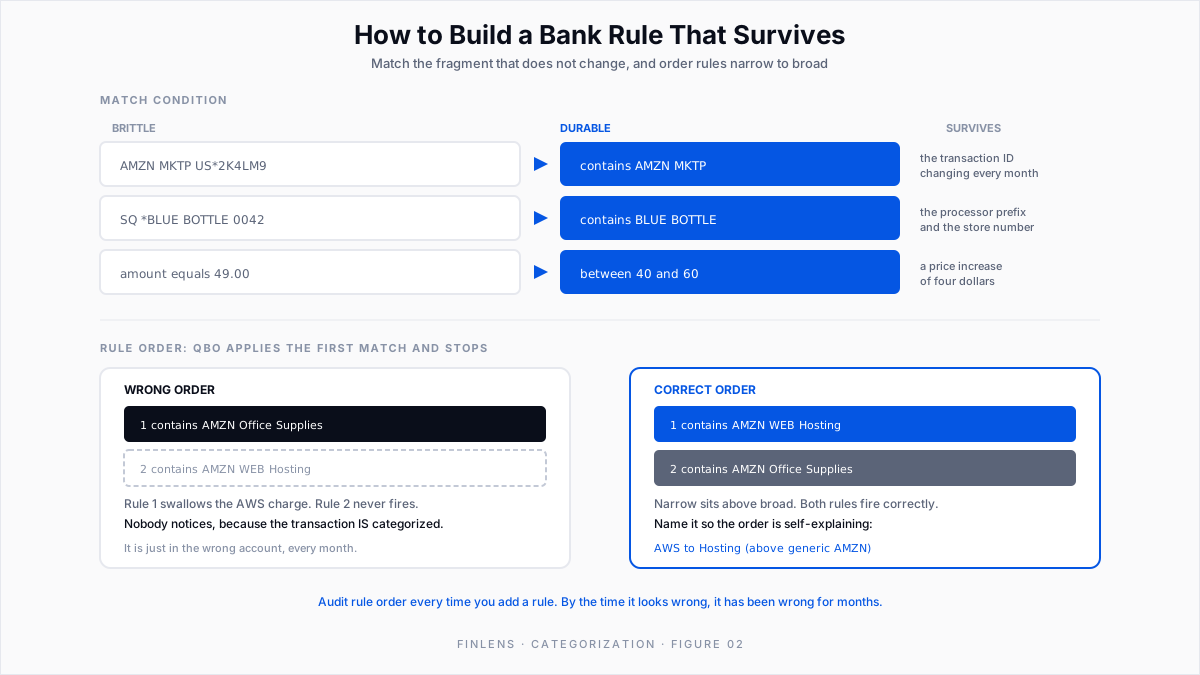
Descriptor drift. The bank text for a vendor is not stable. A card processor appends a store number, a location code, a date fragment, or a transaction ID. AMZN MKTP US*2K4LM9 and AMZN MKTP US*8H2QR1 are the same vendor to a human and two different strings to a rule built on the full descriptor.
Amount conditions that were too tight. A rule scoped to an exact amount stops firing the month the vendor raises the price by four dollars.
Rule ordering. QBO evaluates rules in order and applies the first match. A broad rule created early intercepts transactions a narrower rule created later was meant to catch. The narrow rule never fires and nobody notices, because the transaction does get categorized, just to the wrong account.
None of these are user error. They are the shape of the tool.
What does repeat transaction categorization cost an accounting firm?
Firms usually describe this as a time cost, and it is, but the compounding damage is elsewhere.
Category drift across clients. Two client files with the same vendor and two different treatments. At one or two clients that is invisible. At thirty it is a quality problem the firm cannot see from inside any single file, and it surfaces during multi-client reconciliation rather than during categorization.
How do you build QuickBooks bank rules that do not break?
Before layering anything on top, get the rule layer right. Most firms are running rules that were never built to last.
How should you match a bank descriptor in a QuickBooks rule?
The single highest-use change. Instead of matching the entire bank descriptor, match the part that does not change.
Use contains over equals as the default. Reserve exact matching for cases where you are separating two similar descriptors.
Finlens reads vendor, memo, amount and historical pattern together rather than string-matching a descriptor, so this class of breakage does not arise above the rule layer.
How should bank rules be ordered in QuickBooks Online?
Because QBO applies the first matching rule, the narrowest rule has to sit above the broadest one. A rule that catches AMZN and assigns Office Supplies will swallow AMZN WEB SERVICES unless the AWS rule sits above it. Priority is set by dragging rules in the list, documented in Intuit's how to use bank rules article.
How should you name a QuickBooks bank rule?
What can QuickBooks bank rules not do?
Even a well-maintained rule set has hard limits, and recognizing them is what stops firms from trying to solve this with more rules.
A rule caps at five conditions. Intuit's troubleshoot bank rules article documents the limit. It also flags the match field most firms get wrong. A rule set on Description will not fire against Bank text. They are different strings on the same transaction.
Auto-add breaks silently in two known cases. A rule that splits a transaction and also sets a Payee stops auto-adding. An Intuit Moderator and Community Manager confirmed it in this auto-add thread. The fix is to remove the Payee.
Separately, an exclude rule can report "Rule applied" and still leave the transaction in For Review, covered in this exclude-rule thread.
Neither failure announces itself. Both look like a rule that works.
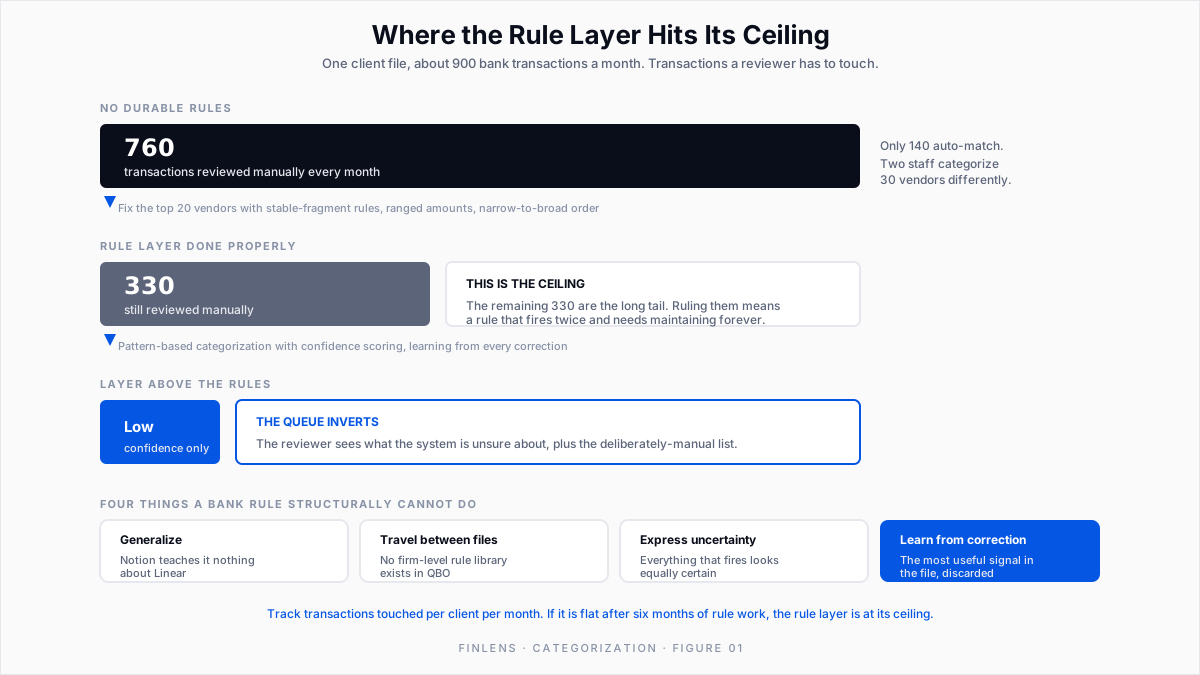
Rules do not generalize. A rule for Notion teaches QBO nothing about Linear. Every vendor is its own encoding exercise.
Rules do not travel between client files. This is what scales badly. Rules live inside a single QBO company.
Work out the treatment for a SaaS vendor at client one and you rebuild it by hand at clients two through thirty. Then you maintain thirty copies. There is no firm-level rule library in QBO.
Rules have no confidence. A rule either fires or it does not. It cannot tell you it is 60% sure, which means it cannot flag the cases a human should look at. Everything that fires looks equally certain, including the ones that are wrong.
Rules do not learn from being corrected. If a reviewer overrides a rule's output every single month, the rule keeps producing the same output. The correction is not an input to anything.
That last limitation is the real one. In a well-run file, the most valuable signal in the system is the reviewer's correction history, and QBO's rule engine has no mechanism to consume it.
How does AI transaction categorization work above bank rules?
This is the gap Finlens was built for. The mechanism matters more than the category.
Finlens auto-categorizes every transaction on the first pass, then learns from the corrections reviewers make and improves its categorization over time using historical patterns. The correction stops being throwaway work and becomes training signal. A vendor corrected once at one client informs how the same pattern is handled later. A rule cannot do that.
The output carries a confidence score, not a binary fire-or-not. High-confidence items clear; low-confidence items surface for a human. That inverts the review queue: instead of scanning everything and hoping attention holds, the reviewer spends attention where the system is unsure.
The model reads vendor, memo, amount and historical pattern together, so descriptor drift stops being a failure mode. AMZN MKTP US*2K4LM9 and AMZN MKTP US*8H2QR1 resolve the same way without anybody maintaining a contains fragment.
The accountant keeps control. Finlens is explicitly human-in-the-loop: accountants review and finalize AI-categorized transactions with one click, and the final categorization is theirs. Categorized transactions then flow into QuickBooks through a real-time two-way sync, so QBO stays the system of record.
Is AI transaction categorization auditable?
The honest criticism of AI categorization, and the one our own comparison piece raises, is that the reasoning is less transparent than a rule. A rule is readable. A model's judgment is not, by default.
The answer is to make the decision inspectable.
Finlens surfaces the basis for a suggestion in the review interface. It shows when it has found similar transactions from the same vendor already categorized a particular way, and asks whether to apply that treatment to the ones it matched.
It also keeps a complete audit log of financial and operational actions, so who categorized what, when, and on what basis stays recoverable.
Hold any categorization layer to that standard: show the basis, keep the record.
How do you reduce the transaction review queue, step by step?
A practical order of operations for a file that is drowning.
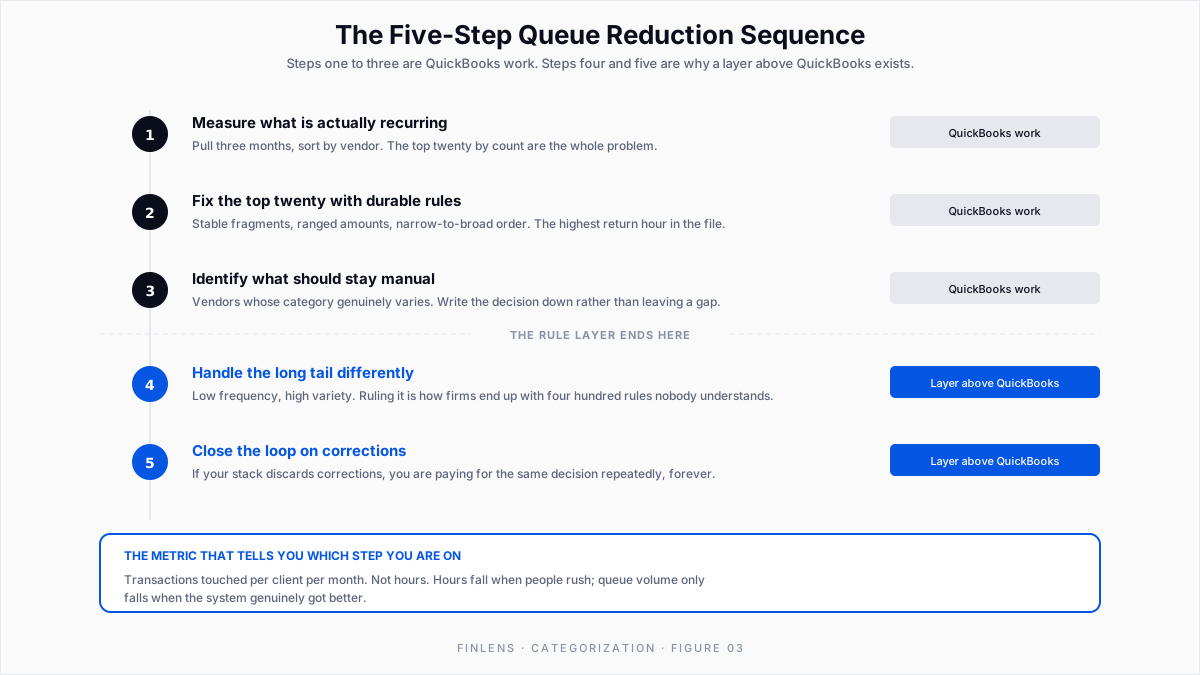
1. Measure what is recurring. Pull three months of categorized transactions and sort by vendor. The top twenty vendors by transaction count are the whole problem. Firms consistently find that a small number of vendors generate most of the review volume.
2. Fix the top twenty with durable rules. Stable-fragment matching, ranged amounts, correct ordering. This is the highest return hour you will spend in the file.
3. Identify the un-rulable. Vendors whose category varies. Leave them manual and note why.
4. Deal with the long tail differently. Everything below the top twenty is low frequency and high variety, which is exactly the population rules handle worst and pattern-based categorization handles well. Trying to rule the tail is how firms end up with four hundred rules nobody understands.
5. Close the loop on corrections. Whatever sits above the rule layer has to treat a correction as input. If your stack discards corrections, you are paying for the same decision repeatedly.
Steps one through three are QBO work. Steps four and five are the reason a layer above QBO exists.
How do you manage transaction categorization across multiple clients?
Everything above is per-file. The firm-level problem is different in kind, not just in volume.
Thirty client files means thirty rule sets, maintained independently, drifting apart. A categorization standard the firm agrees on in a meeting has no mechanism to reach thirty QBO files except thirty people typing.
This is where consistency becomes the deliverable. Finlens applies categorization across every client book a firm manages, so an agreed treatment propagates instead of being rebuilt thirty times.
It connects to over 12,000 financial institutions through Plaid, including banks, credit cards and Ramp accounts, so the transaction feed is consistent across the client base. New clients come online against a default chart of accounts rather than a manual build, which removes the usual lag before a new file's categorization is trustworthy.
The firm metric worth watching is not hours saved. It is how many transactions a reviewer has to look at per client per month, and whether that number is falling. If it is flat after six months of rule maintenance, the rule layer is at its ceiling.
Recurring transaction categorization example: one QuickBooks client file
Numbers make the ceiling visible. A mid-sized client file, roughly 900 bank transactions a month across an operating account, two cards and a Ramp feed.
After fixing the rule layer. The top twenty vendors account for 430 transactions a month. Durable rules on those, built on stable fragments and ranged amounts and ordered narrow to broad, take the review queue to roughly 330.
What the layer above changes. Pattern-based categorization handles the tail without an encoding step per vendor, and confidence scoring separates the transactions that need judgment from the ones that do not. The reviewer's queue becomes the low-confidence population plus the deliberately-manual list, not everything that failed to match a string.
The measure is transactions touched per client per month: 760, then 330, then the low-confidence subset. If that number stops falling, you have found the limit of whatever layer you are on.
Common QuickBooks bank rule mistakes to avoid
Building rules on full bank descriptors. Works for one month. Breaks silently on the next transaction ID.
Exact-amount conditions. Breaks on the first price change.
Adding rules without auditing order. New narrow rules get intercepted by old broad ones, and the symptom is a wrong category, not a missing one.
Treating corrections as cleanup. The correction is the most informative event in the workflow. A stack that does not consume it is asking reviewers to make the same decision forever.
Assuming rules carry between clients. They do not. Every QBO company starts empty.
Conclusion
Re-categorizing the same transactions is a solvable problem, but not by trying harder inside the rule editor. Rules handle the predictable head and never the rest. They cannot generalize, carry between files, express uncertainty, or learn from correction.
Fix the top twenty vendors with durable rules this week. Then put something above it that turns every correction into a permanent improvement.
The downstream payoff lands at close. Clean categorization is what makes bank reconciliation mechanical and what keeps accrual schedules mapped to the right accounts month after month.
Finlens does that work across every client file a firm manages, keeps the accountant in final control of each categorization, and syncs the result back into QuickBooks Online where it belongs.
Book a 20-minute walkthrough if your review queue still has the same vendors in it that it had six months ago.
FAQ: recurring transaction categorization in QuickBooks
Do bank rules apply to transactions already in the register?
No. An Intuit Community Manager states it directly in this thread: rules only apply to transactions in the For review tab and do not reach back to anything already categorized. A new rule does not clean up the past, so period comparability has to be fixed separately. The undeposited funds and categorization guide covers remediating existing history.
Does AI categorization replace bank rules?
No, and claiming otherwise would be overselling it. Rules remain the right tool for high-frequency, unambiguous, named vendors. The layer above handles the long tail, the drifting descriptors and the cross-client consistency that rules cannot reach. Finlens sits on top of QuickBooks. Categorized transactions sync back into QBO.
What should a reviewer still look at every month?
Anything flagged low-confidence, anything in the deliberately-manual population, any new vendor, and any transaction above a materiality threshold the firm sets. That list is short.

