
The QuickBooks Enterprise complete guide: tiers, industry editions, and the decision to stay or move (2026)


This is a working reference for controllers and firm partners running or evaluating QuickBooks Desktop Enterprise. Every technique and rate is sourced from Intuit's own documentation or a real thread on the QuickBooks Community. Pricing cited from third-party resellers is flagged as MSRP and moves regularly.
The problem this guide addresses
Two decisions drive most Enterprise conversations in 2026.
The first is tier selection. Enterprise ships in four tiers - Silver, Gold, Platinum, Diamond - with feature deltas at each step. Buying the wrong tier locks in a year of over-paying (Platinum + Advanced Inventory that never gets used) or under-tooling (Silver, then a mid-year upgrade to Gold when payroll goes in-house). The Enterprise pricing breakdown from apps4rent covers the current tier-by-tier features and MSRP.
The second is stay-or-move. Enterprise is Desktop. QuickBooks Online Advanced is cloud. Intuit Enterprise Suite is Intuit's newer cloud-native platform for multi-entity mid-market. Each has trade-offs on user cap, feature depth, cloud access, integrations, and pricing. Books running Enterprise today face a real question about whether to renew, migrate to QBO Advanced, or evaluate Intuit Enterprise Suite. Intuit's comparison of Enterprise to QuickBooks Online is the starting point for that decision.
The sections below cover what Enterprise actually is, the tier map with pricing, industry editions, capacity limits, hosted vs on-premise deployment, when Enterprise is still the right choice, when it isn't, and the migration considerations for the "move" path.
What QuickBooks Enterprise actually is
Enterprise is Intuit's top-end desktop accounting product. It runs on Windows (macOS support was dropped years ago) and stores its data in a local. QBW company file - either on a server on the local network or on a hosted virtual desktop provided by a third-party hosting vendor. It is not a browser-based product.
Enterprise carries every feature of QuickBooks Pro and Premier plus additional capacity, tools, and industry editions. It targets businesses that outgrew Pro or Premier - typically because of user count (Pro maxes at 3, Premier at 5), list-entry count (Premier maxes at 14,500 customers/vendors/employees combined), or feature needs (Advanced Inventory, Advanced Pricing, Advanced Reporting).
As of 2026, Enterprise is subscription-only. The one-time-license option was retired several years back - every current Enterprise license renews annually.
The tier map
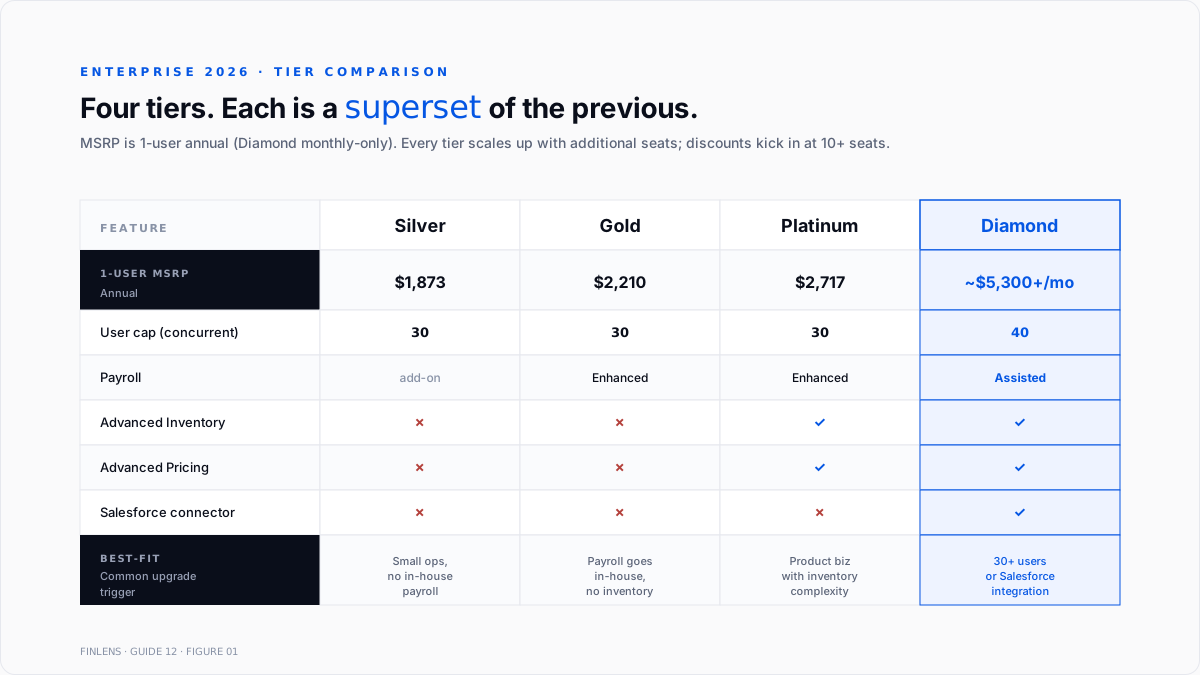
Enterprise ships in four tiers. Each tier is a superset of the previous.
Silver. Core accounting, essential reporting, up to 30 users. Includes Intuit Data Protect (cloud backup) and Priority Circle (dedicated Intuit support). No payroll included - Enhanced Payroll is a separate add-on.
Gold, silver, and enhanced payroll bundled. Payroll runs in-house on the Enterprise machine (or hosted server). Same 30-user cap.
Platinum. Gold + Advanced Inventory + Advanced Pricing. Advanced Inventory adds FIFO valuation, multi-location tracking, barcode scanning, bin/lot number tracking, mobile inventory receiving, and serial number tracking. Advanced Pricing adds rule-based price levels. Same 30-user cap.
Diamond. Platinum + Assisted Payroll (Intuit files payroll taxes on the customer's behalf) + QuickBooks Time (time-tracking + scheduling) + a Salesforce connector. User cap rises to 40. Diamond is billed monthly, not annually, and pricing is quote-based.
Rates as of 2026, from apps4rent and oneupnetworks - verify with Intuit or an authorized reseller before purchase:
Every tier scales up with additional user seats. Volume discounts are common for 10+ seats; the actual quote comes from Intuit direct or an authorized reseller.
Industry editions
Enterprise also ships in seven industry-specific editions. Intuit's industry solutions overview covers each. The general enterprise product plus:
- Contractor Edition. Job costing per project, item percent complete, custom billing (AIA-format progress billing), and certified payroll reports.
- Manufacturing & Wholesale. Sales order fulfillment, backorder tracking, assembly builds, per-lot inventory, and wholesale-specific chart of accounts.
- Nonprofit. Donor and grant management, fund accounting, Form 990-style reports, and in-kind donation tracking.
- Professional Services. Time and expense billing, project-based revenue tracking, and tailored charts of accounts for legal, engineering, marketing, and design firms.
- Retail. Sales tracking with POS integration, inventory management by store, and retail-specific reports.
- Accountant Edition. For CPA firms. Client Data Review, batch enter transactions, period copy, and industry toggles (an Accountant Edition user can switch between industry views while inside a client file).
The industry edition is chosen at install. Intuit's help article on toggling QuickBooks editions covers switching within the Accountant Edition. Non-accountant editions lock into their industry - moving from contractor to manufacturing requires a re-install and a new license.
The industry edition changes reports, chart of accounts templates, sample company files, and menu language. It does not change file compatibility - every industry edition writes to the same. The QBW format and a file created in Contractor Edition open correctly in the Accountant Edition (with the industry-specific reports available).
Capacity limits
The specific numbers that determine when Enterprise is actually needed:
Concurrent users. The pro is 3 seats. Premier is 5. Enterprise Silver/Gold/Platinum is up to 30, and Diamond is up to 40. QBO Advanced is 25. QBO Plus is 5.
List-entry limits (combined customers + vendors + employees). Pro and Premier both cap at 14,500 combined records. Enterprise raises this to 100,000 combined - the single largest capacity delta between Premier and Enterprise, and the reason a growing customer base often forces the upgrade.
File size. Enterprise has no hard-coded file size limit. The QuickBooks Community thread on Enterprise capacity documents practical limits: files run smoothly at 1–1.5 GB, degrade in the 2–3 GB range, and become fragile beyond 3 GB. Anecdotal reports of 10 GB files exist but are not supported operating conditions.
Chart of accounts. Enterprise supports up to 10,000 accounts. Pro and Premier cap at 10,000 as well; the difference is that Enterprise handles that scale with faster reporting queries.
Class list, item list, and price levels. All effectively unlimited on Enterprise. Premier caps at 10,000 combined for many list types.
Hosted vs. on-premise deployment
Enterprise runs in one of two deployment modes.
On-premise. The .QBW file lives on a local server or a dedicated workstation. Users on the same network connect through Multi-User Mode. Fastest performance because everything is local. Requires IT to manage backups, disaster recovery, Windows patches, and remote-access setup (typically Remote Desktop Services or a VPN). Common on established books with existing IT.
Hosted (third-party cloud). The .QBW file lives on a hosted virtual desktop provided by an authorized Intuit hosting partner (Right Networks, Ace Cloud, Verito, Cloudvara, others). Users log in through Remote Desktop or a browser gateway. Cloud-adjacent access without leaving Enterprise. Monthly hosting fees stack on top of the Enterprise license ($35–$75 per user per month depending on provider and configuration).
The Ace Cloud comparison of hosted vs. on-premise covers the operational trade-offs. Most books that move to hosted do so to give remote employees access without maintaining a VPN and to shed the local IT overhead.
Intuit does not offer first-party hosting for enterprise. Every hosted deployment runs through an authorized third party.
When Enterprise is still the right choice
Enterprise makes sense in specific situations:
- Inventory-heavy operations where Advanced Inventory (FIFO valuation, barcode + bin tracking, serial numbers, multi-location) is a hard requirement. QBO's inventory feature is thinner and does not include serial or bin tracking natively.
- 20+ concurrent users where QBO Advanced's 25-seat cap does not create real headroom for growth.
- List-entry counts above 14,500 (usually a large customer base or a payroll roll-up) where Premier is out of runway and QBO Advanced's per-user pricing gets expensive at scale.
- Industry-specific reporting (contractor's percent-complete, manufacturing's assembly builds, nonprofit's fund accounting) that maps cleanly to an enterprise industry edition without heavy customization.
- Existing investment in Enterprise integrations - third-party add-ons like Fishbowl (inventory), Method:CRM, Bill.com (older desktop connector), and industry-specific extensions that are built for desktop and do not have QBO equivalents.
When Enterprise is the wrong choice
The mirror-image cases:
- Remote-first team without hosting. Enterprise runs on Windows. Mac users and mobile access require a hosted deployment or an extra layer. QBO is browser-native and multi-platform out of the box.
- Fewer than 10 users with straightforward accounting needs. QBO Advanced at similar pricing offers native cloud access, mobile apps, and easier third-party integration.
- Multi-entity consolidation is a primary need. Enterprise supports combined financial statements across up to 6 company files, but the workflow is manual and Desktop-bound. Intuit Enterprise Suite (cloud) handles multi-entity + inter-company eliminations natively. Full treatment of the multi-entity trade-off in the multi-entity accounting and inter-company transactions guide.
- Modern app-ecosystem dependency. QBO's App Store has 750+ integrations that update automatically. Enterprise's third-party ecosystem is smaller and often requires per-integration configuration on each workstation.
- API-first workflow. QBO's REST API is well-documented and widely used. Enterprise's SDK is older, more limited, and requires local access to the file.
The migration path - Enterprise to QBO Advanced
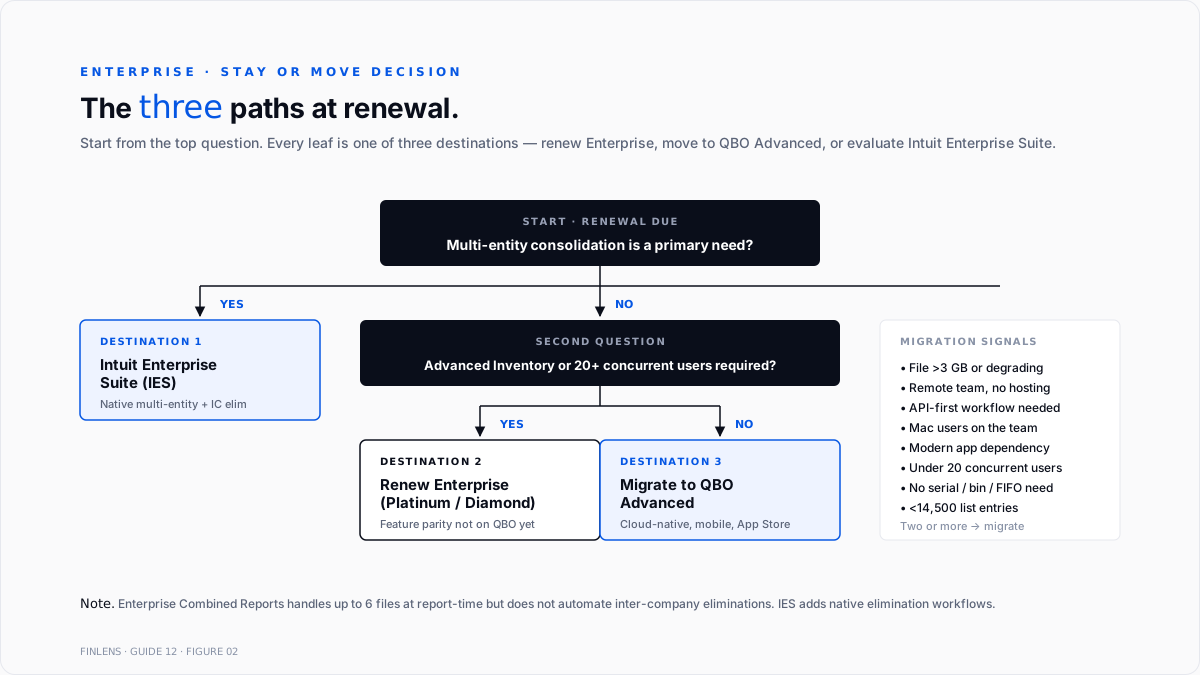
For books that decide to move, Intuit provides a native conversion tool. The workflow:
1. Verify data compatibility. Not every Enterprise feature converts. Advanced Inventory (FIFO valuation history), Advanced Pricing (rule-based price levels), custom reports, and industry-specific fields either convert with data loss or do not convert at all. Confirm the current file's dependencies against the Intuit Desktop → Online conversion limitations list before starting.
2. Clean the source file. Delete unused customers, vendors, items, and accounts. Reconcile every open bank account through the migration date. Close open POs, receive open bills, and apply every unapplied payment. A cleaner source file produces a cleaner target file.
3. Export a trial balance as of the migration date. This is the checkpoint - after conversion, every account balance in QBO Advanced must match the source trial balance. Discrepancies flag conversion errors.
4. Run the Move to QuickBooks Online tool. Intuit's built-in tool exports the file, uploads it, and re-imports it as a QBO Advanced company. Runs typically overnight; larger files (5 GB+) may take 24–48 hours.
5. Reconcile every account against the source trial balance. Post-conversion cleanup normally required: A/R aging, A/P aging, inventory valuation, payroll YTD, and class assignments.
6. Rebuild what didn't convert. Custom reports rebuild in QBO's Custom Reports editor. Advanced Inventory FIFO data resets to Average Cost - most books absorb this at conversion. Industry-specific templates rebuild in QBO's template editor.Realistic timeline for a well-prepared migration: 2–6 weeks from decision to go-live for a single-entity book. Longer for multi-entity or heavy customization.
The migration path - Enterprise to Intuit Enterprise Suite
Intuit Enterprise Suite (IES) is Intuit's newer cloud platform above QBO Advanced. It adds multi-entity native support, shared chart of accounts across entities, and inter-company elimination workflows that are missing from both Enterprise and QBO Advanced.
The Intuit Enterprise Suite multi-entity documentation covers the feature set. IES is priced above Enterprise (custom quote from Intuit) and targets businesses with 5+ legal entities that need consolidation infrastructure.
The migration path from Enterprise to IES is not a native conversion tool as of 2026. Migration runs entity-by-entity through the standard Desktop → Online conversion, then IES adds the multi-entity layer once every entity is in the cloud. Full treatment of the multi-entity trade-off between Enterprise combined reports, QBO Advanced Spreadsheet Sync, and IES sits in the multi-entity accounting guide.
Where Enterprise stops scaling
Three failure modes compound past a certain threshold:
File size above 3 GB. Performance degrades, backups take hours, and the risk of file corruption rises. Books that hit this typically split into multiple company files (with the combined-reports workaround) or migrate to a cloud GL - the best general ledger software in 2026 write-up covers the up-market options.
More than 40 concurrent users on Diamond. The 40-user cap is hard. Books that need more concurrent access have to move upmarket.
Multi-entity consolidation on 5+ entities. Enterprise's combined reports feature works, but the manual workflow scales linearly. Above 5 entities, the consolidation overhead exceeds what Enterprise's tooling was designed to support.
The Finlens approach
Finlens is an AI accounting platform for QBO firms and founder-led businesses. Enterprise itself is a Desktop product, so Finlens's direct feature footprint on an Enterprise book is smaller than on a QBO book. Where Finlens fits:
- Enterprise → QBO Advanced migration assessment. For firms managing clients on Enterprise who are evaluating the move, Finlens produces a diagnostic of the current file (list counts, unused accounts, unreconciled items, inventory valuation drift) that maps to what will and won't convert cleanly.
- Post-migration reconciliation. Once a client moves from Enterprise to QBO Advanced, Finlens reconciles the pre-migration trial balance against the post-migration QBO ledger and flags every account that doesn't tie.
- Multi-entity consolidation on the QBO side. For firms managing enterprise clients who consolidate combined reports today, Finlens's multi-entity workflow (once clients move to QBO) automates the consolidation across up to 20+ QBO files that Enterprise handled manually.
The features that keep the migration accurate - rather than just automated - are the ones surrounding the conversion itself:
- AI diagnostic report on any QBO or enterprise file that surfaces the top 20 conversion risks before the migration runs.
- Human-in-the-loop review gates every post-migration reconciliation adjustment through a CPA.
- The multi-client dashboard runs the diagnostic and reconciliation pass across every client on a firm's book without re-authenticating per client.
For firms managing enterprise clients evaluating the migration to QBO Advanced or Intuit Enterprise Suite, the firm platform handles the diagnostic and post-migration reconciliation. For a controller running the evaluation on a single company, the founder-facing product covers the same workflow at company scale. Book a 20-minute walkthrough against a live Enterprise-to-QBO migration diagnostic: cal.com/finlens/intro.
The verification checklist - pre-purchase and pre-migration
For a business evaluating enterprise-tier selection:
- Current user count and expected 3-year growth mapped against tier caps.
- Advanced inventory usage confirmed as a real requirement, not aspirational (Platinum+).
- Payroll strategy decided - Enhanced (Gold+) vs assisted (diamond) vs gusto/rippling on the outside.
- Industry edition matched to actual workflow (contractor for construction, manufacturing & wholesale for product businesses, etc.).
- Hosting decision: on-premise + IT overhead vs. third-party hosted + monthly cost.
For a business considering a move off Enterprise:
- Current file size, list counts, and top 10 customizations documented.
- Trial balance exported and reconciled.
- Third-party integrations audited - which have QBO equivalents, which don't.
- Migration cutover date set outside a close period.
- Post-migration reconciliation plan documented before the conversion runs.
Conclusion
Enterprise is Intuit's most powerful desktop product and its most expensive. For inventory-heavy operations, 20+ user teams, or list-entry counts above the Premier cap, it's still the right tool. For remote-first teams, cloud-native workflows, multi-entity consolidation, or modern app-ecosystem integration, QBO Advanced and Intuit Enterprise Suite have caught up on most feature parity and pulled ahead on cloud access.
The stay-or-move decision reduces to one question: does the current book need what Enterprise uniquely gives (Advanced Inventory, 30+ user cap, 100k list entries), or is it running on Enterprise because it's always run on Enterprise? Answer that honestly before signing the next renewal.
.png)
FAQ
Whether QuickBooks Enterprise is still sold as a perpetual license?
No. As of 2026, Enterprise is subscription-only. The one-time-license option was retired several years back; every current Enterprise deployment renews annually or monthly (Diamond).
The difference between QuickBooks Enterprise and QuickBooks Online Advanced?
Enterprise is Desktop (Windows, local .QBW file). QBO Advanced is browser-native cloud. Enterprise supports up to 40 users (Diamond), 100k list entries, Advanced Inventory (FIFO, barcode, serial numbers), and industry editions. QBO Advanced supports 25 users, cloud-native access, mobile apps, and a 750+ App Store. Cost is similar at comparable seat counts; feature fit determines the choice.
Whether Enterprise can consolidate multi-entity financials?
Enterprise can produce combined reports across up to 6 company files. This is a report-time consolidation, not a true elimination workflow - inter-company balances are not automatically eliminated. Intuit Enterprise Suite adds native multi-entity + inter-company eliminations. Full treatment sits in the multi-entity accounting guide.
How to switch industry editions on Enterprise?
Only the Accountant Edition supports mid-file toggling between industry views. Non-Accountant editions are locked to the industry at install; switching requires a re-install and a new license key from Intuit.
Whether Enterprise runs on Mac?>
No. Enterprise is Windows-only since the discontinuation of the QuickBooks Desktop Mac line. Mac users access Enterprise through a hosted deployment (Windows virtual desktop) or a local Windows VM.
Realistic Enterprise → QBO Advanced migration timeline?
2–6 weeks from decision to go-live for a single-entity book of typical complexity. Longer for multi-entity, heavy customization, advanced inventory FIFO history, or files above 3 GB. Migration should be scheduled outside a close period - see the month-end and year-end close guide for the close-window definition - and paired with a post-conversion reconciliation pass against the pre-migration trial balance.

