
The QuickBooks File Doctor guide: company file and network damage (2026)


This is a working reference for firm bookkeepers and controllers diagnosing a damaged QuickBooks Desktop company file. Every technique is sourced to Intuit's own documentation or a real thread on the QuickBooks Community. Numbers cited from user reports are flagged as anecdotal rather than benchmarks.
The problem this guide addresses
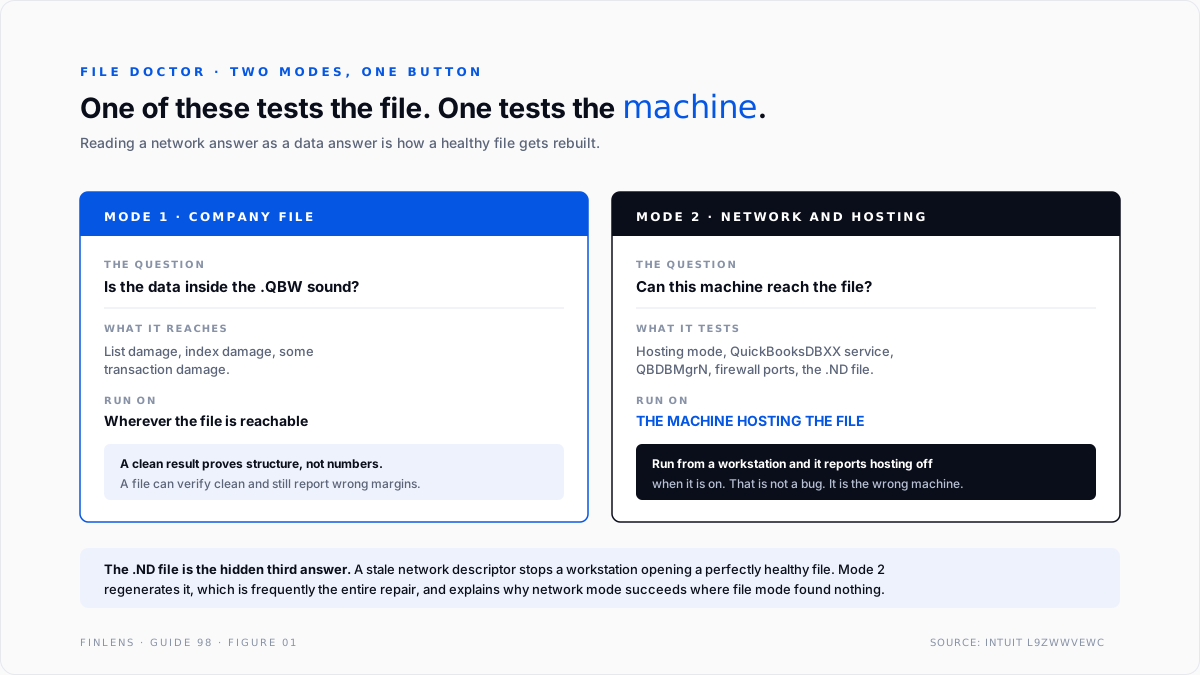
File Doctor answers two different questions with one button, and the answers mean opposite things. One is whether the company file is internally damaged. The other is whether this machine can reach a file that is perfectly healthy. Treating a network answer as a data answer is how a working file ends up rebuilt.
Failure mode one: the network test run from the wrong machine. A QuickBooks Desktop Enterprise 24 user on thread 91685 ran File Doctor along with the rest of the repair ladder and reported that on the server the tools said hosting mode was off when it was on, and that the database manager was not running when it was.
Those readings are not defects. They are what a host-configuration test reports when it is run somewhere other than the host. The user then had contradictory evidence about a configuration that was in fact correct, which is worse than no evidence.
Failure mode two: repair before diagnosis. File Doctor sits between two other operations that people habitually skip or invert. Intuit's guidance on resolving potential data issues puts Verify Data before Rebuild Data for a reason: Verify describes the damage, Rebuild rewrites the file. Running the rewrite first destroys the description.
The File Doctor identity
The tool runs two independent diagnostics and reports them together, which is the source of most misreadings.
MODE 1 · COMPANY FILE DAMAGE
Question: is the data inside the .QBW structurally sound?
Runs on: the file, wherever it lives
Fixes: list damage, index damage, some transaction damage
MODE 2 · NETWORK AND HOSTING
Question: can this machine reach and open the hosted file?
Tests: hosting mode, QuickBooksDBXX service, QBDBMgrN,
firewall ports, folder permissions, .ND file
MUST run on: the machine hosting the file
Two rules follow.
Mode two is a test of the host, so run it on the host. A workstation cannot meaningfully report whether the server is hosting. It can only report that it cannot tell, which the tool renders as a negative.
Mode one does not mean the numbers are right. Structural integrity and accounting correctness are different properties. A file can verify clean and still carry a year of wrong margins, which is why the month-end and year-end close guide checks are not replaced by a repair pass.
Where File Doctor sits in the sequence
Five operations, in strict order. File Doctor is the third, and the two either side of it are the ones that get skipped.
1. Quick Fix my File. The light pass from the Tool Hub's Company File Issues tab. Costs a minute, occasionally ends the investigation. Always first.
2. Verify Data. From File, Utilities, Verify Data inside QuickBooks. This is the diagnostic. It writes what it finds to the QBWin.log, and that log is the only durable description of the damage. Read it before doing anything that rewrites the file.
3. File Doctor. Runs from the Tool Hub. Choose the mode that matches the symptom, and run mode two on the host.
4. Rebuild Data. From File, Utilities, Rebuild Data. This rewrites the company file. Take a backup first, because a rebuild is not reversible.
5. Intuit Data Services. Where the file is beyond local repair. This is a paid recovery path and the correct destination once steps one to four are exhausted with the damage characterised.
Intuit's own guidance on fixing company file and network issues with File Doctor directs downloading the current build each time rather than reusing an old copy, for the same reason the Tool Hub itself should be refreshed. The launcher mechanics are covered in the QuickBooks Tool Hub guide.
The supporting files File Doctor regenerates
A QuickBooks company file is not one file. Three companions sit beside the .QBW and any of them can be the actual fault while the .QBW is perfectly healthy.
The .ND file, network descriptor. Tells a workstation which machine hosts the file and how to reach it. When it goes stale, typically after a server rename, an IP change, or a Windows update, workstations fail to open a file that is fine. File Doctor regenerates it, and that regeneration is frequently the entire repair.
The .TLG file, transaction log. Records transactions since the last backup and is used in recovery. It grows continuously and is not trimmed by ordinary use. A .TLG that has grown to a large multiple of the .QBW is a symptom of a file that has not been backed up properly in a long time.
The .DSN and .QBW.ND pairing on multi-user setups. Governs the database connection. A permissions change on the folder breaks the connection without touching the data.
Why this matters for the diagnosis. A fault caused by any of the three presents identically to file damage from the user's seat: the file will not open. But nothing is wrong with the accounting data, and a rebuild is both unnecessary and risky.
The network mode exists precisely to separate these cases, which is the strongest argument for running it before reaching for Rebuild.
Reading the rebuild loop
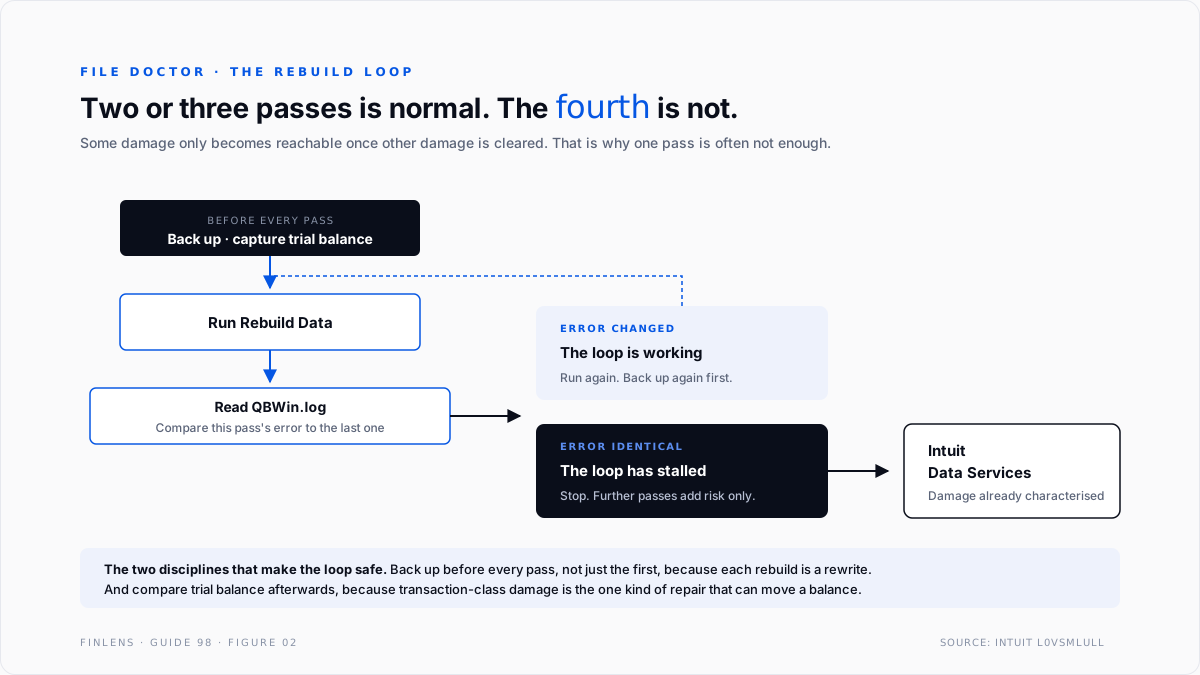
The single most useful piece of field knowledge about rebuilds is that one pass is often not enough, and that this is expected rather than alarming.
A rebuild resolves the damage it can reach. Some damage is only reachable once other damage is cleared, so a second pass finds new problems that the first pass made visible.
The working rule reported by practitioners and echoed in Intuit's guidance is that a rebuild commonly needs running two or three times, and as long as the error messages are changing rather than repeating, the process is working.
The inverse is the stop condition. An identical error on consecutive rebuilds means the loop has stalled, and further passes will not help. At that point the file needs Data Services, not another rewrite.
Three disciplines make the loop safe.
Back up before every pass, not just the first. Each rebuild is a rewrite. A backup taken before pass one is no protection against pass three.
Capture the trial balance before the first pass. A rebuild can change numbers. Without a before figure there is no way to know whether it did.
Read QBWin.log between passes. The log is where the changing error messages live. Watching the dialog boxes only is how a stalled loop gets mistaken for progress.
What "damage" actually means
File Doctor reports damage in categories, and they carry very different implications.
List damage. The chart of accounts, item list, customer or vendor list has a corrupted entry. Usually repairable, usually low-impact, and often the cause of a single report refusing to run.
Index damage. The internal indexes pointing at transactions are wrong. Symptoms are transactions that appear in one report and not another. A rebuild reconstructs indexes and this class repairs well.
Transaction damage. A transaction record itself is corrupted. This is the class that can change numbers, and the reason a trial balance capture before the rebuild is not optional.
Structural damage. The file's internal organisation is broken. This is the class that routes to Data Services, and the one where repeated rebuild passes waste the most time.
The practical distinction. The first two classes almost never move a balance. The third can. Knowing which class Verify reported, from QBWin.log, tells a controller whether the post-repair comparison is a formality or the most important step of the day.
The failure-mode catalog
Six diagnoses cover most File Doctor work.
1. Network mode run from a workstation. Symptom: hosting reported off, database service reported absent, both contradicting the server. Cause: the test is being run away from the host. Fix: run it on the server. This is the thread 91685 reading.
2. Rebuild run before Verify. Symptom: a successful rebuild with no record of what was wrong. Cause: inverted sequence. Fix: Verify writes the description, Rebuild destroys it. Order matters.
3. File Doctor reports clean and the fault persists. Cause: the fault is environmental or program-level, not data-level. Fix: move to the Program Problems and Installation Issues tabs, and to the Windows components QuickBooks depends on. Do not repeat the file pass.
4. The file is over the practical size limit. Symptom: File Doctor times out or will not complete. Cause: very large company files. Intuit specifically directs the Program Problems tools at preventing data issues on files larger than 1 GB, which is also the size band where repair tools become unreliable. Fix: condense or archive before repairing.
5. The .ND or .TLG file is the actual problem. Symptom: the file will not open across the network although permissions look correct. Cause: a stale network descriptor file. Fix: File Doctor regenerates these, which is often the entire fix and explains why network mode succeeds where file mode found nothing.
6. Third-party security software holding the file. Symptom: intermittent open failures, or repairs that succeed then regress. Cause: antivirus or backup software locking the .QBW. Fix: exclude the QuickBooks data directory. No repair tool can fix a file another process is holding.
Worked example
A firm's client file will not open from any of three workstations. It opens on the server. The fault appeared the morning after a Windows update on the server.
What most firms do. Run File Doctor from a workstation, see hosting reported off, switch hosting mode on the server, break the configuration that was working, and then have four machines that cannot open the file instead of three.
What the sequence produces. Quick Fix my File on the server, which finds nothing and costs a minute. Verify Data, which reports no data damage and writes that to QBWin.log. That result is the diagnosis: the file is not damaged.
File Doctor is then run on the server in network mode. It reports the QuickBooksDBXX service stopped, which is consistent with a Windows update having reset service start behaviour. Restarting the service and setting it to automatic restores access to all three workstations.
Total data operations performed: zero. No rebuild, no rewrite, no risk to client numbers.
The fault was never in the file, and the only reason that was knowable early is that the diagnostic ran before the repair. Had the rebuild been run first, it would have reported success, the workstations would still have failed, and the firm would now be troubleshooting a rewritten file.
Where File Doctor stops helping
Threshold one: the numbers are wrong but the structure is sound. File Doctor tests structural integrity. A file with a year of misposted transactions verifies clean, because nothing is structurally broken. That class of problem belongs in reconciliation and close work, not in repair. The bank reconciliation guide covers the most common version.
Threshold two: the environment is the fault. Damaged .NET Framework or MSXML components, permissions structures that block the database service, and security software holding the file are all outside every mode the tool runs.
Threshold three: the hardware is unsupported. Intuit documents that error 6123,0 can be caused by running QuickBooks Desktop on an ARM-based processor rather than Intel or AMD. No diagnostic addresses an architecture mismatch, and the tool will keep reporting file problems that are not file problems.
Threshold four: the file is genuinely beyond local repair. Data Services exists because some damage is not locally recoverable. Recognising that early is cheaper than four more rebuild passes, and the recognition signal is specific: an identical error on consecutive rebuilds with the damage already characterised in QBWin.log.
The Finlens approach
Finlens does not repair company files. It supplies the before-and-after evidence that makes a repair safe, and reduces how often one is needed.
1. Pre-repair capture. Trial balance, subledger control totals, and key report figures are captured before any rebuild, so the file can be proven afterwards to carry the same numbers it carried before.
2. Post-repair comparison. The same figures are compared after the rebuild and any movement is reported line by line. This is the step almost every firm skips, and it is the only way to detect a repair that silently moved a balance.
3. Structural-versus-accounting separation. Finlens tests the ledger identities directly, so a controller can answer the question a repair tool cannot: the file opens and verifies, but are the numbers right. That answer determines whether a repair is even the correct activity.
Four supporting capabilities sit around those three.
- Event correlation, flagging faults that begin at a Windows update, a QuickBooks release, or a bulk import.
- Repair-history tracking per client file, so a file needing frequent repair is escalated rather than repeatedly patched.
- Backup verification, confirming a usable backup exists before a rewrite rather than after.
- A cross-file view for firms, ranking client files by repair frequency and by time since last clean verify.
Verification checklist
Eight lines to run around any File Doctor session.
- A backup exists and has been confirmed restorable before any rebuild pass.
- Trial balance and subledger control totals were captured before the first pass.
- Verify Data was run and QBWin.log was read before anything rewrote the file.
- Network mode was run on the machine hosting the file, never on a workstation.
- The sample company was tested to separate a program fault from a file fault.
- Error messages between rebuild passes were compared, and an identical message stopped the loop.
- The captured totals were compared after the repair and any movement investigated.
- Where the loop stalled, the file was routed to Intuit Data Services rather than rebuilt again.
FAQ
What is the difference between Quick Fix my File and File Doctor?
Quick Fix my File is a light pass that closes background processes and runs a minimal repair. File Doctor is a fuller diagnostic covering both file damage and network access. Run the quick one first.
Which machine should File Doctor run on?
File mode can run wherever the file is accessible. Network mode must run on the machine hosting the file, because it is testing that machine's hosting configuration.
Why does a rebuild need running more than once?
Some damage is only reachable after other damage is cleared. Changing error messages across passes mean progress. An identical message twice means the loop has stalled.
Does a clean verify mean the books are correct?
No. It means the file is structurally sound. Accounting correctness is a separate property tested by reconciliation and close procedures.
Should the current build be downloaded each time?
Yes. Intuit's instruction is to download a new copy rather than reuse an old one, because the tool updates independently of QuickBooks itself.
Can File Doctor repair a file it cannot open?
No. Both modes require the tool to reach the file. A file that cannot be opened at all, as opposed to one that opens and misbehaves, is usually a permissions or path problem first and a damage problem second.
Does running it repeatedly increase the chance of a fix?
No. A second identical run tests the same things against the same file and returns the same answer. Repetition is the most common way time is lost in this workflow.
When is it time to stop and call Data Services?
When Verify has characterised the damage, two or three rebuild passes have produced an identical error, and the file still will not behave. Further passes carry risk without diagnostic value.

