
The QuickBooks Payments guide: fees, deposit routes, refunds, and chargebacks (2026)


This is a working reference for founders and controllers accepting customer payments through Intuit's native QuickBooks Payments product on QuickBooks Online. Every technique is sourced to Intuit's own documentation, the QBO Payments rate card, or a real thread on the QuickBooks Community. Numbers cited from user reports are flagged as anecdotal rather than benchmarks.
The problem this guide addresses
Two failure modes account for most misstated books on accounts using QuickBooks Payments.
The first is fee netting. QuickBooks Payments deducts its processing fee before the deposit hits the bank - the invoice was $1,000, but the deposit lands at $971 after a 2.9% invoiced-card fee. Books that categorize the net $971 deposit as revenue understate gross revenue by $29 and fail to record the $29 as a merchant fees expense. Multiplied across a year, that miscoding rewrites the P&L margin. The Community thread on QuickBooks Payments fee handling documents this pattern across firms.
The second is chargebacks entered as generic bank withdrawals. A customer disputes a $500 charge; the bank pulls $500 back plus the $25 chargeback fee. Books that categorize the $525 reversal as a bank expense fail to reopen the original invoice, leave revenue overstated, and lose the audit trail on the dispute itself. Intuit's help article on handling chargebacks covers the correct workflow.
The sections below cover the fee schedule, chart-of-accounts setup, the four payment paths, deposit routing, fee posting, refund and chargeback workflows, the six failure modes with fixes, reconciliation against the bank feed, and where the standard QBO Payments workflow stops scaling. Readers looking for the shorter product-level overview of QuickBooks Payments should start with the QuickBooks Payments write-up on our blog - this guide is the deeper practitioner reference.
The QuickBooks Payments identity
Every QuickBooks Payments transaction resolves to the same equation:
Gross invoice amount = Deposit received + Processing fee (+ chargeback fee if disputed) − (instant deposit fee if used)
A misstated payments book violates this equation. The three defects are the fee not booked (deposit = gross recorded, but actual net was less), the refund not linked (customer refund creates two open items instead of closing one), or the chargeback fee absorbed into bank service charges without reopening the source invoice. Every fix reduces to identifying which of the three applies.
The fee schedule
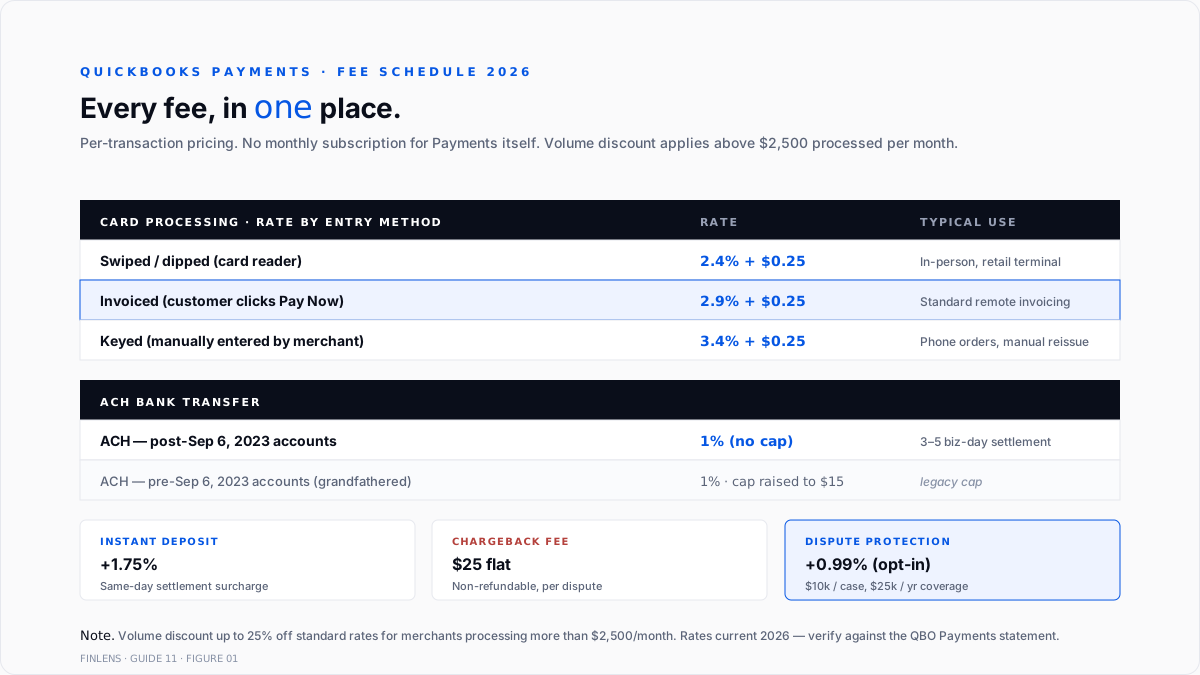
Intuit's Payments fees article is the canonical source. The rate card as of 2026:
Card rates by entry method:
- Swiped (card reader): 2.4% + $0.25
- Invoiced (customer clicks Pay Now on an invoice): 2.9% + $0.25
- Keyed (manually entered in QBO): 3.4% + $0.25
ACH bank transfer: 1% per transaction. The $10 cap that many books remember was removed on September 6, 2023. Accounts created before that date had the cap raised to $15; accounts created after have no cap. The Community thread on the ACH cap change documents the surprise this created for founders who onboarded post-2023 and expected the $10 ceiling.
Volume discount: Businesses processing more than $2,500 per month receive up to 25% off the standard rates. Applied automatically once the threshold is crossed.
Instant Deposit: 1.75% surcharge on top of the standard processing fee for same-day deposit. Otherwise, standard settlement is next business day.
Chargeback fee: $25 per chargeback. Non-refundable, regardless of dispute outcome.
Payments Dispute Protection (optional add-on): 0.99% surcharge on every processed charge. Covers up to $10,000 per chargeback and $25,000 annually. Intuit's Dispute Protection article covers the terms.
There is no monthly subscription fee for the Payments product itself. All costs are per-transaction.
The account setup
Five chart-of-accounts entries carry the QuickBooks Payments cycle. The full close-cycle setup sits in the QuickBooks month-end and year-end close guide.
- Merchant Fees (Expense, detail type: Bank Charges). Where card + ACH processing fees post.
- Instant Deposit Fees (Expense, sub of Merchant Fees). Optional split when Instant Deposit is used regularly, so the incremental cost is visible on the P&L.
- Chargebacks & Disputes (Expense, detail type: Bank Charges). Where the $25 chargeback fee posts. Does not hold the reversed sale - that reopens the original invoice.
- Undeposited Funds (Other Current Asset). QBO auto-creates. Full treatment in the write-up on historical transaction categorization tools for QuickBooks.
- Dispute Protection Fees (Expense, sub of Merchant Fees). Only if the add-on is enabled.
Books already running Stripe or another processor should keep the Merchant Fees account general and use Class or Location tracking to separate processors on the P&L rather than creating one expense account per processor.
The four payment paths
Every QuickBooks Payments transaction enters the ledger through one of four paths. Behavior depends on how the customer paid.
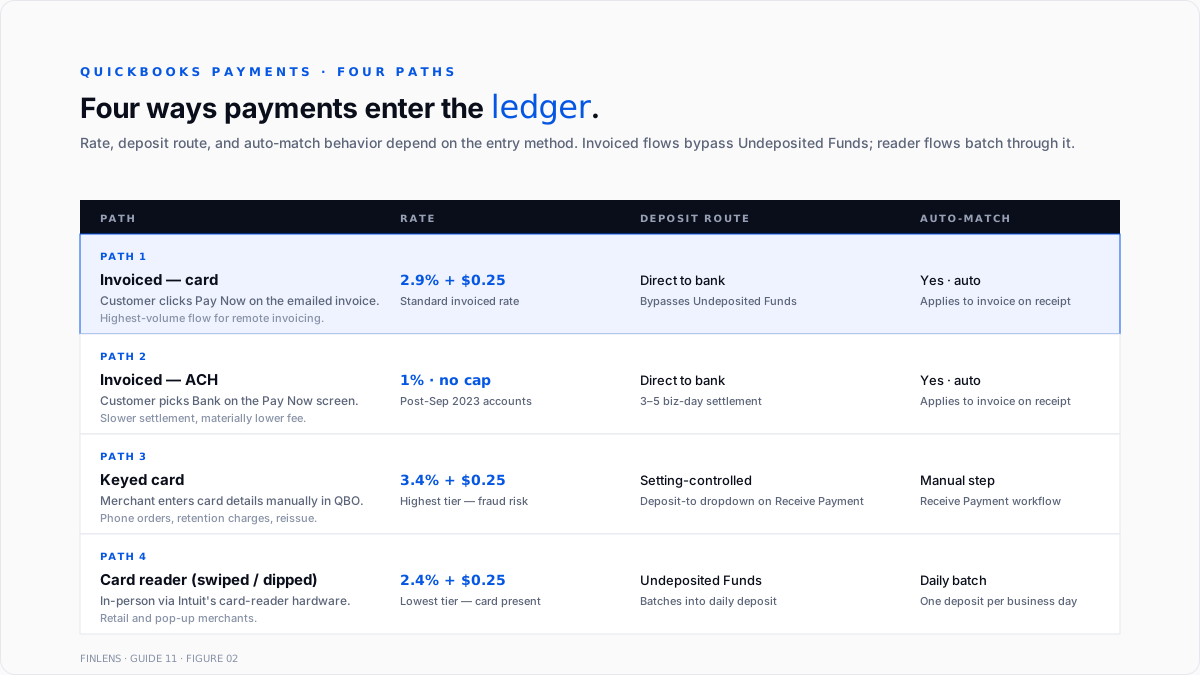
Path 1 - Customer clicks Pay Now on an invoice (card). Standard invoiced flow. Rate: 2.9% + $0.25. Payment automatically applies to the open invoice. The deposit lands in the linked bank account net of the processing fee on the next business day (or same day with Instant Deposit).
Path 2 - Customer clicks Pay Now on an invoice (ACH). Same invoice flow, ACH selected instead of card. Rate: 1% (no cap for post-2023 accounts). Settlement takes 3–5 business days. The payment applies to the invoice on receipt; the bank deposit lands net of the fee.
Path 3 - Merchant keys in a card manually. Recurring for phone orders, retention charges, and manual invoice reissues. Rate: 3.4% + $0.25 - the highest tier because keyed transactions carry the most fraud risk. Payment applies to the specified invoice; deposit lands net of the fee.
Path 4 - Card reader (swiped or dipped). For in-person or retail transactions using Intuit's card reader hardware. Rate: 2.4% + $0.25. Payment flows through Undeposited Funds by default, then batches into the daily deposit.
For invoiced flows (Paths 1 and 2), the payment auto-applies to the open invoice - no Receive Payment step is required. For keyed and reader flows, the standard Receive Payment workflow applies. Each path's deposit routing depends on the merchant's Payments settings.
Direct-to-bank vs Undeposited Funds
QuickBooks Payments deposits behave differently from third-party processors on the Undeposited Funds question.
For invoiced flows (Paths 1 and 2), QuickBooks Payments typically routes the deposit directly to the linked bank account and matches automatically to the bank-feed line - Undeposited Funds is bypassed. The Receive Payment record is created automatically and the invoice closes.
For card-reader flows (Path 4), payments post through Undeposited Funds and batch into the daily bank deposit, matching the actual bank statement grouping.
For keyed flows (Path 3), the Deposit-to setting on the Receive Payment window controls the routing - bank direct or Undeposited Funds.
The recurring configuration error: an invoiced-flow book with the Undeposited Funds default preference still on. QuickBooks Payments routes to the bank direct, and QBO parallel-tracks the payment in Undeposited Funds, producing a residual that never clears. Full treatment of the UF failure modes sits in the write-up on best AI tools to bulk categorize transactions.
Fee posting - gross revenue with fees as a separate expense
The correct treatment on every payment:
- Debit: Cash / Bank (net amount received)
- Debit: Merchant Fees (processing fee amount)
- Credit: Accounts Receivable (gross invoice amount)
Worked example. $1,000 invoiced-card payment on Path 1:
- Gross invoice: $1,000
- Fee: 2.9% + $0.25 = $29.25
- Net deposit: $970.75
Ledger entries:
- dr Cash $970.75
- dr Merchant Fees: $29.25
- cr A/R $1,000.00
The invoice closes at $1,000 (gross). The P&L shows $1,000 of revenue and $29.25 of Merchant Fees expense. Gross margin stays honest.
The wrong treatment is booking the net $970.75 deposit as revenue with no fee entry. Revenue is understated by $29.25 and the Merchant Fees expense line stays at zero - a compounding error over hundreds of transactions.
QuickBooks Payments generates the correct split automatically for invoiced flows. Manual entries and older workflows sometimes miss it. Verify by reconciling the P&L Merchant Fees total against the sum of processing fees on the Payments statement each month.
The refund workflow
Refunds inside QuickBooks Payments run through the same rails as the original charge - the processor pushes funds back to the customer's card or bank, and the merchant's account is debited for the refund amount. Processing fees on the original transaction are not refunded (Intuit keeps the fee).
The correct ledger entries on a $500 refund of an already-collected $500 payment:
- Original payment (already booked):
- Dr Cash $485.50, Dr Merchant Fees $14.50, Cr A/R $500
- Refund transaction:
- Dr. A/R (reopens the invoice) $500
- CR Cash $500
The invoice reopens at $500. Cash decreases by the full $500 (the processor doesn't return the original $14.50 fee). The Merchant Fees expense stays on the books - the fee was incurred and is not reversed.
For a partial refund, the amount split follows the same logic proportionally. For a refund on an invoice that has since been closed and archived, use a credit memo instead of reopening the invoice, then match the credit memo against the outbound refund transaction.
The common defect: refunds recorded as a standalone bank withdrawal with no A/R impact. Cash correctly decreases, but the invoice stays closed and revenue stays booked - the customer got their money back on the bank side, but the P&L still shows the sale.
Chargebacks and disputes
A chargeback happens when the customer disputes a charge with their card-issuing bank. The bank reverses the funds first, then reviews the merchant's response. Intuit's chargeback workflow article covers the mechanics.
The bank pulls the disputed amount plus the $25 chargeback fee from the merchant's linked bank account, typically as two separate transactions. Bank review takes up to 50 days.
The correct ledger treatment on a $500 charge disputed:
- Chargeback pulled ($500):
- Dr. A/R (reopens the invoice) $500
- CR Cash $500
- Chargeback fee pulled ($25):
- Dr. Chargebacks & Disputes expense: $25
- CR Cash $25
The invoice reopens with a $500 balance. The $25 fee hits the Chargebacks & Disputes expense - a separate line so disputes can be tracked and analyzed. The original Merchant Fees entry from the initial charge stays on the books (Intuit does not refund the processing fee on a chargeback).
If the merchant wins the dispute, the bank returns the $500 to the account. Book it as
- Dr. Cash $500
- CR A/R (closes the invoice again) $500
The $25 chargeback fee is not refunded regardless of outcome.
For merchants with material chargeback volume, Payments Dispute Protection may pencil out - the 0.99% surcharge caps chargeback exposure at $10,000 per case and $25,000 annually. The trade-off: 0.99% of every processed charge, not just disputed ones.
The six failure modes with fixes
Every misstatement on a QuickBooks Payments book traces to one of six causes.
1. Net deposit categorized as revenue with no fee entry
Diagnosis. Compare the monthly payments statement fee total to P&L merchant fees total. When the P&L is materially lower, fees are being netted into revenue.
Fix. For each affected deposit, split the entry: dr Cash (net), dr Merchant Fees (fee portion), cr A/R (gross). Bulk correction via journal entry if the miscoding spans multiple periods.
2. Undeposited Funds residuals from parallel tracking
Diagnosis. The UF balance carries invoiced payments that never cleared, despite the bank deposits having been reconciled.
Fix. Turn off Use Undeposited Funds as the default deposit account (Settings → Account and Settings → Advanced) or verify the invoicing flow routes direct-to-bank. Clear the historical UF residuals per the historical transaction categorization workflow.
3. Refund booked as bank withdrawal, invoice stays closed
Diagnosis. Bank shows a refund debit; the corresponding invoice still shows closed on the customer ledger; revenue is overstated for the period.
Fix. Delete the standalone bank withdrawal. Process the refund through the Refund Receipt or Credit Memo workflow so A/R reopens correctly. The bank-feed match then closes the workflow entry.
4. Chargeback fee posted to generic bank service charges; invoice never reopened
Diagnosis. bank shows two withdrawals for the chargeback (the sale amount plus $25). Both booked as bank service charges; the original invoice is still marked paid.
Fix. Delete the bank withdrawals. Reopen the invoice via a Refund Receipt for the sale portion (dr A/R, cr Bank). Book the $25 fee to Chargebacks & Disputes.
5. ACH cap assumption ($10) applied to a post-2023 account
Diagnosis. Books running large ACH transactions ($5,000+) with expected fees of $10 per transaction, when the actual fee is 1% uncapped (i.e., $50 on a $5,000 transaction).
Fix. Update the internal cost model. If the volume is high enough, negotiate the volume discount (25% off above $2,500/month) with Intuit or evaluate whether ACH-heavy books should use a specialty ACH processor with better economics.
6. Instant deposit fees invisible on the P&L
Diagnosis. The instant deposit surcharge of 1.75% adds to processing fees, but the split isn't broken out. The P&L Merchant Fees line rises without explanation.
Fix. Create an Instant Deposit Fees sub-account under Merchant Fees. Update the reconciliation to allocate the incremental fee to that sub-account so the cost of same-day access is visible.
Reconciliation to the bank feed
The monthly reconciliation checkpoint against the Payments statement:
- Sum every deposit on the QuickBooks Payments statement for the period. Expect it to equal the sum of net amounts credited to the bank.
- Sum every fee on the statement. Expect it to equal the P&L Merchant Fees + Instant Deposit Fees + Dispute Protection Fees for the period.
- Sum every chargeback + chargeback fee. Expect the chargebacks to match A/R reopens and the fees to match the Chargebacks & Disputes expense line.
- Confirm no residuals in Undeposited Funds for invoiced-flow payments.
- Volume-discount reconciliation. If monthly processing >$2,500, verify the 25% discount is being applied and the effective rate matches expectations.
Bank rec workflow for the underlying account follows the standard bank reconciliation guide or the shorter how to reconcile bank statements 10x faster walkthrough.
Where in-QBO Payments stops scaling
Three failure modes compound past a certain volume.
Transaction volume above 500 payments per month. Manual reconciliation of individual payment-to-invoice matches becomes the bottleneck. QuickBooks Payments handles the auto-match well for standard invoiced flows, but exceptions (refunds, chargebacks, partial payments, currency conversions) all require human intervention.
Multi-processor stacks. A book using QuickBooks Payments plus Stripe plus Square plus a legacy merchant account runs four separate reconciliation cycles per month, each with its own fee schedule and payout timing. The Merchant Fees P&L line becomes a black box.
High-chargeback verticals. SaaS trials, digital goods, subscription boxes, and travel see chargeback rates above the standard 0.5–1.0% baseline. Chargeback fees at $25 each compound quickly, and Dispute Protection at 0.99% may or may not pencil out depending on the win rate.
The Finlens approach
Finlens is an AI accounting platform for QBO firms and founder-led businesses. Payment reconciliation is one workflow in a 17-feature product.
For QuickBooks Payments specifically, Finlens does the following:
- Auto-splits every deposit into gross revenue and processor fees the moment the bank-feed line lands, so the six failure modes above never accumulate.
- Detects Undeposited Funds parallel-tracking and flags the config mismatch before the residuals compound.
- Reconciles chargebacks and refunds against the original invoice, reopening the correct A/R entry and routing the $25 fee to the Chargebacks & Disputes expense line automatically.
The features that keep Payments accurate - rather than just automated - are the ones surrounding the payment itself:
- Cross-processor reconciliation brings QuickBooks Payments, Stripe, Square, and manual merchant accounts under one dashboard, so the Merchant Fees line resolves to its constituent processors.
- Human-in-the-loop review gates every fee split, refund, and chargeback entry through a CPA before it posts.
- Multi-client dashboard runs Payments reconciliation across every client on a firm's book without re-authenticating per client.
- Audit log produces a tamper-evident record of every payment, refund, chargeback, and fee correction.
The verification checklist
- Every card payment carries a matching merchant fees line at the expected rate for its entry method.
- Every ACH payment carries a 1% Merchant Fees line (no cap for post-2023 accounts).
- P&L Merchant Fees total for the period equals the sum of fees on the QuickBooks Payments statement.
- No refunds recorded as standalone bank withdrawals - every refund reopens or credits the original invoice.
- No chargebacks pooled into Bank Service Charges - chargeback fees isolated in Chargebacks & Disputes.
- The undeposited funds balance carries no invoiced-flow residuals.
- Volume-discount tier verified when monthly processing exceeds $2,500.
- Instant deposit surcharge, if used, tracked separately from standard merchant fees.
For a firm managing payments reconciliation across multiple QBO clients, the firm platform runs it at scale. For a founder running payments on a single book, the founder-facing product auto-splits deposits and reconciles chargebacks against the source invoice. Book a 20-minute walkthrough against a live QBO Payments environment: cal.com/finlens/intro.
Conclusion
QuickBooks Payments hides its fees inside every deposit. The processing fee comes off before the money hits the bank, so books that categorize the net deposit as revenue quietly understate gross sales, understate the merchant fees expense, and misprice the P&L margin. Every reconciliation cycle has to split the deposit back into gross revenue plus fee - and every refund and chargeback has to reopen the source invoice, not vanish into bank service charges.
FAQ
Whether QuickBooks Payments requires a monthly subscription?
No. All costs are per-transaction. The processor is bundled into QuickBooks Online at no additional monthly fee; usage is billed at the rate card described above.
The actual card rate on invoiced payments?
2.9% + $0.25 per transaction, subject to a 25% volume discount above $2,500 monthly processing. Swiped-card and keyed rates differ (2.4% and 3.4%, respectively).
Whether the $10 ACH cap still applies?
Only for accounts created before September 6, 2023 - and those accounts had the cap raised to $15. Accounts created after that date pay 1% with no cap.
How to book a chargeback correctly?
Reopen the original invoice via a refund receipt equal to the disputed amount (dr A/R, cr Bank) and book the $25 chargeback fee separately to a Chargebacks & Disputes expense line. Never absorb the chargeback into a generic bank service charges account.
Whether Payments Dispute Protection is worth the 0.99% surcharge?
Pencils out for merchants with chargeback rates above roughly 1% of processing volume. Below that, the 0.99% cost exceeds the expected chargeback exposure. Model against actual dispute history from the trailing 12 months before enabling.
Realistic payments reconciliation timing?
15–30 minutes per month for a book under 100 payments with clean auto-match. 2–4 hours at 500+ payments per month, with the bulk of that time on exceptions (refunds, chargebacks, and mid-period rate changes).

