
The QuickBooks unrecoverable error guide: causes and the fix ladder (2026)


This is a working reference for firm bookkeepers and controllers hitting unrecoverable errors in QuickBooks Desktop. Every technique is sourced to Intuit's own documentation or a real thread on the QuickBooks Community. Numbers cited from user reports are flagged as anecdotal rather than benchmarks.
The problem this guide addresses
An unrecoverable error is not a diagnosis. It is QuickBooks reporting that it has stopped in a state it cannot continue from, accompanied by two numeric codes that identify the location in the program rather than the cause. Those codes are the most under-used piece of information in the whole message.
Failure mode one: the ladder that reports success while the fault persists. A QuickBooks Desktop Enterprise 24 user on thread 91685 had a file crashing on close, usually straight after a backup, for several weeks.
They ran Windows updates, QuickBooks updates, Tool Hub, Verify and Rebuild Data, Quick Fix my Program, Quick Fix my File, and File Doctor, most of them several times. Every tool reported errors fixed or nothing found. They uninstalled and reinstalled QuickBooks and created a new Windows user account. Ten replies, 805 views.
That sequence is the failure. Seven tools returning clean is a strong diagnosis, and the diagnosis is that the fault is not data damage. Continuing to run data tools after that point cannot succeed.
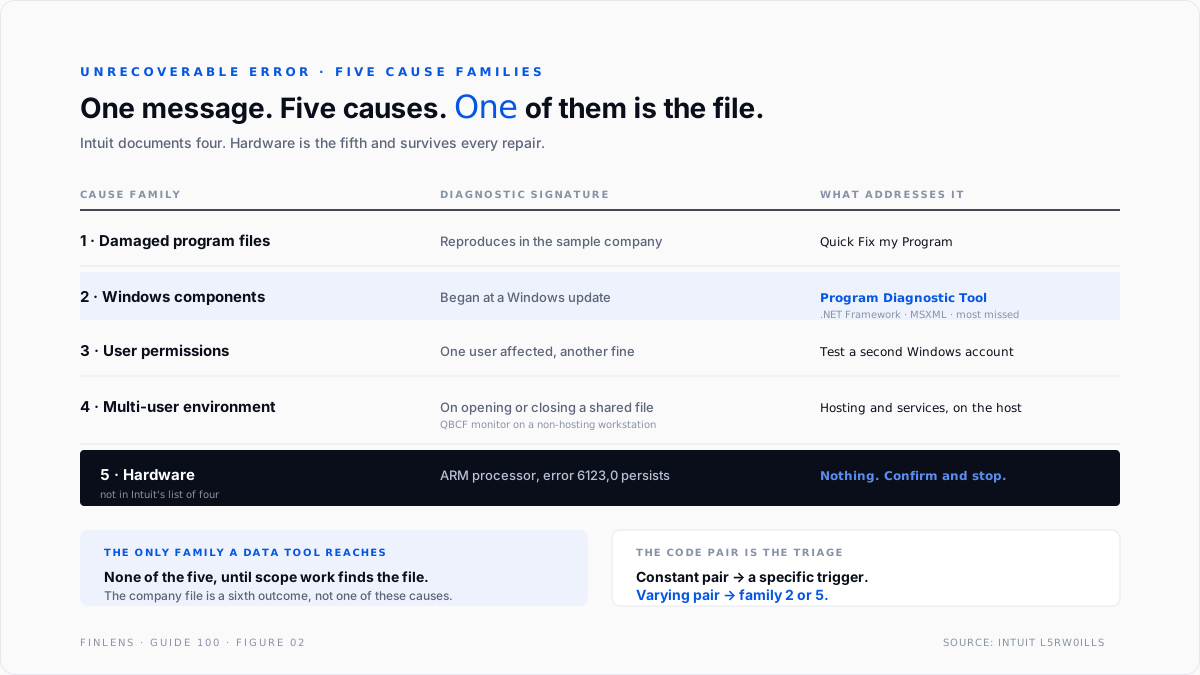
Failure mode two: treating it as one problem. Intuit's documentation on unrecoverable errors attributes them to several distinct causes: damaged QuickBooks program files, Windows components such as .NET Framework or MSXML failing to work with QuickBooks, user permission problems, and multi-user environment faults.
Those four need four different responses, and the error message does not tell you which one you have. The action that does tell you is cheap, and almost nobody performs it.
The unrecoverable error identity
The message carries a code pair, and the pair is the primary diagnostic.
"QuickBooks has encountered a problem and needs to close.
We are sorry for the inconvenience."
Unrecoverable Error: XXXXX YYYYY
└──┬──┘ └──┬─┘
location sub-location
The pair identifies where in the program the failure occurred, which means one thing above all others: the same code pair recurring means the same trigger, and a different pair each time means an environmental fault rather than a specific one.
Three consequences follow, and they determine the entire approach.
Record the pair every time. A recurring identical pair narrows the search to whatever operation the user was performing. A varying pair rules out a single broken record and points at the environment.
Record what the user was doing. On thread 91685 the trigger was closing the company file after a backup, which is highly specific and points at the backup and close path rather than at the data. Pairing the code with the operation converts an opaque error into a bounded search.
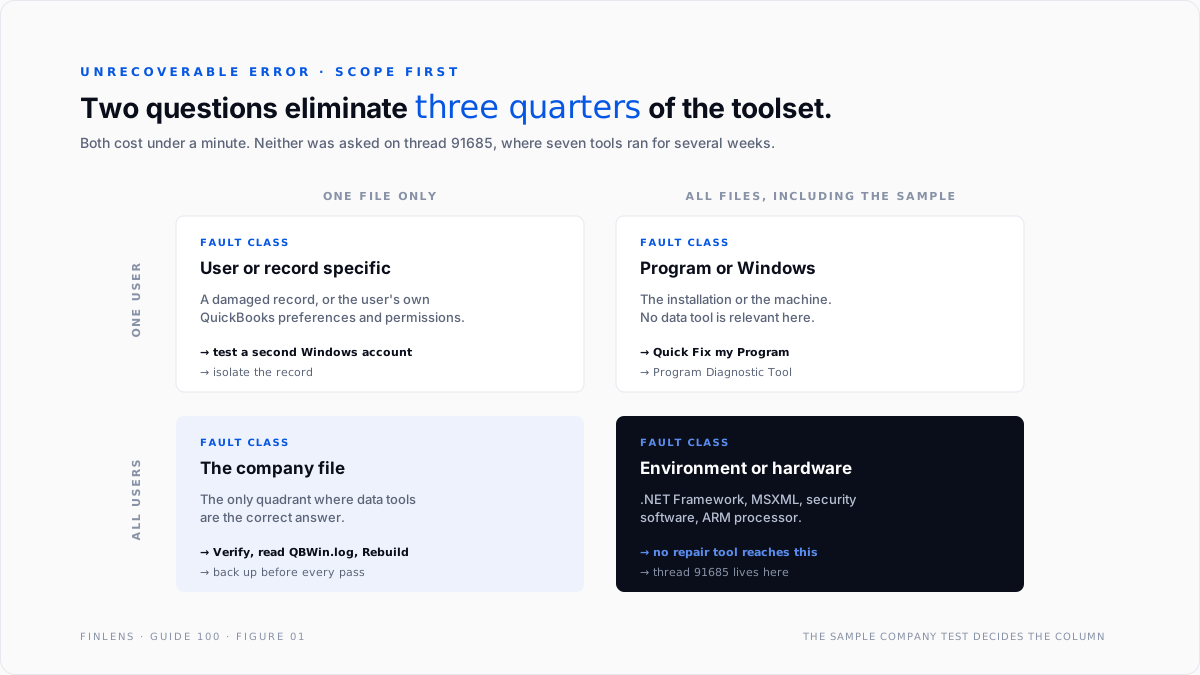
Establish the scope immediately. One user or all users. One file or all files, including the sample company. Those two questions take two minutes and eliminate most of the ladder before it is run.
Scope before tools
Two questions, four outcomes. Each outcome eliminates most of the toolset.
The single most valuable test is opening the sample company. If the sample company reproduces the error, the company file is innocent and every data tool is the wrong tool. That test costs under a minute and removes the largest category of wasted effort. It is also the step skipped on thread 91685, where the ladder ran anyway.
The scope question also decides which machine to work from. A multi-user environment fault must be investigated on the host, and the launcher mechanics for that sit in the QuickBooks Tool Hub guide.
The four cause families
Intuit names four, and they call for different work.
1. Damaged QuickBooks program files. The installation itself is broken. Symptoms reproduce across every file including the sample. Response: Quick Fix my Program, then the Install Diagnostic Tool, then a clean reinstall if those fail. No data tool is relevant.
2. Windows components. QuickBooks depends on .NET Framework and MSXML, and an unrecoverable error can be those failing rather than QuickBooks failing. Symptoms often begin at a Windows update. Response: the QuickBooks Program Diagnostic Tool, which examines exactly these components. This family is the one most often missed, because the error says QuickBooks and the fault is Windows.
3. User permissions. The Windows user cannot write where QuickBooks needs to write, or the QuickBooks user profile itself is damaged. Symptoms affect one user on a machine where another user is fine. Response: test with a second Windows account, which is both the diagnosis and part of the fix.
4. Multi-user environment. Hosting configuration, the database service, or the QBCF monitor service running on a workstation that is not hosting the file. Symptoms appear when opening or closing a shared file. Response: work on the host, verify hosting mode and service state there, and confirm no workstation is inadvertently hosting.
A fifth cause sits outside Intuit's list. Hardware. Intuit documents that error 6123,0 can be caused by running QuickBooks Desktop on an ARM-based processor, since the product targets Intel and AMD. That class of fault survives every repair.
The fix ladder
Seven steps in strict order. The value is in stopping early, not in completing it.
Step 1, record the code pair and the triggering action. Thirty seconds, and it shapes everything after.
Step 2, open the sample company. If the error reproduces, skip every data step and go to step 5.
Step 3, test with a second Windows user account. Isolates the permissions family.
Step 4, update QuickBooks to the current release. Fixes for known crash paths ship in maintenance releases, and running an old build wastes the rest of the ladder.
Step 5, run Quick Fix my Program, then the Program Diagnostic Tool. These address families one and two. Run them before anything that touches data.
Step 6, Verify Data, read QBWin.log, then Rebuild. Only reached if the scope work pointed at the company file. The File Doctor guide covers the loop discipline, including that changing error messages between rebuild passes mean progress and an identical message twice means the loop has stalled.
Step 7, escalate. Either to Intuit Data Services where the damage is characterised and local repair has stalled, or to environment work where every tool has reported clean.
The stop condition is explicit. Two consecutive clean results from data tools end the data investigation. That is what thread 91685 demonstrates, and it is why the correct response there was to stop running tools, not to run them again.
What to capture while it is happening
An unrecoverable error is a transient event, and almost all of its diagnostic value is lost the moment the dialog is dismissed. Five things are worth capturing every time, and together they take under two minutes.
The code pair, written down. Not remembered. Across three or four occurrences the pattern of constant versus varying is the single strongest signal available, and it only exists if the pairs were recorded.
The exact action. Not "it crashed in QuickBooks" but "closing the file after a manual backup", or "running a memorised report", or "saving an invoice with more than forty lines". Specificity is what makes the fault reproducible, and a fault that can be reproduced on demand is usually solved within the hour.
Which user and which machine. This is half of the scope matrix and is frequently unrecorded, which is why the same investigation gets repeated.
Whether anyone else was in the file. Multi-user faults behave differently when the file is opened exclusively, and that is a free test.
What changed recently. QuickBooks updates, Windows updates, new security software, a new workstation, a server rename. Faults that start on a date usually have a cause on that date.
Why this matters more than any tool. Every entry on the fix ladder is an elimination test, and elimination only works against a described fault. A firm that records these five fields turns a recurring mystery into a bounded search, which is the difference between the several weeks on thread 91685 and an afternoon.
The failure-mode catalog
Six diagnoses cover most unrecoverable error work.
1. The ladder run without scope work. Symptom: every tool clean, fault unchanged, hours gone. Cause: steps 1 to 3 skipped. Fix: do the scope work even after the fact. It is still cheaper than another pass.
2. A varying code pair. Symptom: a different pair on each crash. Cause: environmental rather than specific, typically Windows components or memory. Fix: the Program Diagnostic Tool and the Windows component path. A varying pair effectively rules out a single corrupt record.
3. A constant code pair on one action. Symptom: the same pair every time the user does one particular thing. Cause: usually a specific damaged record or a specific report. Fix: isolate the record. This is the one case where targeted data work is the right first move.
4. The error appears only on close, after a backup. Cause: the backup and close path, and frequently third-party backup or security software holding the file at the moment QuickBooks releases it. Fix: exclude the QuickBooks data directory from security software before assuming data damage. This is the thread 91685 shape.
5. Reinstalling before diagnosing. Symptom: a reinstall that changes nothing. Cause: a reinstall only addresses cause family one. Fix: establish that the fault reproduces in the sample company before spending an afternoon on it.
6. Unrecoverable error on importing accountant's changes. Cause: a distinct and documented case with its own resolution path, covered by Intuit at unrecoverable error when importing accountant's changes. Fix: treat it as its own problem rather than as a general crash. Firms hitting it repeatedly should review the accountant's copy workflow described in the QuickBooks Online Accountant guide.
Worked example
Thread 91685's situation, worked the other way round.
The facts. Enterprise 24. Crash on closing the company file, usually after a backup. Several weeks. Multi-user, file on a server.
Step 1. Record the code pair across three crashes. Suppose it is identical each time. That rules out the diffuse environmental picture and points at the close path specifically.
Step 2. Open the sample company, back it up, close it. If the crash reproduces, the company file is innocent, and the whole Company File Issues tab is eliminated. That single test would have prevented the Verify, the Rebuild, the File Doctor runs, and the reinstall.
Step 3 and 4. Second Windows account, current QuickBooks release. Neither resolves it, so permissions and version are eliminated.
Step 5. Program Diagnostic Tool examines .NET Framework and MSXML. This is the first tool in the sequence that is actually aimed at the surviving hypothesis.
Step 6 is never reached, because the scope work established the fault is not in the file.
Where it lands. The surviving candidates are a Windows component fault and third-party software holding the file at close. Both are testable directly: exclude the QuickBooks data directory from the security suite and repeat the backup-and-close cycle.
The contrast in cost. The path actually taken on the thread was seven tools, multiple repetitions, a reinstall, and a new Windows account, across several weeks, with no resolution. The path above is four cheap tests, in order, each of which eliminates a family. The tools were never the problem. The absence of an elimination sequence was.
Where the fix ladder stops
Threshold one: the fault is intermittent. A crash that happens once a fortnight cannot be bisected efficiently, because every test appears to succeed. Intermittent faults are worked by correlating crash timestamps with events: updates, backups, scheduled tasks, other users' activity.
Threshold two: the environment is not under the firm's control. A client's managed IT, a locked-down security suite, or a virtual desktop environment can all cause this class of fault and all sit outside what a bookkeeper can change.
Threshold three: the hardware is unsupported. An ARM-based machine running a product built for Intel and AMD produces faults no software step resolves.
Threshold four: the file needs Data Services. Where the scope work genuinely pointed at the file, Verify characterised damage, and the rebuild loop stalled on an identical error.
The Finlens approach
Finlens does not fix QuickBooks crashes. It removes the uncertainty that makes them expensive, and shortens the elimination sequence.
1. Crash-event correlation. Crash timestamps are correlated against what changed: QuickBooks releases, Windows updates, bulk imports, period closes, and backup schedules. A fault that starts on a specific date usually has a cause on that date, and finding it is faster than testing hypotheses blind.
2. Pre- and post-repair number capture. Trial balance and subledger control totals are captured before any rebuild and compared after, so a repair undertaken during a crash investigation can be proven not to have moved client numbers.
3. Ledger-integrity testing independent of the file. Because Finlens holds the accounting relationships separately, a controller can answer whether the numbers are still right while the file is still misbehaving. That separates the urgent question from the noisy one.
Four supporting capabilities sit around those three.
- Crash-pattern tracking per client file, recording the code pair and triggering action so a recurring pattern is visible across months.
- Backup verification, confirming a restorable backup exists before any step that rewrites the file.
- Environment-change flagging at QuickBooks and Windows update boundaries.
- A cross-file view for firms, ranking client files by crash frequency so the chronic ones get architecture attention rather than repeated repair.
Verification checklist
Eight lines to run on any unrecoverable error.
- The code pair has been recorded for at least three occurrences, and noted as constant or varying.
- The triggering action has been recorded alongside each occurrence.
- The sample company has been tested, including the specific action that triggers the crash.
- A second Windows user account has been tested on the same machine.
- QuickBooks is on the current maintenance release.
- Program-level tools were run before any tool that touches data.
- No data tool has been run more than twice after returning clean.
- A restorable backup exists before any Rebuild, and trial balance was captured before and compared after.
FAQ
What do the two numbers in the message mean?
They identify where in the program the failure occurred, not the cause. Their diagnostic value is in whether they stay constant or vary across crashes.
Does an unrecoverable error mean the company file is damaged?
Not necessarily. Intuit documents four cause families, and only one of them is the file. Damaged program files, Windows components, and permissions account for the rest.
What is the single fastest test?
Open the sample company and reproduce the triggering action. If it crashes, the company file is not the cause and every data tool is the wrong tool.
Why did every repair tool report clean?
Because the fault is outside their scope. That is a diagnosis. The correct next move is environmental investigation, not a further pass.
Is reinstalling QuickBooks worth trying?
Only after the sample company test shows the fault reproduces across all files. A reinstall addresses one of four cause families, and it is the most time-expensive way to test that family.
What causes a crash specifically on closing a file?
Frequently the backup and close path, and often third-party security or backup software holding the file at the moment QuickBooks releases it. Test by excluding the QuickBooks data directory before assuming data damage.

