
QuickBooks Bookkeeping: How CPA Firms Actually Use QBO for Client Books (2026)


QuickBooks bookkeeping is the day-to-day management of a client's books inside QuickBooks Online (QBO) or QuickBooks Desktop. It covers categorizing the bank feed, reconciling accounts monthly, cutting invoices, entering bills, running month-end reports, and communicating with the owner or their CPA. About 70% of US bookkeepers work primarily inside QuickBooks, and firms managing many client files use QuickBooks Online Accountant (QBOA) as the practitioner front-end.
Key takeaways
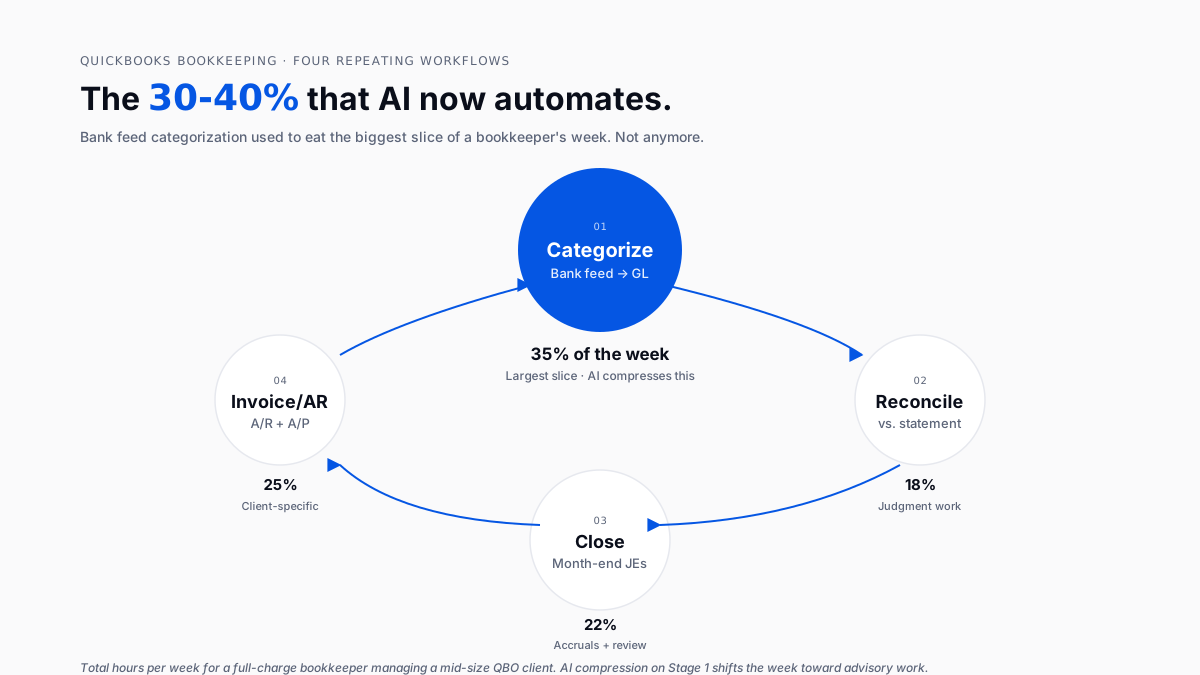
- Four workflows eat the week: bank feed categorization (30-40%), reconciliation (15-20%), invoicing + A/R (10-15%), month-end close (20-25%).
- Bank feed categorization is the biggest hours-consumer and the one AI compresses fastest 60-80% time reduction is realistic with a trained AI layer.
- A well-run month-end close hits 5 working days. A great one hits 2. The gap is almost entirely automation.
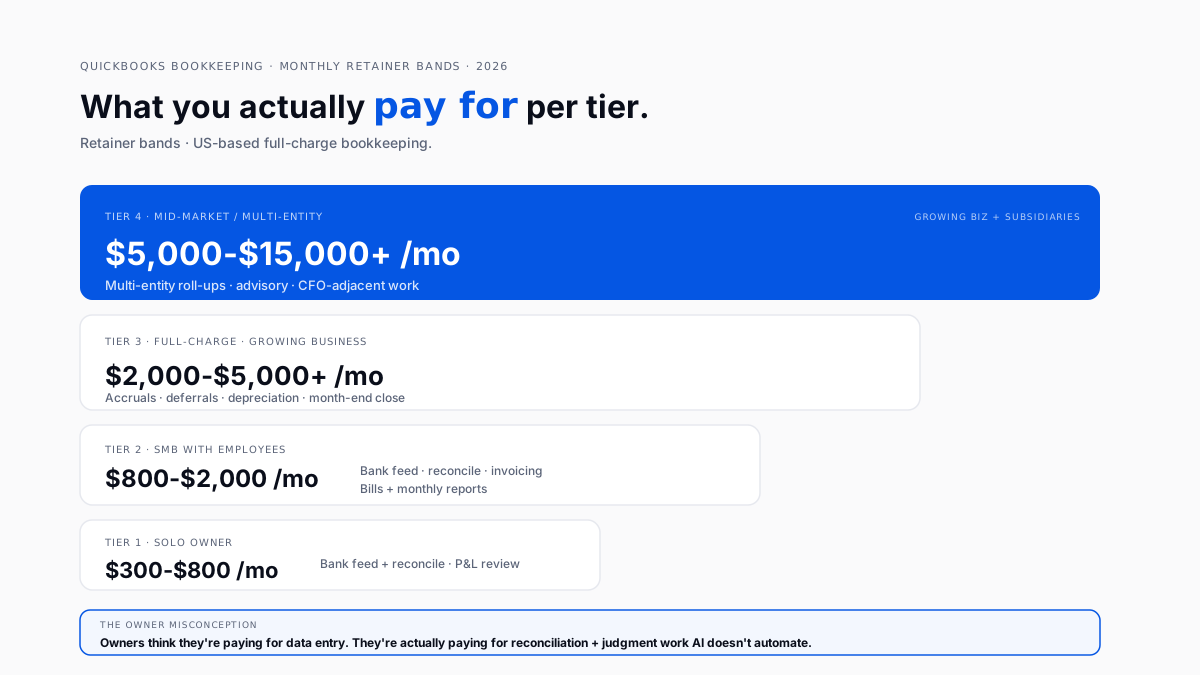
- Monthly retainer pricing: $300-$800 for a solo business, $800-$2,000 for a small business with employees, $2,000-$5,000+ for full-charge work.
- QBCU certification is Intuit's baseline credential. Not legally required in the US, but gets a junior bookkeeper productive fast.
- Firms managing 30+ client files typically add an AI categorization layer rather than switching ledgers.
What is QuickBooks bookkeeping?
QuickBooks bookkeeping is the day-to-day work of maintaining a business's books inside QBO (or, less often now, QuickBooks Desktop). The label covers everything from raw data entry through full-charge bookkeeping with accruals and close journals.
Firms usually split it internally by client size. Solo owners on Simple Start get lighter service (categorization + reconciliation). Growing businesses on Plus get full-charge treatment (add accruals, deferrals, depreciation, intercompany allocations).
A discussion on r/Accounting about whether the QuickBooks Bookkeeping certification is worth it captured how practitioners actually use the credential: the certificate itself doesn't win clients, but the training gets a junior productive fast, and firms use it as a hiring filter.
What does a QuickBooks bookkeeper do every day?
Four workflows on repeat. Rough hour share for a full-charge bookkeeper on a mid-size client:
Categorization is the biggest slice. It's also the workflow that AI compresses fastest. That's the seam behind Finlens as the AI layer on top of QuickBooks.
How does bank feed categorization work in QuickBooks?
Bank feeds pull transactions from linked accounts into QBO's Banking screen. Someone accepts each transaction into the right account, class, and location. The tight sequence:
- Log into QBOA, click into a client
- Open the Banking screen
- Review each transaction against the account it should hit
- Apply class and location per the client's chart
- Add a memo where the vendor name is unclear
- Accept
- Repeat weekly for smaller clients, daily for larger ones
Intuit Assist suggests categories now. Accuracy is fair on frequent vendors (Amazon, Uber, subscriptions) and poor on ambiguous ones (owner draws, split personal-business meals, mixed capital-and-operating expenses). Firms handling many client books review every one anyway.
A trained AI layer changes this math. It learns the specific chart, the vendor-to-account patterns, and the class rules for a given client. Review-pass time shrinks 60-80%. The bookkeeper's role shifts from "categorize everything" to "review the flagged ambiguities."
How does bank reconciliation work in QBO?
Same UI to a new user as a veteran. Discipline is what changes. Veteran order:
- Check beginning balance. QBO's opening balance vs. the statement. If they don't match, stop and figure out why usually the last reconciliation was closed with an out-of-balance adjustment.
- Mark cleared from the statement. Work statement → QBO, not the other way around.
- Investigate 30+ day uncleared items. Duplicate, wrong account, or bank feed miss.
- Close only when the difference is zero. No "small adjustment to move on."
The mistake pattern that fills up cleanup work is closing reconciliations with a small adjustment. Six months later that adjustment is impossible to unwind. See the accounting cleanup pattern for QuickBooks.
How does month-end close work in QuickBooks?
A well-run close hits 5 working days. A great one hits 2. The gap is almost entirely how much of the pre-review work is automated.
Mechanical entries at close:
- Revenue accruals for services delivered but not yet invoiced
- Deferrals for revenue collected but not yet earned
- Prepaid expense amortization
- Depreciation
- Intercompany allocations (multi-entity clients)
All rules-based. All belong in automation. Firms that compress from 10 days to 2 do it by automating everything before the review pass. Human hours land on judgment work instead of data entry. See QuickBooks month-end close automation.
How much does QuickBooks bookkeeping cost per month?
Monthly retainer ranges for a client-facing service:
Full breakdown in the bookkeeping services fees landscape.
Small business owners on r/smallbusiness asking about cheaper alternatives to QuickBooks usually assume bookkeeping is data entry a cheaper tool can eliminate. What they're actually paying for is the reconciliation and judgment work no cheaper tool automates.
How do you set up a new QuickBooks client file the right way?
Most bookkeeping messes trace back to a bad file setup. Three tasks matter, in order:
1. Build a proper chart of accounts.
QBO offers industry-default charts, but the defaults are always too shallow for a real bookkeeper. Firms build a template per industry, import into every new client, and refine it. See chart of accounts patterns for QuickBooks.
2. Turn on class and location tracking from day one.
Available on Plus and Advanced. What lets you slice the P&L by service line, location, or job? Skip it in month one; live with regret in month twelve. Retrofitting class tracking onto twelve months of history is one of the least fun tasks in bookkeeping.
3. Get opening balances right.
The most commonly botched setup task. Beginning balances must tie to the client's prior books or tax return. Wrong opening balances make every subsequent reconciliation wrong.
How does QuickBooks bookkeeping change at firm scale?
The mechanics change materially between one bookkeeper handling 5 clients and a firm handling 50.
Solo bookkeeper (1-10 clients). Client-by-client. Log into QBOA, work the queue, and log out. Time billed hourly or fixed retainer. Tools: QBO + Google Drive.
Small firm (5-20 bookkeepers, 30-100 client files). Workflow standardizes. Firms build a chart template, monthly checklist, and review pass. Add:
- Workflow tool (Karbon, Financial Cents, or Keeper)
- Client-communication tool
- Receipt-capture app for expense clients
This is where firms hit the ceiling of manual QBO work and where ROI on an AI layer becomes measurable in weeks.
Mid-market firm (20+ bookkeepers, 100+ files). QBO alone stops being enough. Firms either:
- Invest in an AI categorization layer (fastest ROI)
- Specialize in a vertical (single-industry books look almost identical)
- Raise prices and stop taking bookkeeping-only work
Firms in this position often reach the point where they've outpaced standalone QuickBooks.
A discussion on r/Bookkeeping asking what alternatives to QBO actually are captured the practical answer: Switching platforms is almost never the answer. Client-side switching costs eat the theoretical benefit. Adding automation on top is what actually works.
What are the 5 most common mistakes in QuickBooks bookkeeping?
- Undeposited funds abuse: Owners hit "Receive Payment" without a matching bank deposit, and the Undeposited Funds account balloons into a phantom asset. Cleaning it can take a week for a year of history.
- Duplicate income from Stripe or Square: The integration records gross, and the bank feed records net. Unless the fee split is coded correctly, income doubles. See QBO Stripe reconciliation mistake patterns.
- Wrong opening balances: Inherit a file mid-year with untied opening balances, and no amount of good current-period work will produce reports that tie to the prior year.
- Class and location skipped on setup: The P&L can't be sliced later without retrofitting twelve months of history.
- Personal-and-business expense mixing: The owner draws personal meals and mixed vehicles in the business account. Reclassified at close by hand or by a trained AI layer.
Do you need to be certified to do QuickBooks bookkeeping?
No certification is legally required in the US. But firms use certification as a hiring filter and directory inbound:
- QuickBooks Bookkeeping Certified User (QBCU): Intuit's baseline. Demonstrates mechanical competence.
- QuickBooks ProAdvisor: free base level, paid advanced level. Firms appear in Intuit's Find-a-ProAdvisor directory.
Neither substitutes for actual accounting knowledge. Bookkeepers who don't understand the underlying accounting struggle the moment QBO shows something the AI can't explain. See the enrolledenrolled agent vs. CPA path for tax-side credentials.
Can AI replace QuickBooks bookkeeping?
No but it replaces most of the categorization time. Reconciliation, review, judgment on complex entries, and client communication still live with humans.
The ratio shifts. Bookkeepers who used to spend 40% of the week on categorization spend 10%. Freed hours move to advisory work. This is why firms measuring before and after typically see 40-60% of bank feed categorization move off human hands within a month of implementing a proper AI layer.
Conclusion
QuickBooks bookkeeping in 2026 is a different job than it was five years ago, even if the ledger looks identical. The mechanics haven't changed. The ratio of time spent on data entry vs. judgment has. Firms still doing bookkeeping by hand pay twice once in bookkeeper hours, once in the ceiling those hours placed on client count. Firms with an automation layer on top of QBO have raised the ceiling. That's the delta.
FAQ
What does a QuickBooks bookkeeper actually do?
Categorizes bank feed transactions, reconciles accounts monthly, cuts and manages invoices, enters bills, produces month-end reports, and communicates with the owner or their CPA. Mid-size clients also require accruals, deferred revenue, and depreciation entries at close.
How much does QuickBooks bookkeeping cost per month?
$300-$800 for a solo business, $800-$2,000 for a small business with employees, and $2,000-$5,000+ for full-charge work at growing firms. Multi-entity mid-market pricing runs $5,000-$15,000+ monthly. See the bookkeeping services fees breakdown.
Is QuickBooks Online good for bookkeepers?
Mixed sentiment. A discussion on r/Bookkeeping asking about QBO alternatives captured the honest answer: QBO has genuine gaps but ecosystem depth and integration count keep it the practical default. Most firms make it work by adding automation on top.
Do I need to be certified to do QuickBooks bookkeeping?
No, not legally required in the US. Intuit's QBCU and ProAdvisor certifications add credibility but don't substitute for accounting knowledge.
Can AI replace QuickBooks bookkeeping?
No. AI replaces most of the categorization time. Reconciliation, review, judgment, and client communication still require humans. Categorization time drops 60-80% with a trained AI layer.
What's the difference between QuickBooks Online and QBOA?
QBO is the client-facing product. QBOA (QuickBooks Online Accountant) is Intuit's free front-end for practitioners. Firm access doesn't count against a client's paid user seats.
How do I clean up a messy QuickBooks file?
Order: reconciliation surface first (every bank and credit card account reconciles to last statement), then chart of accounts (catch mis-categorizations), then rebuild broken opening balances. See the accounting cleanup pattern for QuickBooks files.
Should my firm move off QuickBooks?
For most firms, no. Switching cost is high; the receiving-platform learning curve is real. The move that actually changes firm economics is adding automation on top of QBO. See the automation-first pattern for CPA firms.

