
QuickBooks for Bookkeepers: A Practitioner Walkthrough (2026)


Bookkeepers use QuickBooks because their clients use QuickBooks. Intuit has held ~80% of the US small business accounting software market for over a decade, so almost any client a working bookkeeper takes on already sits inside QBO or wants to. Learning QuickBooks well isn't a preference for a professional bookkeeper; it's a job requirement.
Key takeaways
- QuickBooks Online Accountant (QBOA) is Intuit's free practitioner front-end and the single most important tool for a bookkeeper working across many client files.
- ~80% US market share is the reason bookkeepers can't avoid QuickBooks. Client familiarity is the moat.
- ProAdvisor certification is free at the base level and paid at Advanced. Commercial value is directory inbound and client credibility.
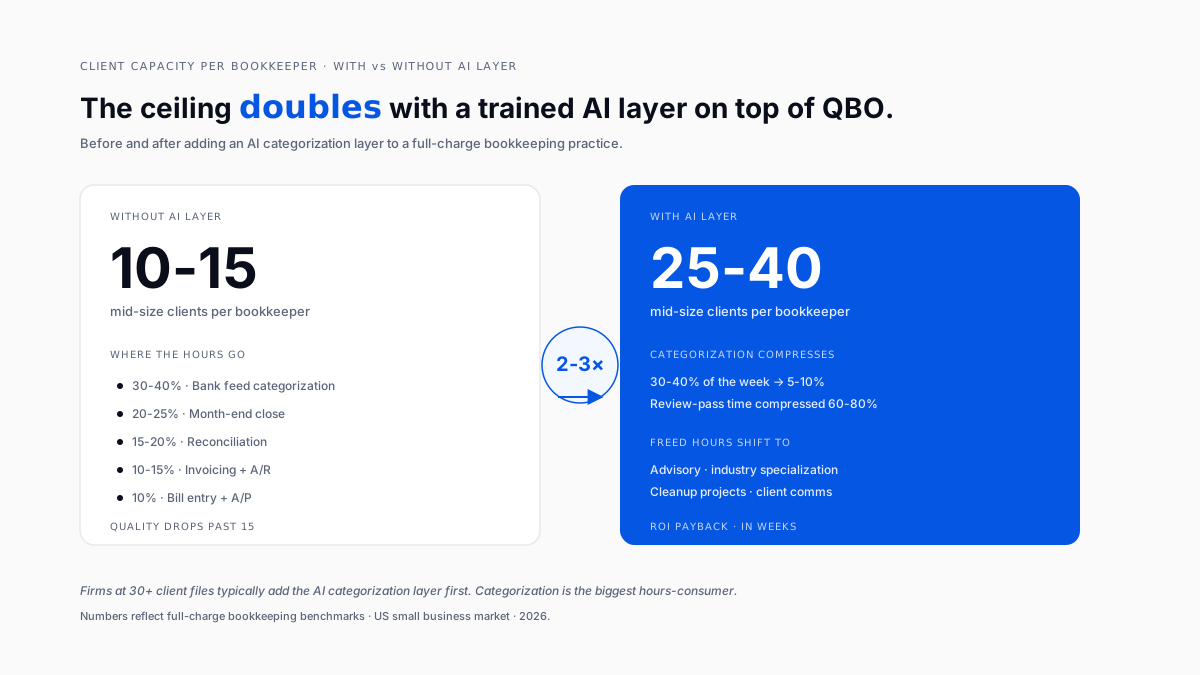
- Categorization eats 30-40% of a bookkeeper's week. AI compresses it to 10% or less at firm scale.
- Client capacity ceiling: 10-15 mid-size clients without automation, 25-40 with a trained AI categorization layer.
- Reconcile discipline matters more than the tool. The rookie mistake is closing with a small adjustment "to move on."
Why do bookkeepers use QuickBooks?
Because their clients do. Intuit's ~80% US small business accounting share means the client-side familiarity is what a bookkeeper is being hired against. Learning QuickBooks well is the entry credential for a working bookkeeper in the US.
A discussion on r/Accounting about the best way to learn QuickBooks captured the entry path: ProAdvisor certification is the fastest structured way in, but real fluency comes from working several client files across different industries. Certification gets you employable. Reps make you good.
The complaint side is real:
- Reporting flexibility is limited outside Advanced
- Categorization AI drifts
- Multi-entity work requires workarounds
- Renewal pricing keeps drifting up
The practical response in 2026 has become adding automation on top of QBO rather than switching platforms.
What is QuickBooks Online Accountant (QBOA)?
QBOA is Intuit's free front-end for practitioners. Firms don't pay for QBOA the way clients pay for QBO subscriptions. It's the tool a professional bookkeeper actually logs into every day.
Three capabilities client-side QBO doesn't have:
- Client switcher. Jump between client files without logging in and out.
- Accountant toolbox. Reclassify transactions in bulk, write off invoices, batch actions, and trial balance access the way an accountant expects.
- ProAdvisor identity. Firms that certify staff appear in Intuit's Find-a-ProAdvisor directory, a real inbound channel for many bookkeepers.
Workflow implication: a well-run firm has every bookkeeper working from QBOA, not from individual client logins. Client files sit in the firm's QBOA workspace, permissions are managed centrally, and the firm brand shows up in the client's practitioner dropdown.
What is the daily QuickBooks workflow for a bookkeeper?
The bulk of a bookkeeper's time inside QuickBooks is the banking screen. Transactions land there. Someone accepts them into the right account, class, and location. The tight sequence:
- Log into QBOA, pick a client
- Open the Banking screen
- Review each transaction against the account it should hit
- Apply class and location per the client's chart
- Add a memo where the description is unclear
- Accept
- Next client
Weekly for smaller clients. Daily for larger ones.
QBO's built-in Intuit Assist suggests categories. Accuracy is fair on frequent vendors and poor on ambiguous ones (owner draws, split personal-business meals, mixed capital-and-operating expenses).
Bookkeepers on r/Bookkeeping asking about multi-business client setups captured the categorization ceiling: even with AI suggestions, the review pass is what a bookkeeper is paid for.
A trained AI layer learns the client's specific chart, vendor-to-account patterns, and class rules. Review-pass time drops 60-80%. The bookkeeper's role shifts from "categorize everything" to "review the flagged ambiguities." See the AI layer for the QuickBooks pattern.
How do experienced bookkeepers reconcile in QBO?
Same UI, different discipline. Veteran order:
- Check beginning balance. QBO's opening balance vs. the statement. If they don't match, stop and figure out why.
- Mark cleared from the statement. Statement → QBO, not the other way around.
- Investigate uncleared items older than 30 days. Duplicate, wrong account, or bank feed miss.
- Close only when the difference is zero.
The rookie mistake is closing reconciliations with a small adjustment "just to move on." Six months later that adjustment is impossible to unwind. See the accounting cleanup pattern for QuickBooks.
How does month-end close work for a bookkeeper?
Full-charge bookkeepers earn their retainer here. Mechanics stack:
- Accruals for revenue earned but not yet invoiced
- Deferrals for revenue collected but not yet earned
- Prepaid expense amortization
- Depreciation
- Intercompany allocations (multi-entity clients)
- The review pass
A well-run close hits 5 working days. A great one hits 2. The gap is almost entirely about how much pre-review work is automated. Firms doing everything by hand rarely hit 5 days. Firms with proper close automation regularly hit 2. See the pattern for automating month-end close in QBO.
What is a QuickBooks ProAdvisor, and is certification worth it?
A ProAdvisor is a bookkeeper or accountant who has passed Intuit's certification and is listed in the Find-a-ProAdvisor directory. Two flavors:
- Certified ProAdvisor free, requires passing a proctored exam
- Advanced Certified ProAdvisor requires annual renewal, a harder exam, and deeper product knowledge
Is it worth it? For firms that want inbound, yes. The directory generates real inquiries. Firms that don't show up rely on referrals and outbound.
The bookkeeper-familiarity moat matters here too. Owners on r/smallbusiness looking for a QuickBooks Online replacement sometimes want to leave QBO but find the bookkeeper-familiarity moat too deep to swim. That's exactly what the ProAdvisor certification reinforces.
How many clients can one bookkeeper handle in QuickBooks?
Without automation: 10-15 mid-size clients. With a proper AI categorization layer: 25-40, depending on client complexity.
The math changes because categorization is the biggest hours-consumer per client. Compress that from 8 hours/week to 2 hours/week per client, and the capacity per bookkeeper doubles or triples. See the automation-first pattern for CPA firms managing many QuickBooks files.
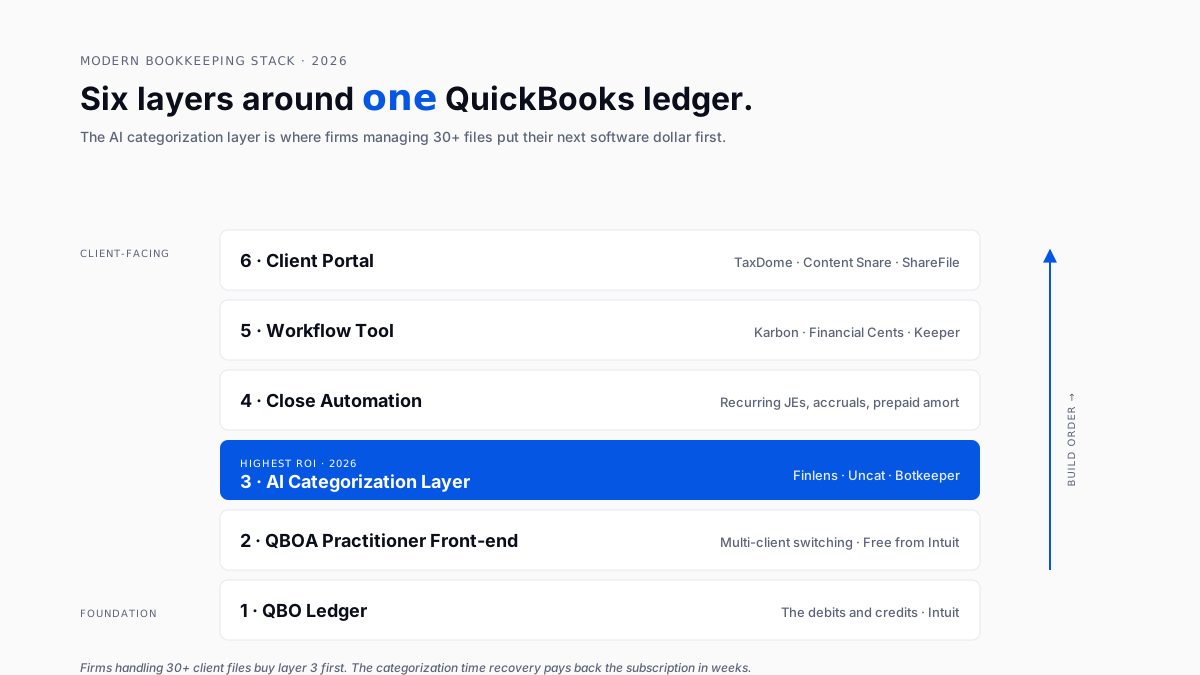
What tools sit around QuickBooks in a modern bookkeeping practice?
The default 2026 stack:
- Ledger: QBO
- Practitioner front-end: QBOA
- Workflow: Karbon, Financial Cents, or Keeper
- Receipt capture: Ramp, Expensify, or Zoho Expense see historical categorization tools on top of QuickBooks
- Client portal: TaxDome, ShareFile, or Content Snare
- AI categorization: Finlens, Uncat, or Botkeeper sits between the bank feed and the ledger
- Close automation: dedicated tool or workflow-tool templates
Which layer to add first? For firms at 30+ client files, the AI categorization layer beats every other choice on ROI. Categorization time is the biggest single-hour consumer; accuracy gains show up in the same month, and clients feel it (books close on time).
When should a bookkeeper recommend against QuickBooks?
Four client profiles where an honest bookkeeper should recommend an alternative:
- Genuinely simple books for a single owner, no employees, minimal transactions → Wave, ZipBooks, or spreadsheets
- Real inventory complexity for manufacturers and multi-warehouse retailers: Xero + dedicated inventory tool, or mid-market ERP
- Multi-entity in one org parent + subsidiaries → NetSuite (past 3 entities, manual QBO roll-ups get painful)
- Non-US with heavy multi-currency and localized tax → Xero often fits better. See the bestbest Xero alternative for AI bookkeeping in 2026
For everything else in US small businesses, QBO wins by default. A practical bookkeeper's job is to make QBO work well, not fight it.
Conclusion
QuickBooks for bookkeepers is a settled category with a moving frontier. The settled part is the ledger, QBOA, and the ProAdvisor path. The moving part is the automation layer bolted on top; that's where the practice-scale economics have shifted decisively in the last two years. Bookkeepers who invest in getting good at QBO plus one strong AI layer are running practices at scales that used to require twice the headcount. The rest are stuck in the manual work QBO's marketing implied would go away years ago and never actually did.
FAQ
How do I become a QuickBooks bookkeeper?
Get comfortable with QBO through hands-on work (dummy files or a first client at a nonprofit or family business), pass Intuit's ProAdvisor certification, and build a portfolio of 3-5 client files before charging market rates. See enrolled agent vs. CPA path for tax-side credentials.
How much do QuickBooks bookkeepers charge?
Retainers run $300-$800/mo for a solo owner, $800-$2,000/mo for a small business with employees, and $2,000-$5,000+/mo for full-charge at growing firms. See the bookkeeping services fees landscape.
What is a QuickBooks ProAdvisor?
A bookkeeper or accountant who passed Intuit's certification and is listed in the Find-a-ProAdvisor directory. Base cert is free. The advanced cert is paid and renewed annually. Commercial value is directory inbound and client-side credibility.
Should I use QuickBooks Online or QuickBooks Desktop?
QBO. Intuit stopped selling new desktop subscriptions to most US customers in mid-2024. New clients almost always land on QBO.
How many clients can one bookkeeper handle?
Without automation: 10-15 mid-size clients before quality drops. With a proper AI categorization layer: 25-40 depending on client complexity. See the automation-first pattern for CPA firms managing many QuickBooks files.
Do I need accounting knowledge to use QuickBooks?
Basic knowledge is enough to start (debits, credits, and chart of accounts). Full-charge bookkeeping requires more especially accruals, deferrals, and closing entries. Bookkeepers who don't understand the underlying accounting struggle the moment QBO shows something the AI can't explain.
Can I do bookkeeping remotely?
Almost all QBO bookkeeping is remote now. QBOA + client portal + workflow tool is enough to run a full practice from anywhere.
What's the biggest bookkeeping mistake in QuickBooks?
Closing reconciliations with unresolved differences. Small adjustments made "to move on" compound into unfixable messes. Second biggest: running a practice past 20 client files without an AI categorization layer, because the hours math stops working.

