
The QuickBooks guide to purchase orders, receiving, and 3-way match (2026)


This is a working reference for founders and controllers who want to stop paying vendor bills that do not agree to what was ordered or received. Every technique is sourced to Intuit's own documentation, FASB standards, or a real thread on the QuickBooks Community. Numbers cited from user reports are flagged as anecdotal rather than benchmarks.
The problem this guide addresses
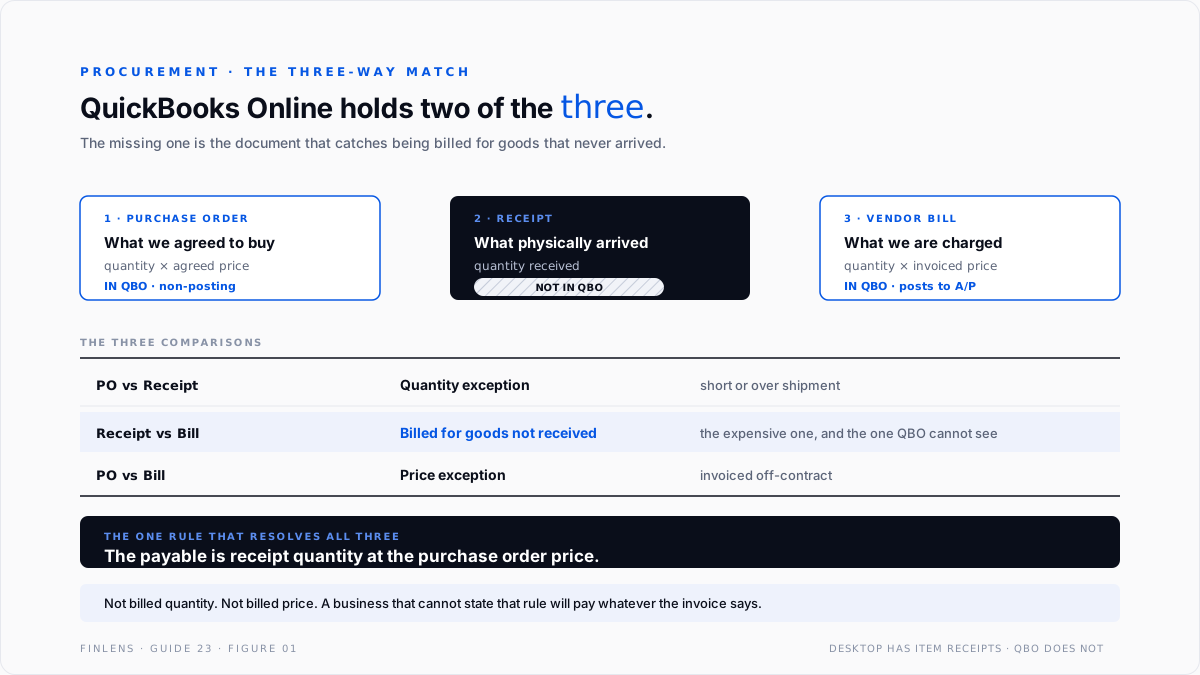
A three-way match compares what was ordered, what arrived, and what was invoiced. QuickBooks Online holds two of those three, and the one it is missing is the one that catches the expensive errors.
Failure mode one: the purchase order that closes itself. A QBO user on thread 92190 published a six-step reproduction. Create a purchase order for $1,000. Go to Bills, select the vendor, and QBO surfaces the open PO and loads the line. Change the bill amount to $750 for a partial delivery. QBO closes the purchase order, with $250 still outstanding.
They reported trying every setting with the same result. It is not a setting.
And the documentation and the behaviour need reconciling carefully here, because both are true.
Intuit's article on adding purchase orders to expenses, bills or checks states that where only part of a purchase order has been received, just those parts can be added to a bill. That is accurate. What it does not say is that the purchase order then closes anyway.
So the precise statement is: you can bill part of a PO. You cannot keep the PO open for the balance. The first is a feature and the second is the gap, and conflating them is why the thread reads as a bug report.
Failure mode two: no receiving document at all. QuickBooks Desktop has item receipts and a Received Partially status. QuickBooks Online has neither. There is no document that records goods arriving independently of a bill, which means the second leg of the match does not exist and the comparison collapses into a two-way match between the order and the invoice.
The three-way match identity
PURCHASE ORDER what we agreed to buy quantity x agreed price
RECEIPT what physically arrived quantity received
VENDOR BILL what we are being charged quantity x invoiced price
MATCH when all three agree.
PO vs Receipt disagree → quantity exception, short or over shipment
Receipt vs Bill disagree → billed for goods not received
PO vs Bill disagree → price exception, invoiced off-contract
The payable is the receipt quantity at the purchase order price. Not the billed quantity, and not the billed price. Every exception resolves to that one rule, and a business that cannot state it will pay whatever the invoice says.
Two further properties matter.
A purchase order is non-posting. It is a commitment, not a transaction, and it changes no account balance. An open PO never explains a margin movement or a balance change, which is covered in the Cost of Goods Sold guide.
Goods received create a liability before the bill arrives. Under accrual accounting the obligation exists at delivery, not at invoicing. The gap between the two is the received-not-billed accrual, and it is the accounting reason the receiving leg matters rather than a procurement nicety.
What QuickBooks actually supports
This table is the honest answer to whether QBO can do three-way match. It cannot. It can do a two-way match between a purchase order and a bill, and even that breaks on partial fulfilment.
The practical consequences are three.
A partial delivery has to be handled outside the PO. Either the bill is entered for the full PO and corrected later, or the PO is closed and a new one raised for the balance. Neither is a match.
Received-not-billed has to be accrued manually. Goods delivered in March and invoiced in April are a March liability. Without an item receipt, nothing in QBO records the arrival, so the accrual comes from the warehouse rather than the ledger. The entry then reverses against the bill, with the mechanics covered in the accounts payable guide.
Desktop is a real consideration here. For a business where procurement control matters, the item receipt is a genuine functional difference rather than a preference, and it belongs in the platform decision covered in the QuickBooks Online versus Desktop guide.
Turning the feature on, and the settings that come with it
Purchase orders are off by default, and three adjacent settings determine whether the match is even attempable.
Purchase orders themselves. Settings, Account and settings, Expenses, then the Purchase orders section. Intuit's guide to creating and sending purchase orders covers the issuing flow.
The items table on expense and purchase forms. Under Bills and expenses. Without it, a purchase order carries only accounts and amounts, not items and quantities, which makes a quantity match impossible. A file that has been raising category-only POs cannot three-way match anything, and turning the setting on does not retrofit the history.
Expenses and items billable, and tracked by customer. Only needed where purchases are rebilled, but they change the form layout, so decide once rather than toggling.
One structural choice sits underneath all three. A purchase order written against an expense account produces a commitment with no item and no quantity. One written against an inventory item produces both.
The second is the only version that supports a match, and it also feeds the inventory valuation described in Intuit's notes on inventory assets and Cost of Goods Sold tracking.
The account structure
Five accounts, and the third is the one most files are missing.
Goods Received Not Invoiced is the account that makes the cutoff work. Without it, a delivery on 29 March with an invoice dated 3 April is simply absent from March, which understates both inventory and liabilities at the balance sheet date.
Purchase Price Variance keeps the exception visible. Absorbing an off-contract price into inventory cost makes it part of the margin and invisible as a vendor problem. Posting it to variance makes it a number somebody can take to the supplier.
The count-difference side is a different account and a different investigation, covered in the inventory adjustments guide.
Running the match without the receiving document
Four steps that work inside QBO's constraints rather than against them.
Step one, record receipt outside the ledger. A packing-slip log, a spreadsheet, or the warehouse system. It needs date, PO number, item and quantity received. This is the missing document, reconstructed.
Step two, match the bill against the receipt log before entering it. Quantity first, then price. A bill that fails either test does not get entered as presented.
Step three, enter the bill at the correct figures and record the difference. Quantity to the receipt log, price to the PO. Any difference between that and the invoice is either a short-pay, a credit requested, or a posted variance.
Step four, accrue goods received and not invoiced at each close. The receipt log minus bills entered, valued at PO price, is the accrual.
The order of those steps is the control. Entering the bill first and investigating afterwards means the payable is already wrong, the approval has already happened, and the correction competes with the next close for attention.
The failure-mode catalog
Six diagnoses cover most procurement work.
1. The PO closed on partial billing. Symptom: an open commitment disappears after a part-delivery is invoiced. Cause: QBO's documented behaviour, not a setting. Fix: track the balance outside, or reopen the PO. Changing its status back to open restores the items as billable. This is thread 92190.
2. Goods received and never invoiced. Symptom: inventory on the shelf that is not on the balance sheet, or a vendor chasing payment for something with no bill. Cause: no receipt document exists, so nothing prompts the accrual. Fix: the receipt log and a period-end accrual.
3. Billed for goods never received. Symptom: inventory per the ledger exceeding the physical count. Cause: the bill was entered against the PO without checking the receipt. Fix: this is the single most valuable control in the whole workflow, and it only works if the receipt log exists.
4. Price creep absorbed into inventory. Symptom: average cost drifting upward with no purchasing decision behind it. Cause: invoiced prices above the PO accepted silently. Fix: post the difference to Purchase Price Variance so it is visible, and take it to the vendor.
5. A closed PO that should be open. Symptom: a vendor's remaining delivery cannot be billed against anything. Cause: the PO was closed manually or automatically, which closes all its lines. Fix: set the status back to open.
6. Duplicate billing against one PO. Symptom: paying twice for one delivery. Cause: a PO billed once, then the vendor sends a second invoice for the same goods and nothing links them. Fix: the receipt log is the control, because quantity received is the cap on quantity payable.
Worked example
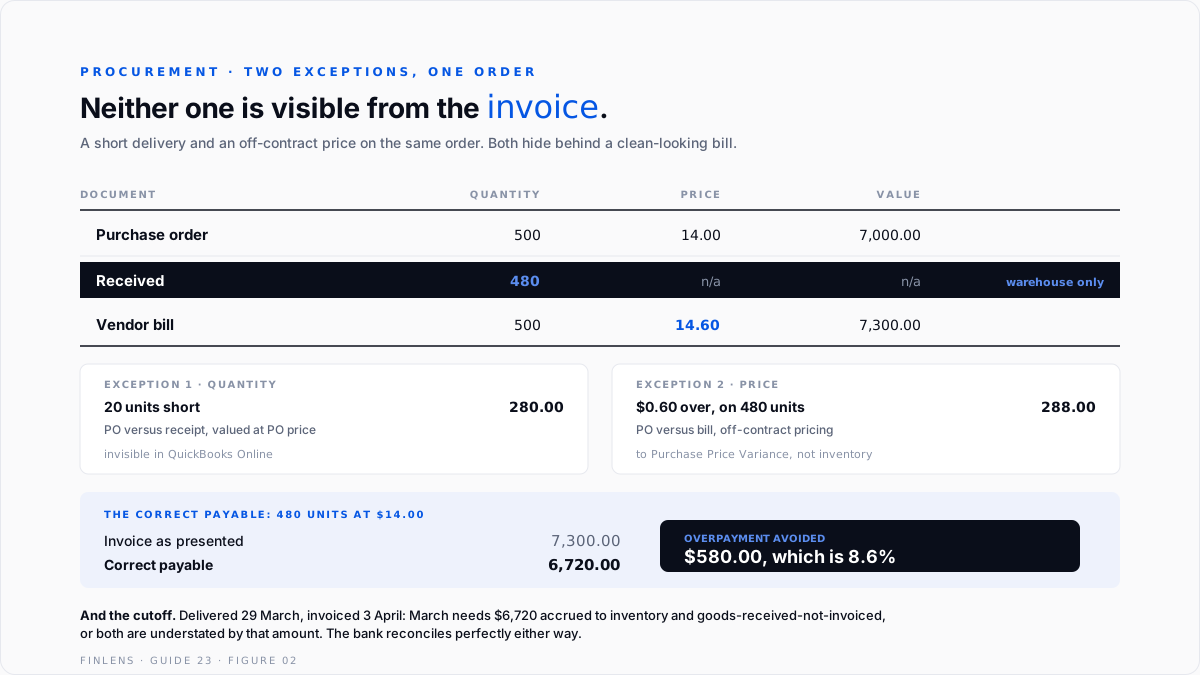
A purchase order for 500 units at $14.00, total $7,000. The delivery arrives with 480 units. The vendor's invoice shows 500 units at $14.60, total $7,300.
Two exceptions, not one.
The correct payable is 480 units at $14.00, which is $6,720.00.
That is 8.6% of the correct payable on a single order. Neither exception is visible from the invoice alone, and neither is visible in QuickBooks Online, because the receipt quantity exists only in the warehouse.
The cutoff consequence. If the goods arrived on 29 March and the invoice is dated 3 April, March needs an accrual of $6,720 to Inventory Asset and Goods Received Not Invoiced. Without it, March inventory and March liabilities are both understated by $6,720, and the bank reconciles perfectly either way.
Where in-QBO procurement stops scaling
Threshold one: any partial delivery. Not a volume threshold. The first part-shipment breaks the PO workflow, as thread 92190 documents.
Threshold two: approval workflows. Multi-step approval before a PO is issued, and before a bill is paid, is not a QBO capability on the base tiers. Workflow automation appears on Advanced, covered in the QuickBooks Online Advanced deep-dive.
Threshold three: landed cost. Freight, duty and brokerage arriving on separate invoices days later have to be allocated across the units in the shipment, and nothing in QBO performs that allocation.
Threshold four: vendor contract pricing. A match on price assumes an agreed price exists somewhere QuickBooks can see. Where pricing lives in a contract or a rate card rather than on the purchase order, the price leg of the match is only as good as whoever typed the PO.
Threshold five: blanket and standing orders. A single agreed price drawn against over many months is a commitment QBO cannot represent, since a PO is a single document consumed by a single bill.
The Finlens approach
Finlens reads the purchase, bill and inventory data in QuickBooks and reconstructs the match the product cannot perform.
1. Order-to-bill exception detection. Every bill is compared against its purchase order on both quantity and price, and any difference is raised with the value attached before the bill is approved rather than after it is paid.
2. Received-not-invoiced tracking. Receipt data, from the warehouse system or an uploaded log, is held against bills entered so the period-end accrual is a number rather than an estimate, and so goods billed but never received are flagged.
3. Purchase price variance surfacing. Invoiced prices above the agreed PO price are separated from inventory cost and reported by vendor and by item, which turns silent margin erosion into a supplier conversation.
Four supporting capabilities sit around those three.
- Open commitment tracking, holding the remaining balance on a PO that QuickBooks has closed on partial billing.
- Duplicate bill detection against the same purchase order and the same delivery.
- Cutoff testing at period end, comparing receipt dates to bill dates around the boundary.
- A cross-file view for firms, ranking clients by the value of bills paid without a matching receipt.
Verification checklist
Eight lines to run before any vendor bill is approved, and at each close.
- The bill quantity does not exceed the quantity actually received.
- The bill price agrees to the purchase order price, or the difference is posted to variance.
- The payable equals receipt quantity at PO price, not billed quantity at billed price.
- Purchase orders closed by partial billing are tracked for their remaining balance.
- Goods received and not invoiced at the period end are accrued at PO price.
- The accrual reverses against the bill in the following period, with no duplication.
- No purchase order has been billed twice for the same delivery.
- Purchase Price Variance has been reviewed by vendor, not merely absorbed.
.svg)
FAQ
Can QuickBooks Online do a three-way match?
No. It has no item receipt document, so the receiving leg does not exist. It can do a two-way match between a purchase order and a bill, and that breaks on partial fulfilment.
Why does my PO close when I bill part of it?
Because QBO closes the purchase order when a bill is created against it, regardless of the amount. Selecting partial PO lines for a bill is not supported, and adjusting the bill amount is what triggers the close.
Can a closed purchase order be reopened?
Yes. Changing its status back to open restores the lines as billable. Closing a PO closes all its items, which is why a mistaken close removes everything.
Does a purchase order affect the financial statements?
No. It is non-posting. Nothing changes until goods are received or a bill is entered, which is why an open PO never explains a balance movement.
What is the correct amount to pay on a mismatched invoice?
Quantity received at the purchase order price. Not the billed quantity and not the billed price.
How do I handle goods received before the invoice arrives?
Accrue them at period end to inventory and a goods-received-not-invoiced liability, then reverse against the bill when it is entered.

