
The Audit Log in QuickBooks: What It Proves, and the Two-Year Line


The audit log answers one question well: who did what, and when.
It cannot restore anything. It will not tell you why. And past roughly two years, it stops telling you at all.
Those three limits decide how a forensic review actually goes. This guide covers how to read the log when something is wrong, the date filter that makes entries look like they vanished, what user roles QuickBooks will and will not enforce, and why the control you need is almost always upstream of the log rather than inside it.
What the reports cluster already covers
This guide is about who touched the numbers, not what the numbers say.
Month-end and year-end close covers the close date and the period lock. Bank reconciliation covers proving the balance. Profit and loss customization covers the segment views a reviewer reads.
Deleted is deleted
Start with the hard fact, because everything else follows from it.
Once a transaction is deleted in QuickBooks Online, it cannot be restored. The audit log records enough detail to re-enter it manually, which is a different thing entirely. Intuit's own article on the subject, L8RHvqYB4_US_en_US, is titled for exactly this: using the audit log to re-enter deleted transactions.
A user posting as leann9 lived through it in How do I add back a reconciled deleted item, 15 replies and 659 views, after accidentally deleting a reconciled transaction.
The accepted path has three steps. Find the details in the audit log. Re-enter the transaction with its original date. Then, in the account register, click the checkmark column repeatedly until it reads R for reconciled, and save. Done correctly, the total discrepancy difference returns to $0.00 and the beginning balance agrees to the statement again.
Note what that process depends on. The audit log still holding the record.
The two-year line
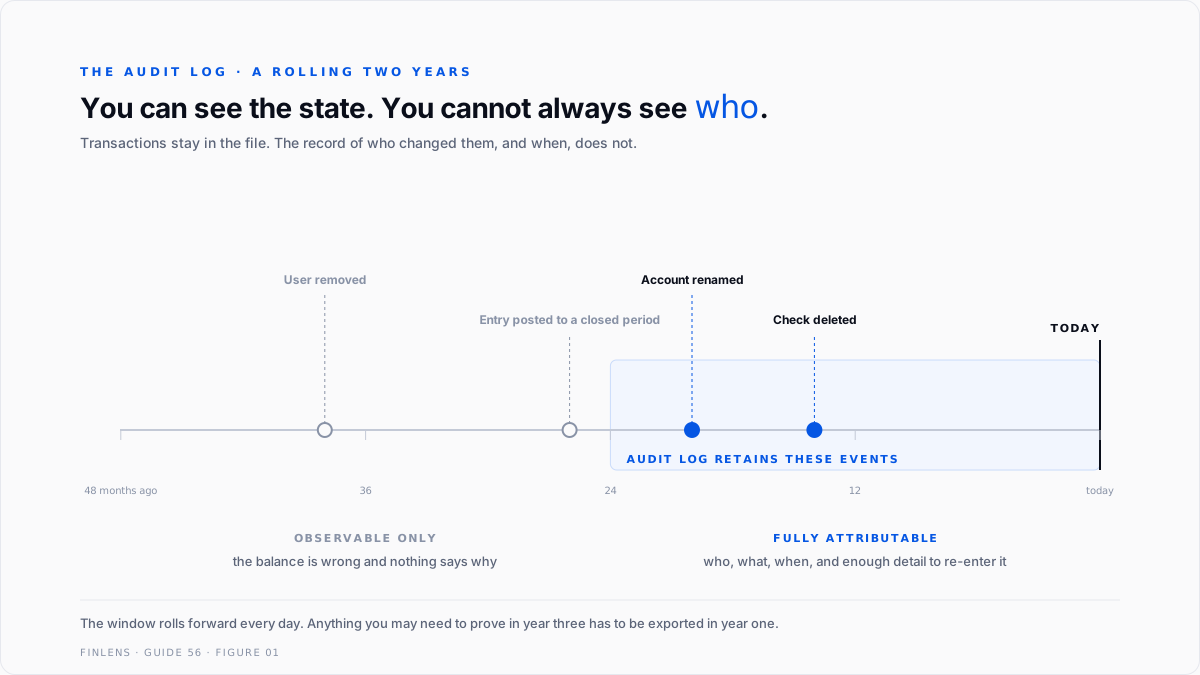
The best answer in that same thread states it plainly: everything you need to rebuild the transaction is in the audit log, which keeps events for two years.
Intuit's help content says the same thing from the other direction. If the deletion is older than the two-year window, it may no longer appear.
Work out what that means for a real review. A discrepancy found during a 2026 audit of the 2023 books is outside the window. The transactions are still in the file if they were never deleted, but the record of who changed them is gone. You can see the state. You cannot see the history that produced it.
This is the argument for exporting the audit log on a schedule rather than treating it as permanent infrastructure. Anything you might need to prove in year three has to be captured in year one.
One more boundary: the audit log only covers transactions that were saved. Work abandoned before saving leaves no trace, which is correct behaviour and occasionally disappointing.
The filter that hides everything
This one costs people whole investigations.
A user posting as Big-Al opened Missing from Audit Report????, 4 replies and 106 views, while investigating suspected fraud. Entries that appeared in an Undeposited Funds report for January 2022 were absent from the audit report. Separately, entries dated 5 May showed up inside a report filtered to 1 to 30 April.
Both symptoms have one cause, given by BigRedConsulting. The audit report's date range filters on entered or modified dates, not on the transaction's accounting or posting date. In their words, the dates at the top "filter the report to include transactions that were entered or edited in the selected date range instead of the transactions' accounting/posting dates."
So a January transaction edited in May is invisible in a January filter and present in a May one. To a reviewer who assumes posting dates, entries appear and disappear for no reason.
The fix is to replace the Entered/Modified filter with the standard Date filter when you want accounting dates. The deeper point is that both views are useful and they answer different questions. Entered/modified answers "what did someone do in this window." Posting date answers "what happened to this period." A forensic review needs both, run separately, and compared.
In QuickBooks Online the equivalent discipline is to filter the audit log by User, set Date Changed, and set Events to Deleted/Voided transactions, then open View in the History column for the full detail. Intuit's own tip is to use the browser's find function for the word "deleted."
What roles QuickBooks will actually enforce
Here is where expectations and the product diverge most.
There is no read-only user. A user posting as Melissa146 asked for one in adding a read only user, 7 replies and 561 views, which is a lot of views for a question with a one-word answer.
Intuit moderator ReymondO confirmed it: the option to add a user who can see everything but cannot make entries or change existing ones is unavailable in the program. The nearest substitutes are the Standard limited customers and vendors role, or custom roles on Advanced.
Custom roles are an Advanced feature. Per article L8Ugph7xl_US_en_US, custom roles require QuickBooks Online Advanced. They cover banking, sales, payroll, expenses, reports, budgets and inventory, with actions including view only, create, edit, delete, approve and all access, plus data restrictions such as limiting sales data by location.
Two caveats inside that, both documented. Granular view, create, edit and delete permissions are available only for selected areas, not everywhere. And all user roles have full access to custom reports and management reports, so report access cannot be restricted at all.
Read that last one against a payroll file. If someone can reach a report, they can reach what the report contains.
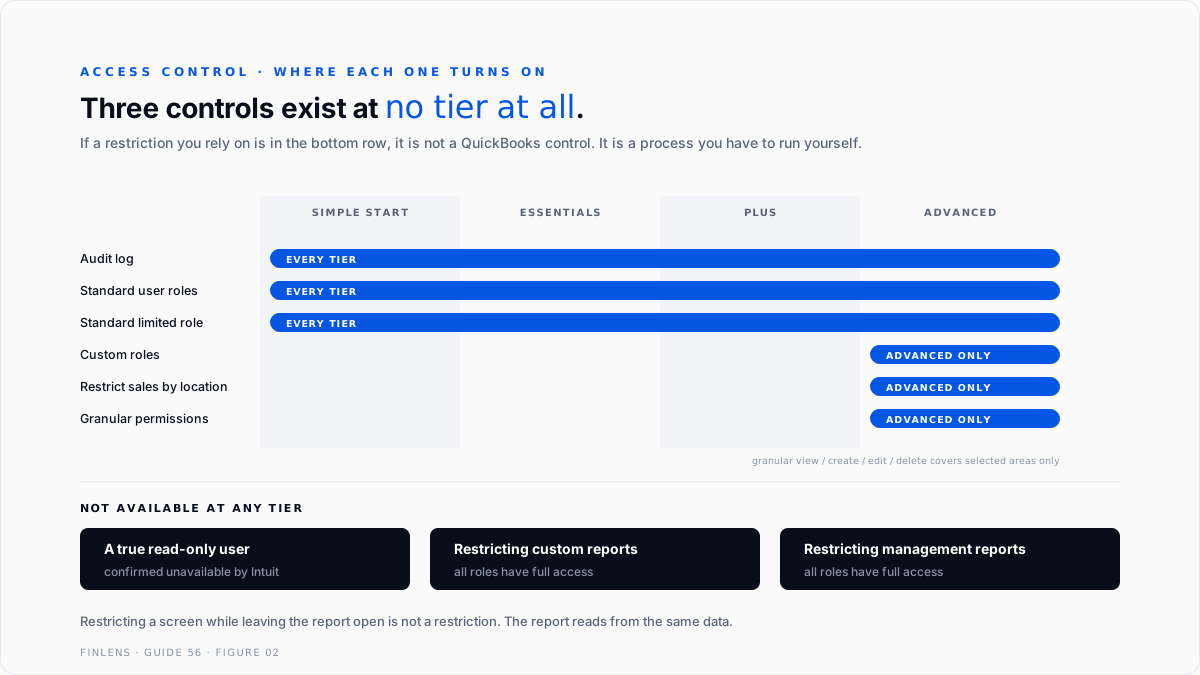
The tier question is covered in the QuickBooks Online Advanced tier deep dive, and the Desktop equivalent in the QuickBooks Enterprise complete guide.
Configuration is data, and data breaks
A user posting as sf4915 found this out in Lost Memorized and Favorite Reports after Desktop Update, 6 replies and 52 views, when memorized reports stopped running after a Desktop Enterprise update.
The trail ran through re-sorting the list, Rebuild Data and Verify Data, surfaced unfixed errors, and ended at the QuickBooks Tool Hub without resolution, from November 2024 to January 2025.
The relevance here is that your controls live in the same file as your transactions. Roles, permissions, close dates and saved report configurations are all data. A file problem is a controls problem.
Worked example: a $4,280 difference, found 14 months later
March reconciliation will not start cleanly. The statement beginning balance is $62,450.00. QuickBooks shows $66,730.00.
The difference is $4,280.00, and it is a round single number rather than an accumulation of small ones. That shape matters. A drift of a few dollars across many lines is a categorisation problem. One clean figure is usually one transaction.
Work the direction first. QuickBooks is higher than the bank. A missing deposit would make QuickBooks lower. A missing payment makes it higher, because the outflow is no longer recorded. So you are looking for a payment of exactly $4,280.00 that the bank cleared and the file no longer contains.
Then the log. Filter the audit log to Deleted/Voided transactions, widen the date range well past the period, and search the page for "deleted." The event gives you the user and the timestamp. Opening View in the History column gives the rest: date, amount, account and payee.
Say it returns a check to a subcontractor, dated 18 January of the prior year, for $4,280.00, deleted 14 months ago by a user who no longer works there.
The repair. Re-enter the check with its original date and details. In the register, click the checkmark column until it shows R. Re-run the reconciliation. QuickBooks beginning balance of $66,730.00 less the restored $4,280.00 is $62,450.00, which agrees to the statement, and the total discrepancy difference reads $0.00.
Now move the deletion back twelve months. At 26 months the audit log no longer holds the event. The $4,280.00 difference is still there and still real, but there is no record of the payee, no record of the date, and no record of who removed it. You can post a correcting entry. You cannot say what it corrects.
That is the two-year line, priced.
Reading a single log entry
A log entry answers four questions and refuses a fifth.
Who is the user account, which is only as useful as your login hygiene. Shared credentials turn every entry into "someone." This is the cheapest control in the entire guide and the most commonly skipped.
What is the event type, and the History view carries the transaction detail behind it: date, amount, account and payee. That detail is what makes re-entry possible rather than theoretical.
When is the timestamp of the change, which is not the transaction date. Keeping those two straight is the whole skill, and it is the same distinction that produces the filter problem above.
Which record is the transaction the event attaches to, where one still exists.
The fifth question is why, and nothing in the log will tell you. A deletion by a bookkeeper correcting a duplicate and a deletion concealing a payment look identical in the record. The log establishes that something happened and who did it. Intent is established by asking people, in order, after you have exported the evidence.
Running an actual forensic review
Six steps, in this order, because each one narrows the next.
One, fix the window. Decide the period under review by posting date, and separately decide the period of activity you care about by entered or modified date. They are different windows and you will need both.
Two, export before you investigate. Pull the audit log for the full available range and save it outside QuickBooks. Everything after this point is easier when the evidence cannot change underneath you.
Three, isolate the event types. Deleted and voided transactions first. These are the only events where the thing itself is gone and the log is the sole record.
Four, check the close date. Entries posted into a closed period are a different category of finding from entries posted into an open one. The close-date control is covered in the month-end and year-end close guide.
Five, reconcile the period independently. The log tells you what changed. The bank tells you what actually happened. A discrepancy between them is the finding. Bank reconciliation is the instrument.
Six, write down what you could not determine. A review that does not state its own blind spots is not a review. If the window closed two years ago, say so.
Six ways audit reviews go wrong
One, assuming deleted means recoverable. It does not. Plan for re-entry, and plan for the reconciliation repair that follows.
Two, filtering on the wrong date. Entered or modified is not posting date. Thread 1153939 exists because that distinction is not obvious from the interface.
Three, treating the log as permanent. Two years. Export on a schedule.
Four, relying on a read-only role that does not exist. If the control matters, it has to be a role restriction on Advanced or a process control outside QuickBooks.
Five, restricting someone from a screen but not from the report. All roles can reach custom and management reports. Restricting the screen while leaving the report open is not a control.
Six, investigating without exporting first. Evidence that can still change is not evidence.
Thresholds: how much control you need
One owner, one login. The audit log is enough. Export it annually.
Two to four users, QuickBooks Online Plus. Use the standard roles, accept that read-only does not exist, and put the close date to work as your real control.
Anyone handling both cash and the books. Separation of duties cannot be achieved with Plus roles alone. Either move to Advanced for custom roles or add an external review step.
Multiple locations or departments. Advanced custom roles can restrict sales data by location. Below that tier, segmentation is reporting only, not access.
A regulated file, a lender, or a dispute in prospect. Export the audit log monthly and store it outside QuickBooks, because the two-year window is shorter than most disputes.
Any suspected fraud. Export first, investigate second, and bring in someone independent before you confront anyone.
How Finlens approaches this
The audit log is a record, not a control. By the time it is useful, the thing it recorded has already happened.
Finlens treats the close date as the primary control and the audit log as the evidence of whether it held. Periods are locked when they close, and entries into closed periods are surfaced as exceptions each month rather than discovered during a review.
The log is exported on a schedule and retained outside QuickBooks, so the two-year window never becomes the limit of what can be proved. Where a role restriction is not available at the client's tier, the gap is documented as a process control with a named owner rather than left as an assumption.
Verification checklist
FAQ
Can I recover a deleted transaction in QuickBooks Online?
No. Deletion is permanent. The audit log holds enough detail to re-enter it manually, and you then have to re-mark it reconciled in the register.
How far back does the QuickBooks Online audit log go?
Roughly two years. Events older than that may no longer appear, which is why exporting on a schedule matters.
Why are transactions missing from my audit report?
Most likely the date filter. The audit report filters on entered or modified dates rather than posting dates, so a January transaction edited in May appears only in a May window.
How do I find out who deleted something?
Filter the audit log by user, set the Date Changed range, set Events to Deleted/Voided transactions, then open View in the History column. Searching the page for the word "deleted" is Intuit's own shortcut.
Can I give someone read-only access?
Not in QuickBooks Online. Intuit has confirmed the option does not exist. The closest options are the Standard limited role or a custom role on Advanced.
Can I stop a user from seeing certain reports?
No. All user roles have full access to custom reports and management reports. Restricting a screen does not restrict the report that reads from it.
Which tier do I need for custom roles?
QuickBooks Online Advanced. Granular view, create, edit and delete permissions are available for selected areas only, not every area.
Does the audit log record everything?
Only saved transactions and events. Work abandoned before saving leaves no record.
Should I export the audit log, and how often?
Yes, and monthly if anything in the file is likely to be disputed later. The two-year window is shorter than most disputes, most audits and most litigation, so the export is the only version that survives long enough to be useful.

