
The QuickBooks error codes reference: company file, install, and payroll (2026)


This is a working reference for firm bookkeepers and controllers decoding QuickBooks Desktop error codes. Every technique is sourced to Intuit's own documentation or a real thread on the QuickBooks Community. Numbers cited from user reports are flagged as anecdotal rather than benchmarks.
Scope note. This guide covers company file, network, installation, licensing, and payroll error families. Bank feed error codes are covered separately and in full in the bank feed troubleshooting guide, which owns 102, 105, 155, 187, 324, 350, and the OL and OLSU families. Those codes are deliberately not repeated here.
The problem this guide addresses
QuickBooks reports faults as numbers, and there is no consolidated index of what those numbers mean. That gap is not a perception. It is documented by users trying to close it.
Failure mode one: the reference that does not exist. A QuickBooks Enterprise Solutions 21.0 user on thread 97141 asked for any link to a description of QuickBooks error codes: what they are and how to fix them.
They noted that software once shipped manuals documenting error codes in detail, and that searching the QuickBooks site, QuickBooks Help, and Google had all failed. They named the specific searches that returned nothing useful: "error codes", "error code list", "Error 165", "Error 292". Forty-two replies and 1,844 views, the highest engagement of any thread in this cluster.
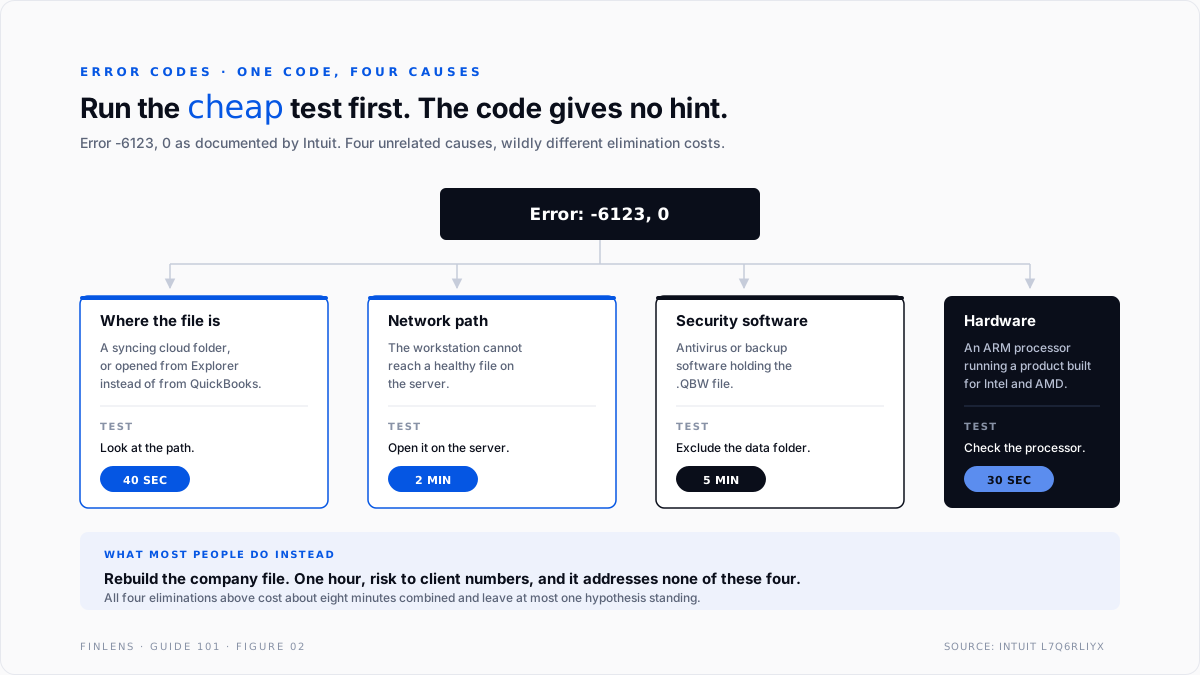
Failure mode two: treating the number as the cause. A code identifies a symptom class, not a root cause. Intuit's own article on error 6123, 0 lists network issues, damaged company files, third-party security software, and, notably, running QuickBooks Desktop on an ARM-based processor when the product targets Intel and AMD.
One code, four unrelated causes. Searching the number and applying the first fix found is how an afternoon disappears.
The code family identity
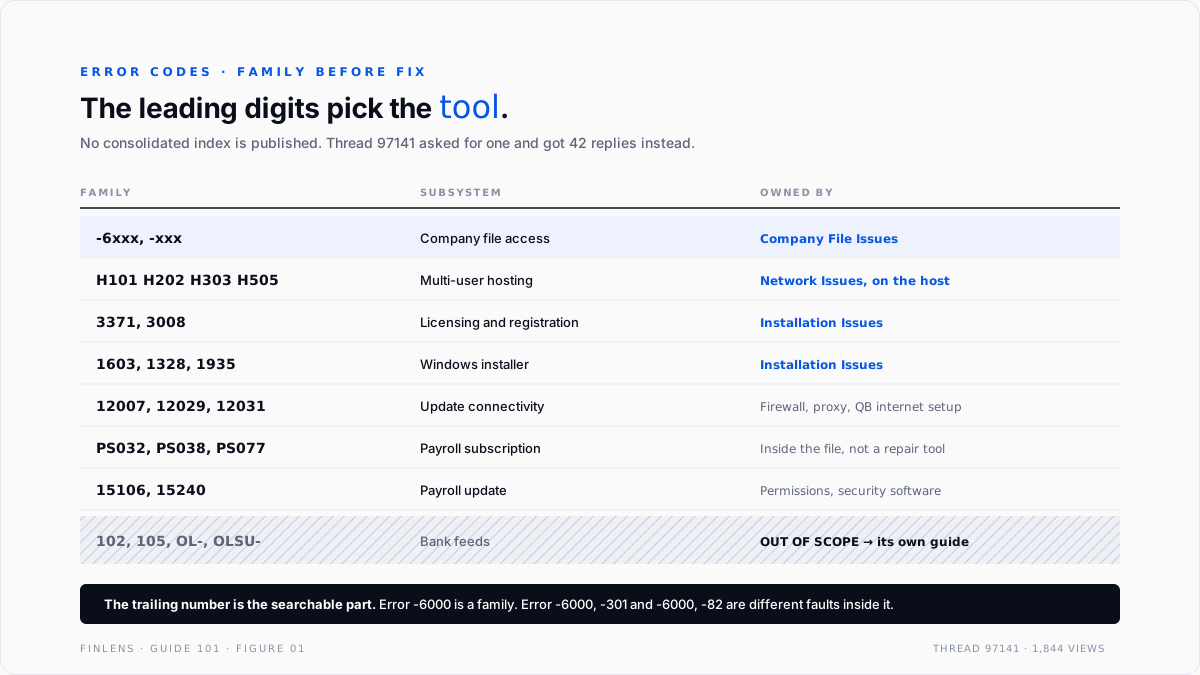
Codes are not random. The leading digits identify the subsystem, and knowing the family narrows the search before any specific code is looked up.
FAMILY RANGE / FORM SUBSYSTEM
6000-series -6xxx, -xxx Company file access
H-series H101 H202 H303 H505 Multi-user hosting
3000-series 3371, 3008 Licensing and registration
1000-series 1603, 1328, 1935 Windows installer
12000-series 12007, 12029, 12031 Update and connectivity
PS-series PS032 PS038 PS077 Payroll subscription and update
15000-series 15106, 15240 Payroll update
Feed codes 102, 105, OL-, OLSU Bank feeds → separate guide
Two rules follow from that structure.
The family selects the tool before the code selects the fix. A 6000-series code routes to the Company File Issues tab. An H-series code routes to Network Issues, run on the host. A 3000 or 1000-series code routes to Installation Issues.
Getting the family right eliminates most of the toolset immediately, and the routing itself is covered in the QuickBooks Tool Hub guide.
A code with a second number carries more information than the first alone. Error -6000 is a family. Error -6000, -301 and error -6000, -82 are different faults inside it. The trailing number is the part worth searching, and the part most often dropped when a user reports the error.
The 6000-series: company file access
The largest family and the one most firms meet. Every member means QuickBooks could not open or properly access the company file.
Two moves resolve most of this family before any tool runs. Open the file from inside QuickBooks rather than by double-clicking the .QBW in Windows Explorer, which Intuit specifically identifies as a cause.
And confirm the file is on a local or properly mapped path rather than a syncing cloud folder, which is a common modern cause of intermittent -6000 codes.
Where those fail, the sequence is Quick Fix my File, then Verify, then File Doctor, then Rebuild, with the discipline covered in the File Doctor guide.
The H-series: multi-user hosting
Four codes, one subject, and the distinction between them is the entire diagnosis.
H505 is the one that is genuinely informative. It says the host is not hosting. Every other member of the family is some flavour of the workstation being unable to complete a connection, which can be the service, the firewall, the .ND descriptor, or DNS.
Run these from the host, never from the workstation showing the code. A workstation cannot test a server's hosting configuration, and the readings it produces when it tries are the contradictory ones documented on the unrecoverable-error thread: hosting reported off when it is on, database service reported absent when it is running.
That specific trap is worked through in the unrecoverable error guide.
Installation, licensing, and update families
3371, status code 11118. QuickBooks could not load the licence data. Usually a damaged EntitlementDataStore.ecml file or missing Windows components. Deleting the entitlement file forces re-registration and is the standard fix.
1603, 1328, 1935. Windows installer faults rather than QuickBooks faults. These sit on the Installation Issues tab and frequently trace to .NET Framework or MSXML, which is the same dependency chain behind many unrecoverable errors.
12007, 12029, 12031. Update connectivity. QuickBooks cannot reach Intuit's servers, typically because of firewall rules, proxy settings, or an incorrect internet connection setup inside QuickBooks itself.
PS032, PS038, PS077. Payroll subscription and update faults. PS038 in particular means a paycheck is stuck in a send state, which is a data condition rather than a connectivity one and is resolved inside the file.
15106, 15240. Payroll update failures, usually permissions or security software blocking the update process rather than a payroll problem.
How to search a code so it returns something useful
The complaint on thread 97141 was that searching the QuickBooks site, QuickBooks Help, and Google for a code returned nothing usable. That is partly a documentation gap and partly a search technique problem, and the second half is fixable.
Search the full code with its punctuation. -6000 -301 and 6000 return different result sets. Intuit's own article titles carry the trailing number, so dropping it hides the article that answers the question.
Add the product edition. Desktop Pro, Premier, Enterprise, and Accountant diverge on several of these families, and Enterprise in particular has hosting behaviour the others do not.
Add the QuickBooks year. Fixes change across releases, and an answer written for a five-year-old version can describe a menu path that no longer exists.
Restrict to Intuit's own domain first. Third-party sites reproduce and mutate Intuit's fixes, often stripping the preconditions that made them safe. Start with the primary source, then use community threads for the cases the article does not cover.
Read the Community thread before the help article for intermittent faults. Help articles describe the documented cause. Community threads describe what people actually found, which is where the syncing-folder and ARM-processor causes surfaced long before they appeared anywhere official.
The underlying reason this works. Codes are indexed by Intuit article, not by family, so the search has to name the exact article's subject. A code plus edition plus year is close enough to an article title to retrieve it. A bare number is not.
The failure-mode catalog
Six diagnoses cover most code-driven work.
1. The trailing number was dropped. Symptom: a search for "error 6000" returning a hundred unrelated fixes. Cause: -6000, -301 and -6000, -82 are different faults. Fix: record the full pair from the dialog.
2. The first fix found was applied. Symptom: a documented fix that changes nothing. Cause: one code, several causes. Fix: eliminate causes in order of cost. For 6123, checking where the file is stored costs seconds; a rebuild costs an hour and carries risk.
3. A bank feed code worked as a file problem. Symptom: File Doctor run against a feed error. Cause: the code was not classified into its family. Fix: feed codes belong entirely to the bank feed troubleshooting guide and no file tool touches them.
4. An H-code diagnosed from the workstation. Symptom: hosting readings that contradict the server. Cause: the test is of the host and was run elsewhere. Fix: work on the host.
5. The file is in a syncing cloud folder. Symptom: intermittent 6000-series codes with no pattern. Cause: the sync client holds or versions the .QBW while QuickBooks has it open. Fix: move the file to a local or properly hosted path. This is a growing cause and appears in no error message.
6. Hardware. Symptom: 6123 that survives every repair, on a newer laptop. Cause: an ARM processor running a product built for Intel and AMD. Fix: there is no software fix. Confirm the processor before spending further time.
Worked example
A firm hits Error: -6123, 0 opening a client file on a workstation. The file is on a server.
The cheap eliminations, in cost order.
One, how was the file opened? From Windows Explorer or from inside QuickBooks. Intuit names the Explorer path as a cause. Cost: ten seconds.
Two, where does the file live? A server share is fine. A synced cloud folder is a known cause. Cost: thirty seconds.
Three, does it open on the server? If yes, this is a network fault wearing a file-error code, and the whole data toolset is eliminated. Cost: two minutes.
Four, what processor is the workstation? If ARM, stop. Cost: thirty seconds.
Five, does the sample company open on this workstation? Separates program from file. Cost: one minute.
What is left after four minutes. If the file opens on the server, the fault is the network path and belongs to File Doctor's network mode run on the host. If it fails everywhere including the sample company, the fault is the installation. If it fails everywhere except the sample company, the file is the candidate and Verify comes next.
The comparison that matters. Those five tests cost roughly four minutes and eliminate three of four cause families. A rebuild costs an hour, carries risk to client numbers, and addresses one family. Running the expensive test first is the single most common error in this entire cluster, and the code itself gives no hint that it is a mistake.
Where a code reference stops helping
Threshold one: the code is generic. "QuickBooks has stopped working" carries no code and no family. It is worked as an unrecoverable error, by scope rather than by lookup.
Threshold two: the code is accurate but the cause is upstream. A 12000-series update failure caused by a corporate proxy is correctly reported and not fixable inside QuickBooks.
Threshold three: the fault is intermittent. A code that appears once a month cannot be bisected by lookup. It is worked by correlating occurrences with events.
Threshold four: the code is a symptom of a retired product. Discontinued QuickBooks Desktop versions stop receiving the server-side services several code families depend on, so update and payroll codes appear on a machine where nothing is broken locally. The version-support boundary is covered in the QuickBooks Enterprise guide.
Threshold five: the numbers are wrong and nothing errors. The most expensive faults in a ledger produce no code at all. A file that opens cleanly and reports the wrong margin is a close problem, and belongs in the month-end and year-end close guide rather than in any error index.
The Finlens approach
Finlens does not decode QuickBooks error codes. It reduces how often one blocks the work that actually matters, which is producing correct numbers on time.
1. Fault-to-impact separation. When QuickBooks throws a code, the first question a controller needs answered is whether client numbers are affected or whether access is merely blocked. Finlens holds the ledger relationships independently, so that question is answerable while the file is still down.
2. Occurrence correlation. Codes are logged with timestamps and correlated against QuickBooks releases, Windows updates, and file-location changes. A code that starts on a date has a cause on that date, and correlation beats lookup for the intermittent class.
3. Environment drift detection. File path changes, a company file appearing inside a syncing folder, or a hosting configuration change are flagged when they happen rather than when they produce an error weeks later.
Four supporting capabilities sit around those three.
- Code-and-context logging per client file, recording the full code pair, the machine, and the user.
- Repair-impact verification, comparing trial balance before and after any fix that rewrites the file.
- Backup confirmation before any destructive step.
- A cross-file view for firms, showing which clients throw which families, which is how an architecture problem gets distinguished from bad luck.
Verification checklist
Eight lines to run on any QuickBooks error code.
- The full code has been recorded, including any trailing number.
- The family has been identified, and the bank feed family routed to its own guide.
- The file was opened from inside QuickBooks, not from Windows Explorer.
- The company file location has been confirmed as local or properly hosted, not a syncing cloud folder.
- The file has been tested on the host as well as the workstation.
- The sample company has been tested to separate program from file.
- Cheap eliminations were completed before any step that rewrites the file.
- A restorable backup exists before any Rebuild, with trial balance captured before and compared after.
FAQ
Is there an official complete list of QuickBooks error codes?
No consolidated index is published. Intuit documents codes individually across help articles, which is exactly the gap described on thread 97141 with its 1,844 views.
Why does the same code have several different fixes?
Because a code identifies a symptom class, not a cause. Error 6123 alone covers network paths, file damage, security software, and unsupported processors.
Which codes are not in this guide?
Bank feed codes: 102, 105, 155, 187, 324, 350, and the OL and OLSU families. They are covered in full in the bank feed troubleshooting guide and are not repeated here.
What does the trailing number after a comma mean?
It narrows the family to a specific fault. Error -6000, -301 and error -6000, -82 are different problems, and the trailing number is the searchable part.
Does an error code ever mean the accounting is wrong?
Rarely and indirectly. Codes report access and integrity faults. Wrong numbers usually produce no error at all, which is why reconciliation is a separate discipline from troubleshooting.
What should be checked first on any 6000-series code?
How the file was opened and where it is stored. Both are free, and between them they account for a large share of this family.
Why do third-party sites have longer answers than Intuit?
Because they aggregate every reported cause without the preconditions. A longer answer is not a better one, and several of the steps commonly listed elsewhere rewrite the company file for a fault that never touched it.

