
The Board Package in QuickBooks: Assembling a Recurring Deliverable


A board package is not a set of reports. It is a decision document that happens to contain reports.
The difference shows up in the questions it answers. A report dump answers "what happened." A board package answers "what happened, why it differs from the plan, how long the cash lasts, and what we need you to approve." Most packages produced out of QuickBooks answer only the first one, at length.
This guide covers the structure that works, which QuickBooks feature produces each part, the three limits you will hit before the second month, and the scheduling detail that quietly sends the board a short period.
What the reports guides already cover
This guide assembles. It does not re-explain.
Profit and loss customization with classes and locations covers segment reporting. Budgets, forecasts and variance analysis covers the variance page. The cash flow statement, direct versus indirect covers the cash statement. SaaS KPI dashboards covers MRR, ARR and runway.
What follows is how to put them in an envelope every month without rebuilding them.
The five parts, in order
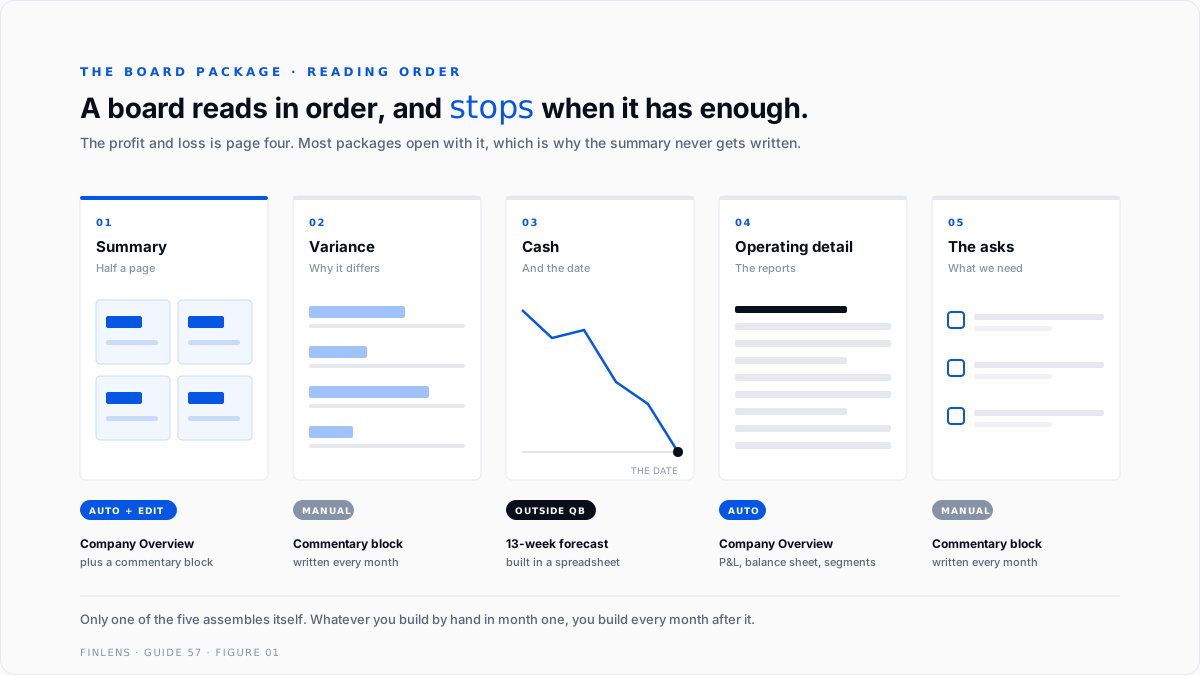
Order matters, because a board reads in order and stops when it has what it needs.
One, the summary page. Half a page. The three or four numbers that define the period, each against plan, each with a direction. If a director reads only this page they should still know whether the quarter is working.
Two, the variance explanation. Not the variance table, the explanation. Every material difference gets one sentence saying what caused it and whether it recurs. "Recurring" is the word the board is listening for.
Three, cash. Position, runway, and the date the next decision becomes unavoidable. A runway number without a date is decoration. The 13-week cash flow forecast is the instrument for this page.
Four, the operating detail. Profit and loss, balance sheet, and whichever segment view the business is actually run by. This is the part everyone builds first and the board reads last.
Five, the asks. What requires a decision, by when, and what happens if it slips. A package with no asks is a status update, and status updates do not need a board.
What QuickBooks actually gives you
QuickBooks Online has a feature built for exactly this, called Management reports, documented under article L90RAh2XZ_US_en_US.
Three templates ship with fixed contents:
You can start from a template or build custom. The editor takes text blocks for commentary and executive summaries, applies branding, and supports smart chips for KPIs and date ranges that refresh against live data. Standard reports are added with Add to Management reports. Output is PDF or DOCX.
That is genuinely a board package builder, and the commentary blocks are the part that matters most, because commentary is what turns part four into parts one and two.
The branded, presentation-ready version with KPI chips and charts is an Advanced tier capability, covered in the QuickBooks Online Advanced tier deep dive.
Three limits you will hit by month two
One, custom reports may return nothing. A user posting as phylwith opened Management Report not working with Custom Report, 6 replies and 99 views, running 15 custom reports on a monthly email schedule.
In their words: "I tried to add the new custom report to a Management Report so I could group them but the custom reports don't report any data, regardless of the timeframe I select."
They raised three things at once. New custom reports cannot be grouped for a single email. New custom reports show no data inside Management reports while older ones work. And PDF versions cannot be scheduled, only Excel exports.
The QuickBooks Team reply from MirriamM confirmed these features "aren't available" and suggested third-party tools. A community member posting as PBJ10 put it more plainly, that the features were removed and would not be restored. The original poster concluded it was time to look at other options.
The practical workaround that surfaced elsewhere in these threads is to switch to legacy management reports, under Reports, then Management reports.
Two, the package belongs to one login. A user posting as Matteo_S asked for something reasonable in Make management report available to other users, 14 replies and 153 views. Not sharing the output. Sharing the template, so a colleague could generate it as configured.
QuickBooks Team member ShyMae confirmed that custom management reports created by one user cannot be viewed or generated by others, even with full administrative access. The offered path was to export a PDF and email it.
Read that against what a board package is. The deliverable your directors depend on is configured inside one person's login, and the only way another person produces it is if that person is available. One commenter in the thread noted that the suggestion to share credentials was a serious security risk, which it is.
Three, the configuration can break. A user posting as sf4915 reported in Lost Memorized and Favorite Reports after Desktop Update, 6 replies and 52 views, that memorized reports stopped running after a Desktop Enterprise update.
Support walked through re-sorting the list, then Rebuild Data, then Verify Data. The rebuild surfaced unfixed errors and the trail ended at the QuickBooks Tool Hub. The thread ran from November 2024 to January 2025 without resolution.
Report configuration is data. It lives in the file, and it is subject to everything else that happens to the file.
Where Desktop still wins
QuickBooks Desktop does the thing QuickBooks Online will not.
Under Reports, Memorized Reports, Memorized Report List, the Memorized Report button offers New Group. Reports go into the group, the whole group opens at once with Display, and the group emails on a recurring schedule through Set email schedule. Articles L8TUb2B8j_US_en_US and L0pQ4ifGJ_US_en_US cover the setup.
Grouping, one-click run, scheduled delivery of the set. That is the board package workflow, and it is the capability phylwith was asking for.
If you are running Desktop and considering a move, this belongs in the decision rather than being discovered afterwards. The QuickBooks Enterprise complete guide covers the tier that holds it.
The scheduling detail that sends a short period
This one is small, documented, and costs people a board meeting.
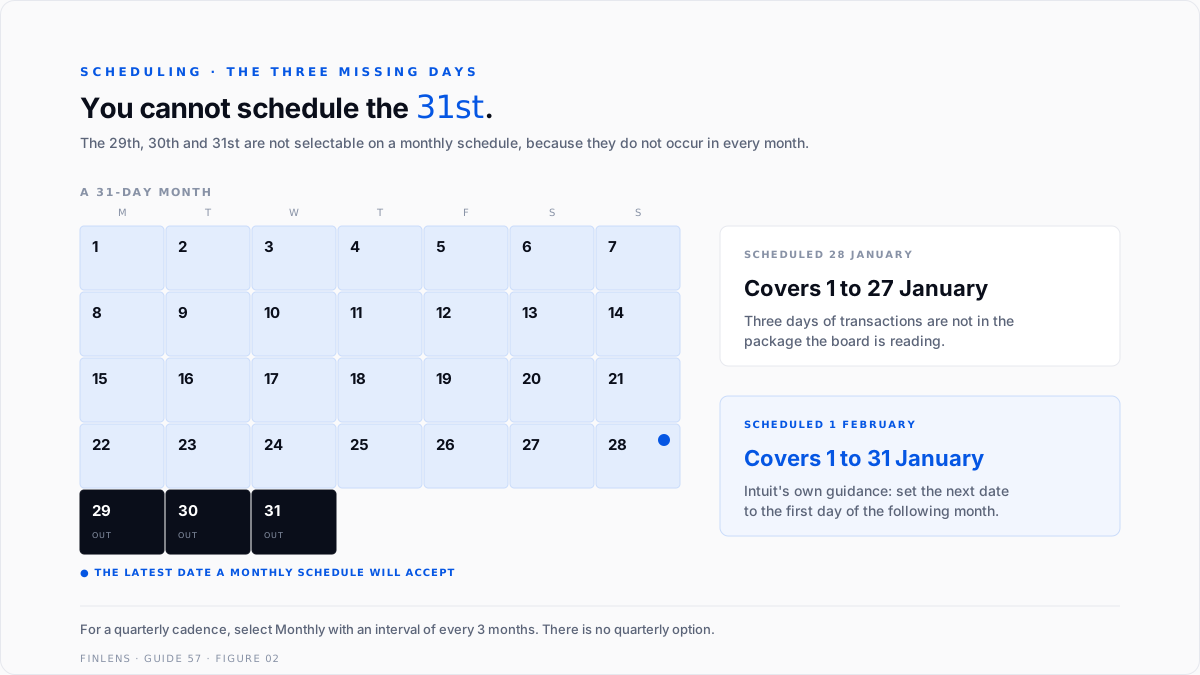
On a monthly email schedule you cannot select the 29th, 30th or 31st, because those days do not exist in every month. Intuit's own guidance is to set the next date to the first day of the following month, so the schedule captures all of the activity in the month being reported.
Work the dates. A package scheduled for 28 January reports a January that ends on the 27th or 28th, depending on the run. Three days of January transactions are not in it. On a month with a quarter end or a payroll run in that window, the gap is not cosmetic.
Scheduled for 1 February, the same package covers 1 to 31 January in full.
For a quarterly cadence, select Monthly with an interval of every 3 months rather than looking for a quarterly option.
The second half of this problem is not scheduling at all. A package delivered on 1 February reports a January that may still be open. If entries post after the board has read the numbers, the numbers change behind them. Lock the period first. Month-end and year-end close in QuickBooks covers the close-date control that makes the package final.
Writing the variance sentence
The commentary block is the only part of the package QuickBooks cannot produce for you, and it is the part the board reads most carefully.
A usable variance sentence has three components and nothing else. What moved, what caused it, and whether it recurs.
"Gross margin fell 4 points against plan. Two large jobs were priced before the March material increase. Both complete in Q3 and current quotes carry the new cost." That is a sentence a director can act on. They now know the margin is not structurally broken and they know when it resolves.
Compare the version most packages contain. "Gross margin was below budget due to higher material costs." True, unhelpful, and it invites the question you did not answer, which is whether next quarter looks the same.
Two rules keep the section honest. Write a sentence for every material variance, including the favourable ones, because an unexplained favourable variance is usually a timing difference that reverses. And name the recurrence explicitly, because that single word is what separates a problem from an event.
Documenting a configuration QuickBooks will not share
Given that a custom management report cannot be generated by anyone except the user who built it, the mitigation is a document, kept outside QuickBooks, that lets someone else rebuild it.
Five things to record for each component of the package:
- The exact report name as QuickBooks lists it, which is not always what you called it
- Every filter applied, including the ones left at default that matter
- The date range basis, whether it is a fixed range or a relative one like last month
- Accounting method, cash or accrual, because the two produce different packages
- Any manual adjustment made after export, and why
Store it where the package is stored, not in the file. The point of the document is that it survives the thing it describes, so a copy inside the QuickBooks company file defeats the purpose.
This is also the artefact that makes handover possible. A new controller with this document produces the same package in week one rather than reverse-engineering it from last quarter's PDF.
Six ways board packages fail
One, leading with the detail. The profit and loss is page four, not page one. A board that has to derive the summary will derive a different one than you intended.
Two, variance tables with no sentences. A number next to a number is not an explanation. Material differences get one sentence each, including whether they recur.
Three, no asks. If nothing needs a decision, the meeting did not need to happen. If something does, it belongs on its own page with a date.
Four, rebuilding the package every month. Whatever assembly you do by hand in month one, you will do every month for as long as the business exists. Automate it or budget for it honestly.
Five, one person owning the configuration. Given that management reports cannot be shared between users, the mitigation is documentation: which reports, which filters, which date ranges, written down outside QuickBooks.
Six, sending before the period is closed. Numbers that move after the board sees them cost more credibility than numbers that arrive two days later.
Thresholds: how much machinery the package needs
A single owner and an informal advisory board. The Company Overview template plus a commentary block. Fifteen minutes a month.
An outside board or investors. All five parts, with the variance explanations written rather than implied, and the cash page carrying a date.
Classes or locations in use. The segment view belongs in part four and the summary page should name the segment that moved. Profit and loss customization covers the build.
A subscription business. MRR, ARR, net revenue retention and runway go on page one, not in an appendix, per the SaaS KPI dashboard guide.
More than one person assembling it. Document the configuration externally, because QuickBooks will not share it for you.
A lender or covenant involved. The package becomes an external document with consequences. Close the period before it is sent, without exception, and keep the version that was sent.
How Finlens approaches this
A recurring deliverable should cost less every month, not the same.
Finlens treats the board package as a fixed structure with a documented configuration that lives outside any single QuickBooks login, so it survives a holiday, a resignation, and a file rebuild. The five parts are set once and the monthly work is commentary and verification, not assembly.
The period is closed before the package is produced, so the numbers the board reads are the numbers that stay. Variance explanations are written against the budget that was approved rather than the latest forecast, which is the version the board actually agreed to. Budgets, forecasts and variance analysis covers the underlying discipline.
Verification checklist
FAQ
Does QuickBooks have a board report feature?
QuickBooks Online has Management reports, with Company Overview, Sales Performance and Expenses Performance templates, plus a custom option with commentary blocks and branding. Output is PDF or DOCX.
Can I schedule a management report to email automatically?
Not reliably for custom reports in QuickBooks Online. Community threads and the QuickBooks Team confirm that grouping new custom reports for a single email and scheduling PDF versions are not available. QuickBooks Desktop does support grouped, scheduled, emailed report sets.
Can another user run the management report I built?
No. Custom management reports created by one user cannot be viewed or generated by others, even with full administrative access. Export and send the output, and document the configuration separately.
Why does my custom report show no data inside a management report?
It is a known behaviour reported in the community, with older reports working while newer custom reports return nothing. The workaround that surfaced is to switch to legacy management reports from the Reports menu.
What date should a monthly report be scheduled for?
The first day of the following month. The 29th, 30th and 31st cannot be selected because they do not occur in every month, and any earlier date omits the end of the period being reported.
How do I set a quarterly schedule?
Select Monthly and set the interval to every 3 months. There is no separate quarterly option.
What belongs on page one?
Three or four numbers against plan, with direction. For a subscription business, add MRR and runway. Everything else is later.
Should the package go out before the books are closed?
No. Numbers that change after the board has read them are more expensive than numbers that arrive two days later.

